







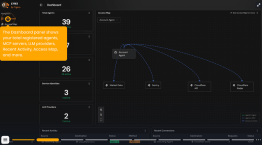

The Lynx Launch package covers the following:
Lynx Launch takes you from a completed proof of concept to Lynx governing the AI agents in a first environment, with your own team able to run it. Over five consecutive days, a named Tigera Solutions Architect works alongside your platform, security and AI teams to install Lynx, discover every AI workload in the cluster, register the agents you choose to allow, and put a default-deny posture in place with explicit policy for the paths your agents need: LLM providers, MCP servers and agent-to-agent calls.
The engagement is built around proof on your own agents, not a demo environment. You will follow a real request end to end in the audit trail, quarantine and release an agent, and apply sandbox rules, so that the controls are understood by the people who will operate them.
Our journey begins with installation and identity, moves through discovery and registration, then policy design and enforcement, and finishes with containment drills and a hand-over to your team and to Tigera support. The same Solutions Architect stays on your account afterwards as your customer success contact.
By the end of the five days, Lynx is live in one cluster, your agent registry is established as the record of allowed agents, and your team can add agents, write policy and read the audit trail without Tigera.
Scope
Installing the Lynx control plane in one cluster, in one environment, wired to one identity model (OIDC against your identity provider, SPIFFE, or PodOwner) and to trace storage (ClickHouse in cluster or bring-your-own).
Discovering all AI workloads in that cluster and registering the agreed set of agents, MCP servers and LLM providers, within the starter package limits.
Establishing a default-deny posture and writing Cedar policy for the agent paths agreed during the policy design session, verified with refused and permitted calls at runtime.
Demonstrating audit trail, quarantine and sandbox on your own agents, and enabling your team to operate Lynx day to day.
Lynx Launch is the default onboarding attached to a Lynx starter package. Additional clusters or environments, identity provider or SPIRE work on the customer side, gateway re-architecture, agent discovery on VMs or bare metal, custom development, on-site delivery and production go-live outside the five days are scoped separately as a custom SOW.
Prerequisites
Day 1 does not start until the following are in place. The kick-off call checks them.
A completed PoC with agreed success criteria, or a scoping call covering the same ground.
One Kubernetes cluster (amd64) with persistent storage and nodes of at least 8 GB RAM; kernel (5.17 as bare minimum for discovery, 6.3+ required for quarantine and sandbox policy) and OS versions captured.
An existing ClickHouse instance, or capacity to run one in cluster (about 4 GB RAM and a persistent volume).
Identity model decided: OIDC (EntraID, Okta, Keycloak or similar), SPIFFE (SPIRE present or Istio ambient mode), or PodOwner.
Schedule resource that has access to configure IdP with Lynx.
Schedule resource that has access to configure IdP with Lynx.
Any LLM, agent or MCP gateway in the path identified (for example LiteLLM), with how it is used.
Cluster access for the Tigera SA, or a customer engineer driving with the SA on the call.
The list of agents, MCP servers and LLM endpoints to be governed first, and named customer owners for platform, security/governance and the AI team.
Lynx licence issued and support portal contacts registered.
How agent teams deploy today (GitOps, CI pipeline, manual), so registration can be wired into the same path.
Value
Move from a PoC to Lynx governing real agents in a production-shaped environment in five working days, with fixed scope and a named Tigera owner.
Gain a complete picture of the AI agents, MCP servers and LLM providers running in your cluster, including the ones nobody registered.
Establish an agent registry as your organisation's record of allowed agents, with an owner and a process for adding new ones.
Enforce which agents may talk to which LLM providers, MCP servers and other agents, with every call auditable end to end.
Build confidence in containment: quarantine, release and sandbox rules practised on your own agents before you need them in an incident.
Leave with a team that can register agents, write policy and read the audit trail without Tigera, and a runbook that captures how.
Delivery
Step 1: Install
Kick-off:
- Introductions, agenda review and confirmation of the prerequisites
- Confirm the estate: cluster, nodes, storage, kernel and OS versions, gateways in the path
Control plane:
- Helm install of the Lynx control plane
- Trace storage: ClickHouse in cluster or bring-your-own
Identity and logging:
- Configure the identity model: OIDC against your IdP, SPIFFE, or PodOwner
- Configure log export; confirm the control plane is healthy
Step 2: Discover and register
Discovery:
- Deploy the agent detector on every node where agents run
- Review the discovered AI workloads with your platform, security and AI teams
Registration:
- Create credentials and register the agreed agents, MCP servers and LLM providers
- Produce the inventory of discovered versus registered agents
Agent registry:
- Name the registry owner and agree the process for adding new agents
Step 3: Policy
Default deny:
- Confirm the default-deny posture and what it means for unregistered agents
Policy design session:
- Which agents may call which LLM providers, MCP servers and other agents
- Cedar policy model and how policies are evaluated
Enforcement:
- Write, apply and version the policy set
- Verify refused and permitted calls at runtime
Step 4: Prove
Audit trail:
- Prompt an agent and follow the request end to end in the audit trail
Containment:
- Quarantine and release an agent, including via the API
- Configure and apply sandbox rules
Optional, if time allows:
- Token budgets and spend controls
Step 5: Enable and hand over
Enablement session:
- Registering a new agent end to end, writing policy, reading the audit trail, day-two operations
Hand-over:
- Runbook walkthrough; support portal access and escalation path confirmed
- Close-out deck and sign-off; account live in Tigera support
Deliverables
Lynx control plane healthy in one cluster, with identity model, trace storage and log export configured.
Inventory of discovered versus registered agents, and an agent registry with a named owner and an agreed new-agent process.
Policy set applied and versioned, with policy design notes and runtime verification of refused and permitted calls.
Recorded audit walkthrough and containment drill results (quarantine, release, sandbox).
Runbook, close deck and sign-off; account handed to Tigera support with a named customer success contact.



