









For many organizations, modernizing their VMs before migrating them is not a realistic option, especially when external events trigger the migration. Mapping dependencies and refactoring network configurations before the deadline is impractical, forcing VMs to move as they are.
The mechanics of moving a VM are largely solved. Tools like Forklift handle what a vSphere admin would recognize as a cold or warm migration: copy the VMDKs off the datastore, convert the guest, and boot it as a KubeVirt VM on Kubernetes. The guest comes through with its disks, its OS, its MAC address, and the static IP still written in its network configuration.
Recreating the NSX segment the vNIC was attached to, the VLAN that defined the VM’s compliance scope, or the firewall rules that reference its address is a different story. The VM arrives in a cluster that knows nothing about any of it. Everything NSX was doing for that VM now has to be rebuilt on the Kubernetes side.
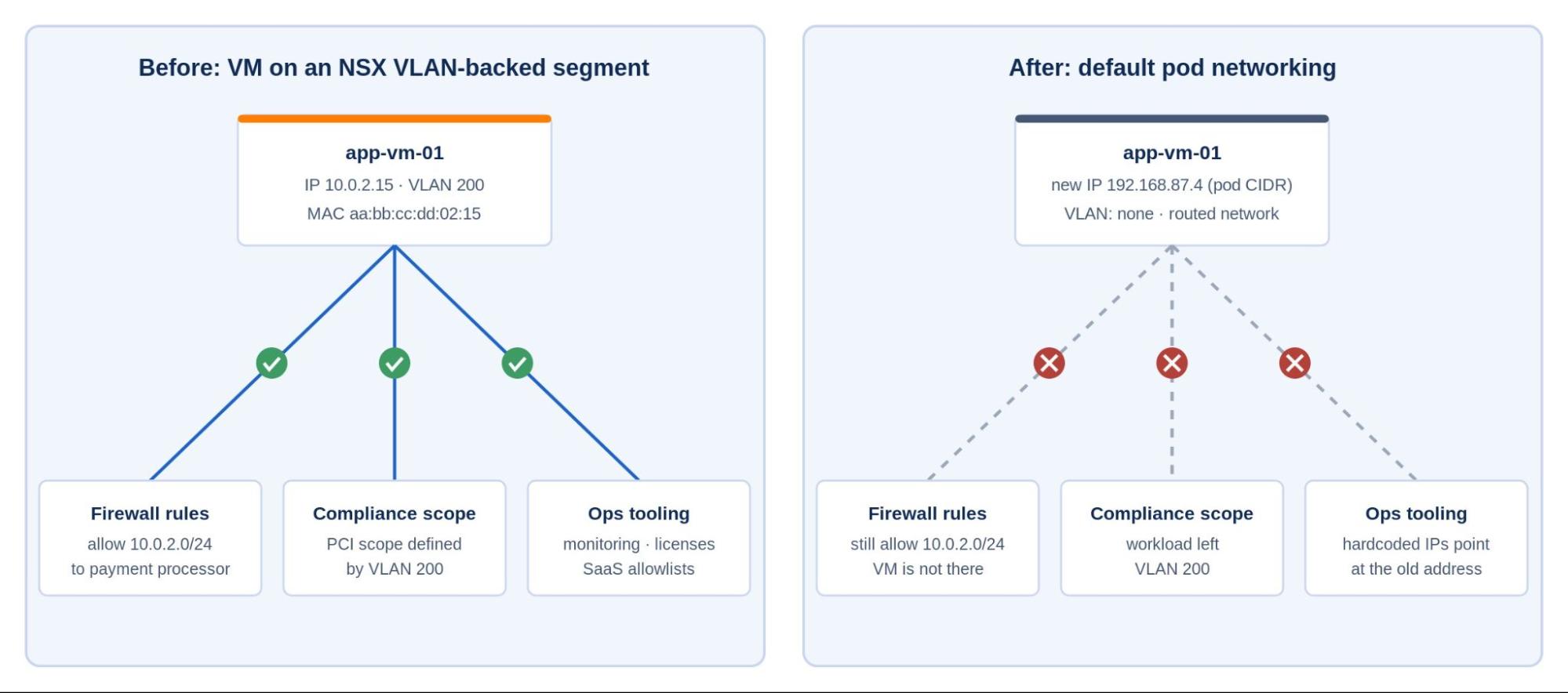
Kubernetes networking cannot solve this on its own, for two reasons. First, pod IPs are assigned dynamically from the cluster’s pod CIDR, and a KubeVirt VM attached to the pod network is treated like any other workload, meaning that it gets a fresh address on arrival and again whenever it reschedules, so the static IP in its configuration file is unusable. Second, the pod network is routed. The model has no concept of a VLAN, a broadcast domain, or a persistent MAC address. A VM whose compliance scope or firewall rules depend on VLAN membership needs L2 semantics that the standard Kubernetes stack was never designed to carry.
L2 vs L3: why the mismatch matters
Traditional VM networking is rooted in L2. A VM on a VLAN-backed segment sits in a broadcast domain: when it needs to reach anything outside its subnet, it broadcasts an ARP request for its default gateway, and the gateway answers with its MAC address because they share that domain. The upstream switch learns the VM’s own MAC the same way, and its static IP belongs to the VLAN’s subnet.
Two VMs on the same segment talk to each other without a router ever being involved. The pod network offers none of this, not because Kubernetes is deficient but because it was scoped for workloads designed for a routed network from the start. Running an L2-dependent VM in a cluster means extending L2 into the cluster explicitly, and that is where Calico’s L2 Bridge comes in.
Why VMs may need to stay on their original VLAN
The short answer is that the VLAN is rarely just a VLAN. Over time it accumulates dependencies that make changing it expensive in ways that have nothing to do with technology.
The most common is compliance scope. In PCI DSS environments, the cardholder data environment is often defined by VLAN membership. The audit evidence says “these workloads are in scope because they are on VLAN 200.” Moving a workload off that VLAN and redefining scope through a different mechanism, such as labels, policy selectors, and egress controls, is possible, but it requires re-engaging the auditor, updating the scoping documentation, and getting sign-off before the workload moves. That process runs on a different timeline than a migration project.
Upstream firewall rules are the other major dependency. Perimeter firewalls and network ACLs are typically written against subnets and VLAN ranges, not individual IPs. A rule that permits traffic from 10.0.2.0/24 to the payment processor is a rule about VLAN 200. Changing the workload’s IP or VLAN means finding every rule that references that range, across every firewall that sits between that workload and anything it talks to, and updating them in coordination. Each of those updates requires a scheduled change window and with it the usual requests, approvals, and rollback plans.
Beyond compliance and firewalls, there are the smaller dependencies that pile up over years of operations. Monitoring systems with hardcoded IPs, application configuration files that reference addresses directly, license servers that are locked to a specific IP, and external SaaS integrations that have the service IP on an allowlist are just a few examples. None of these are hard to fix individually. Together they represent enough coordination overhead that “just keep the IP” is often the right engineering decision, not a workaround.
How Calico preserves VLAN-backed segment outcomes
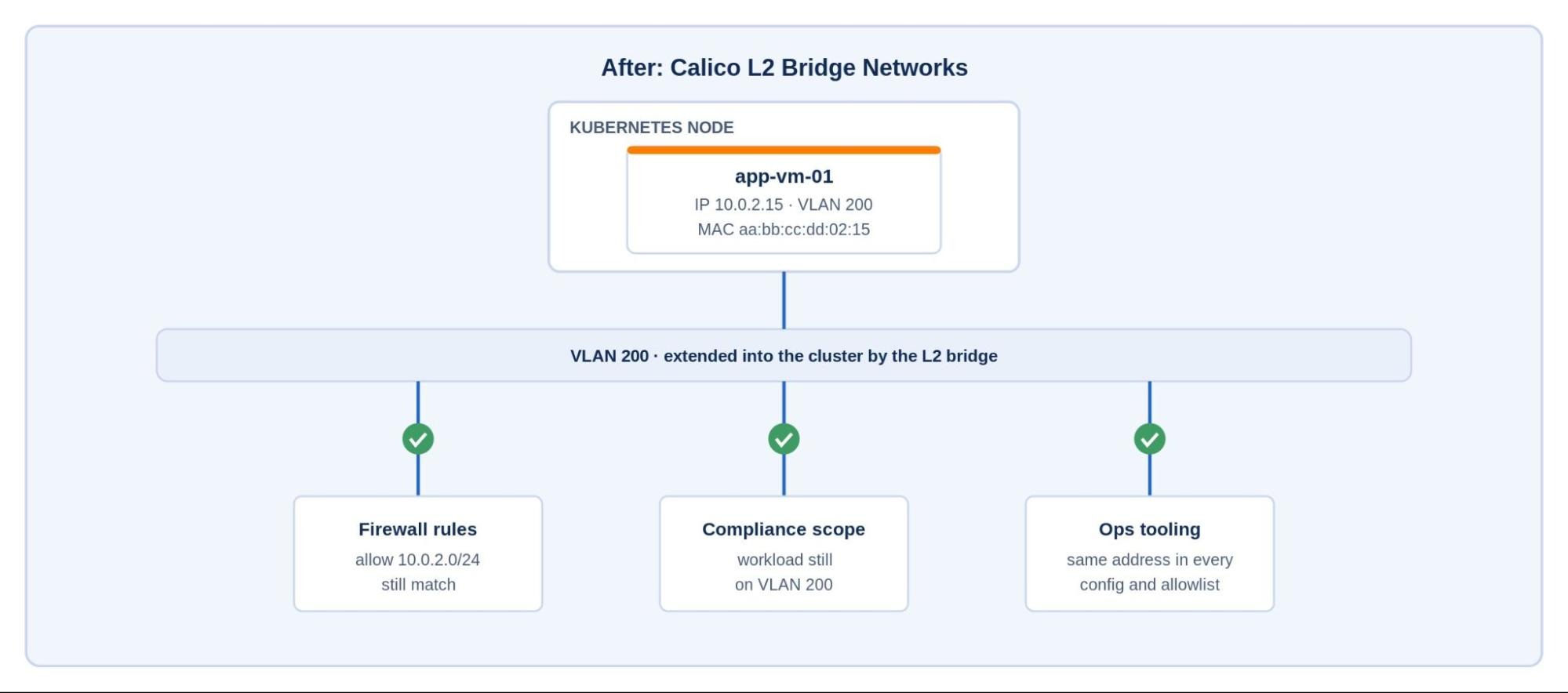
The three categories of dependency from the previous section all trace back to the same requirement: the VM needs to keep its IP address, its VLAN membership, and its MAC address after it moves. If those three things are preserved, nothing upstream needs to change.
Calico L2 Bridge Networks preserve all three. Instead of attaching the VM to the routed pod network, a Network resource tells Calico to connect the VM’s vNIC to a Linux bridge on the cluster node. The bridge is easiest to understand as the node’s vSwitch: the physical NIC is the uplink, and a VLAN sub-interface on that NIC plays the role of the tagged port group that selects the VM’s VLAN out of the trunk.
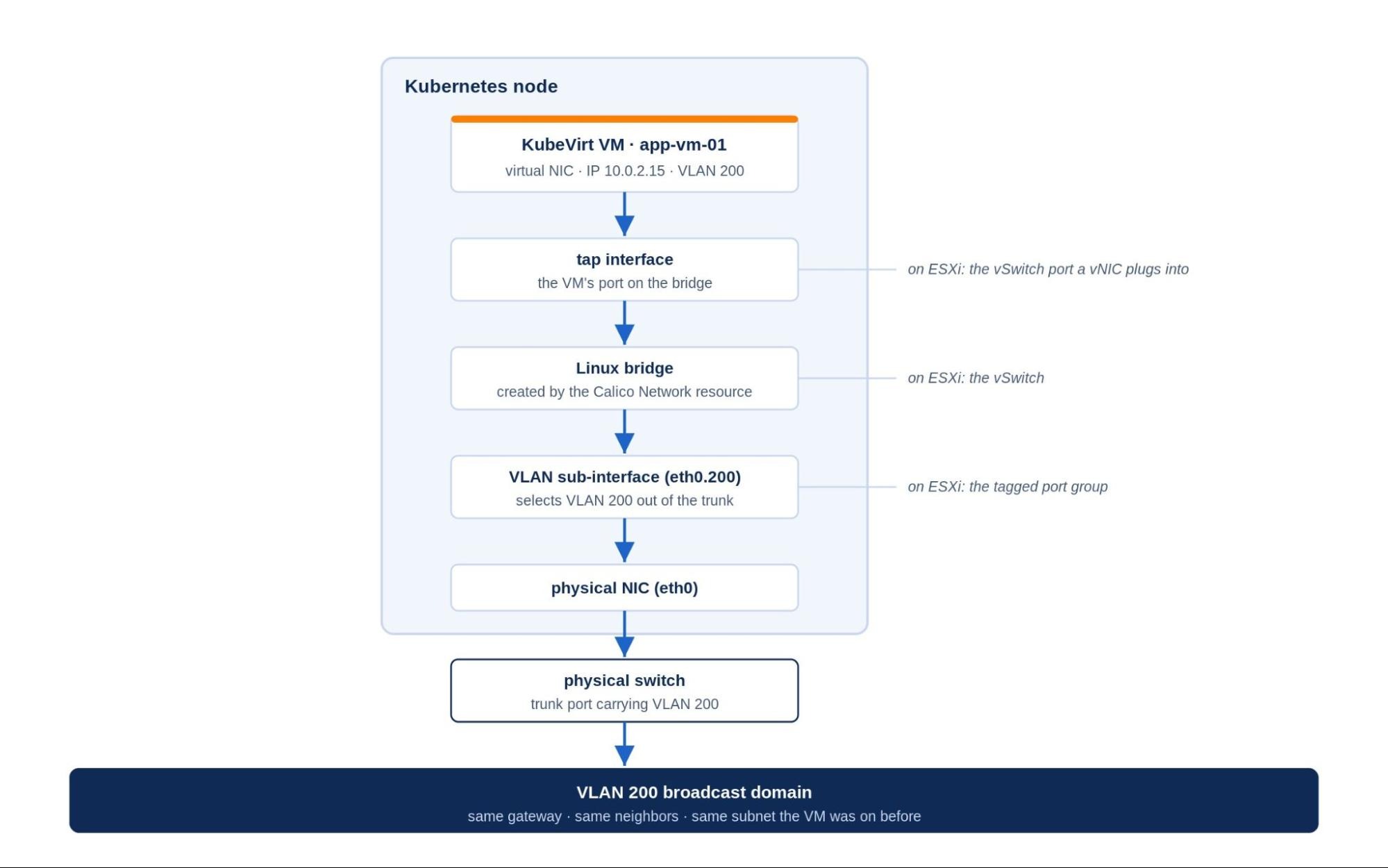
There is one physical prerequisite. The node’s NIC must be plugged into a switch trunk port that carries the VM’s VLAN, just as an ESXi host’s uplinks must be trunked for a VLAN-backed segment to work. If VLAN 200 has not been extended to the Kubernetes nodes, there is no broadcast domain for the VM to join.
With that in place, the VM sits in the same broadcast domain it occupied on ESXi. It ARPs for its gateway and the same physical gateway answers. The auditor still sees the workload on VLAN 200, the firewall still sees traffic from the same IP and subnet, and the license server, the monitoring system, and the application’s own configuration all still point at an address that hasn’t changed. The only real difference is that the VM now runs on a Kubernetes node instead of an ESXi host, with its network attachment declared as a Kubernetes resource instead of an NSX segment. The next section covers how the bridge is actually constructed.
How Calico L2 Bridge works
KubeVirt runs each VM inside a pod. When that pod is created, the cluster assigns it an IP from the pod CIDR like any other pod. The VM then boots inside it, and its virtual NIC is normally wired into the pod’s network namespace, so the VM inherits the pod’s identity: a cluster-assigned address on a routed network where its original IP means nothing. Calico L2 Bridge Networks change that wiring step: instead of connecting the vNIC to the pod network interface, Calico connects it to a Linux bridge on the node.
When a Network resource defines an L2 bridge network and associates it with a VLAN, Calico sets up a Linux bridge on the cluster node. That bridge has an uplink to the VLAN sub-interface on the node’s physical NIC, which gives it access to the trunk the node is already connected to. The VM’s virtual NIC is attached to that bridge through a tap interface, the Linux equivalent of the vSwitch port a vNIC plugs into on ESXi. The result is a direct L2 path from the VM to the physical switching fabric: VM tap device, through the Linux bridge, through the VLAN sub-interface, out the physical NIC, into the same broadcast domain the VM was on before.
The upstream switch learns the VM’s MAC address the same way it always has, by watching frames arrive on the VLAN. From the switch’s perspective, a new port came up carrying a MAC it already knew. Nothing in the physical network needs to be reconfigured.
This is the plumbing a migration plan needs to account for, and in practice it comes down to a short checklist. Before the move, record the VM’s VLAN and IP address. Create a Network resource referencing that VLAN, and point the VM’s KubeVirt definition at it by name. When the VM starts on its new node, Calico builds the bridge, the guest boots with the network configuration it has always had, and traffic flows on the same VLAN as before. As far as the VM knows, it’s still where it always was.
Keep the network, move the machine
None of the dependencies this blog started with have to be rewired when your VM moves to a Kubernetes cluster. The auditor’s scoping document, the perimeter firewall rules, the license server record, the hardcoded addresses in a decade of operational tooling: all of it still holds, because the VM still has the IP, the MAC address, and the VLAN membership they were written against. The migration moves the machine without touching the network identity everything else depends on.
There is a broader point here that goes beyond any single VM. Because the VLAN extends into the cluster, ESXi and Kubernetes stop being two separate worlds with a hard cutover between them. During a migration they are just two sets of hosts attached to the same networks, which means you can move one VM this week, ten next month, and leave the stubborn ones where they are for now. The workloads that have moved keep talking to the ones that haven’t, and if something goes wrong, rolling back is a matter of booting the VM on the other side again. That changes what an NSX team is actually signing up for. The migration stops being a leap to an unfamiliar platform and becomes a gradual shift of workloads across a network you still recognize and still control, with the Kubernetes learning curve spread over months instead of compressed into a cutover weekend.
If a phased migration like that is what you are planning, read our ebook: Calico Enterprise for NSX Administrators. When you are ready to try Calico yourself, you can get started for free.
Ready to migrate VM-centric architectures to Kubernetes platforms? Read our ebook, Calico Enterprise for NSX Administrators.



