







What is VMware Migration?
VMware migrations involve moving virtual machines (VMs) from on-premises environments to public clouds (AWS, Azure, Google Cloud) or alternative virtualization platforms to reduce costs, modernize infrastructure, or exit existing data centers. Common strategies include using VMware HCX for live, zero-downtime migrations to cloud-hosted VMware services, or using third party tools like Calico or Velero to migrate to native cloud infrastructure.
VMware migration is not limited to just moving VMs. It often includes the migration of storage, network configurations, and sometimes application-level dependencies as well. Different migration approaches and tools are available depending on the source and target environments, as well as business requirements such as compliance, cost, and operational continuity.
Common migration targets:
- VMware cloud on AWS: Allows running workloads natively on AWS hardware, utilizing tools like HCX for seamless transition.
- Azure VMware solution (AVS): Enables migration to Azure while maintaining VMware consistency.
- Google Cloud VMware engine: Similar to AWS/Azure, offering a native VMware stack on GCP.
- Alternative hypervisors (KVM, Proxmox, Hyper-V): Moving to open-source or different vendor solutions, which often requires a full shut-down (cold migration).
Key migration steps:
- Discovery & assessment: Map dependency relationships and identify workload resource requirements.
- Planning & segmentation: Group VMs into “waves” for staged migration.
- Migration execution: Utilize tools like AWS Transform or VMware HCX for moving workloads, often using block-level replication to minimize downtime.
- Validation & post-migration: Test functionality, update network configurations, and optimize cost/performance.
In this article:
- Why Businesses Are Considering VMware Migration
- Common VMware Migration Targets
- VMware Migration Strategies
- Technical Approaches to VMware Migration
- Key VMware Migration Steps
- Notable VMware Migration Tools
- Common VMware Migration Challenges
- VMware Migration Best Practices
Why Businesses Are Considering VMware Migration
VMware migration is driven by a mix of technical and business factors. Organizations reassess their infrastructure as costs rise, requirements change, or new platforms offer more flexibility. Below are common reasons behind VMware migration initiatives:
- Cost optimization: Licensing, support, and infrastructure costs can grow quickly in VMware environments. Businesses look for lower-cost cloud or alternative virtualization platforms to reduce ongoing expenses.
- Cloud adoption and scalability: Many organizations move to public or hybrid cloud to gain on-demand scaling, global availability, and reduced hardware dependency.
- Data center consolidation or exit: Companies migrating away from physical data centers aim to simplify operations and eliminate aging hardware.
- Vendor lock-in concerns: Some teams migrate to avoid dependency on a single vendor and to gain flexibility in choosing tools and platforms.
- Performance and modernization needs: Legacy VMware setups may not meet modern application requirements. Migration enables the use of newer architectures like containers and microservices.
- Disaster recovery and resilience improvements: Moving workloads can support better backup, failover, and disaster recovery strategies, especially when using cloud-native features.
- Compliance and data governance: Regulatory requirements may require workloads to be hosted in specific regions or environments, prompting migration to compliant platforms.
- Mergers, acquisitions, or organizational changes: Infrastructure consolidation after business changes often requires migrating VMware workloads into a unified environment.
Common VMware Migration Targets
VMware Cloud on AWS
VMware Cloud on AWS is a common migration target, integrating on-premises VMware environments with Amazon Web Services. This solution enables organizations to extend or migrate existing VMware workloads to AWS without refactoring applications or retraining staff. VMware Cloud on AWS supports familiar tools, processes, and management interfaces.
The platform provides AWS scalability, global reach, and integration with native AWS services. Organizations can use hybrid cloud scenarios such as disaster recovery, data center extension, and cloud bursting. Operational consistency between on-premises and AWS-hosted VMware environments simplifies management and reduces migration risk.
Azure VMware Solution
Azure VMware Solution provides a managed VMware environment on Microsoft Azure, allowing enterprises to migrate, extend, or protect VMware workloads in the cloud. This service supports organizations that want to use Azure infrastructure and services while maintaining compatibility with existing VMware tools and processes.
Businesses can integrate with Azure-native services such as analytics, AI, and security. The platform supports disaster recovery scenarios and enables gradual adoption of cloud-native features.
Google Cloud VMware Engine
Google Cloud VMware Engine delivers a dedicated VMware environment on Google Cloud, enabling organizations to run and manage VMware workloads in the cloud. This service supports lift-and-shift migrations, allowing businesses to move VMware-based applications without extensive changes.
Integration with Google Cloud services, such as BigQuery and AI/ML tools, supports modernization after migration. Organizations also benefit from Google’s global infrastructure and billing models.
Alternative Hypervisors
Some organizations migrate away from VMware entirely, targeting alternative hypervisors such as Microsoft Hyper-V, KVM (kernel-based virtual machine), or platforms like Proxmox. This approach may be driven by cost considerations, licensing changes, or a desire for more control and customization. Migrating to a new hypervisor involves converting virtual machines, reconfiguring networks, and adapting management practices.
This transition is more complex than moving within the VMware ecosystem and requires careful assessment of compatibility and performance.
VMware Migration Strategies
Quick Comparison
| Strategy | Goal | Key Characteristics |
| Rehosting (Lift-and-Shift) | Move workloads with minimal changes for speed. | Quick cloud adoption, minimal disruption, avoids refactoring. |
| Replatforming | Migrate with targeted changes to align with the new platform. | Updates OS/middleware, integrates managed services without full refactor. |
| Refactoring / Re-architecting | Redesign applications to be cloud-native. | Uses microservices/containers, requires significant time and resources. |
| Hybrid or Multi-Cloud Migration | Distribute workloads across multiple environments. | Placement based on cost/compliance, requires integrated management tools. |
Rehosting (Lift-and-Shift)
Rehosting, or lift-and-shift, moves VMware workloads from one environment to another with minimal changes. This approach is often chosen for speed, as it avoids refactoring applications. Rehosting is suitable for organizations seeking quick cloud adoption or data center consolidation.
While lift-and-shift minimizes initial disruption, it may not fully use capabilities of the target environment, such as cloud-native features or cost optimization.
Replatforming
Replatforming migrates VMware workloads to a new environment while making targeted changes to align with the target platform. This can include updating the operating system, modifying middleware, or integrating with managed databases or storage.
Replatforming offers some benefits of the new platform without a full refactor and requires assessing workload compatibility.
Refactoring/Re-Architecting
Refactoring, or re-architecting, redesigns applications to use the target environment, often the cloud. This can involve rewriting parts of the application and adopting architectures such as microservices, containers, or serverless functions.
Refactoring requires significant time and resources and is typically used for applications that need modernization.
Hybrid or Multi-Cloud Migration
Hybrid or multi-cloud strategies distribute VMware workloads across multiple environments, such as on-premises data centers and public clouds. This approach allows workload placement based on cost, compliance, or performance needs.
Implementing hybrid or multi-cloud migration requires integration and management tools to maintain visibility and security across environments.
Technical Approaches to VMware Migration
Live Migration
Live migration moves VMware workloads from one host, cluster, data center, or cloud environment to another while minimizing service interruption. This approach is commonly used when downtime must be avoided or kept very low, such as for production applications, customer-facing systems, or business-critical workloads.
Live migration typically relies on continuous replication or memory-state transfer so that the VM can continue running while its data is copied to the target environment. Once synchronization is complete, the workload is switched over to the destination with minimal disruption. Network connectivity, bandwidth, latency, storage compatibility, and target platform readiness are important factors in determining whether live migration is suitable.
This approach is often used in VMware-to-VMware migrations, especially when moving workloads to cloud-hosted VMware environments. It is less suitable when the target platform requires a major format change, application redesign, or significant operating system changes.
Related guides: VMware Live Migration
Cold Migration
Cold migration moves virtual machines while they are powered off or suspended. Because the VM is not running during the move, this approach usually involves planned downtime. Cold migration is often used when live migration is not technically possible, when the target platform is significantly different, or when a clean and controlled migration is preferred.
Cold migration can be simpler than live migration because it avoids the need to maintain active workload state during the move. It may also support broader compatibility scenarios, such as moving VMs across environments with different CPU, network, or storage configurations. However, downtime must be scheduled carefully, especially for production workloads.
This approach is commonly used for lower-priority workloads, legacy systems, development and testing environments, or migrations to alternative hypervisors where VM conversion and reconfiguration are required.
Storage Migration
Storage migration focuses on moving a virtual machine’s disks and related data from one datastore, storage system, or storage tier to another. This may happen as part of a broader VMware migration or as a standalone activity to improve performance, reduce storage costs, consolidate storage platforms, or prepare for cloud migration.
Storage migration can be performed while a VM is running or while it is powered off, depending on the tools, storage architecture, and migration requirements. In VMware environments, storage migration may involve moving virtual disks between datastores, converting disk formats, changing storage policies, or shifting workloads from traditional storage to vSAN, cloud storage, or other target storage services.
Successful storage migration requires validating available capacity, storage performance, snapshot status, backup coverage, and application consistency. Poor planning can lead to performance degradation, long transfer windows, or data integrity issues.
Key VMware Migration Steps
1. Discovery and Assessment
Discovery and assessment establish the technical and business baseline for the migration. This stage identifies which VMs exist, what resources they consume, how they communicate, and which applications or services depend on them. It also helps determine which workloads are suitable for lift-and-shift migration and which may require replatforming, refactoring, or retirement.
Key activities include collecting VM inventory, CPU and memory usage, storage consumption, network dependencies, operating system versions, licensing requirements, security controls, backup policies, and compliance constraints. Application dependency mapping is especially important because many VMware workloads are connected to databases, file shares, identity systems, monitoring tools, or other internal services.
The output of this phase is a clear migration inventory, workload grouping, risk profile, and initial target-state recommendation. This information supports cost modeling, tool selection, migration strategy, and wave planning.
2. Planning and Segmentation
Planning and segmentation organize the migration into manageable phases or “waves.” Instead of migrating every workload at once, organizations group VMs based on application dependencies, business priority, downtime tolerance, complexity, compliance requirements, and target environment readiness.
During this stage, teams define the migration sequence, rollback approach, testing plan, network design, security requirements, DNS changes, firewall rules, identity integrations, and operational responsibilities. Workloads with strong dependencies are usually migrated together to reduce application disruption. Less critical systems may be moved first as pilot migrations before business-critical systems are scheduled.
A strong migration plan also includes success criteria, communication plans, maintenance windows, change approvals, and contingency steps. This reduces risk and helps stakeholders understand what will move, when it will move, and how business continuity will be protected.
3. Migration Execution
Migration execution is the process of moving workloads from the source VMware environment to the target platform. The execution method depends on the chosen migration strategy and technical approach, such as live migration, bulk replication, cold migration, VM conversion, or storage-level migration.
Before execution, teams typically prepare the target environment, configure connectivity, validate permissions, confirm backup coverage, and run pre-migration checks. During the migration, data is transferred, VM configuration is recreated or converted, networks are mapped, and workload cutover is performed. For live or replicated migrations, synchronization usually occurs before the final cutover to reduce downtime.
Execution should be closely monitored for replication errors, bandwidth limitations, failed dependencies, storage issues, and application-level problems. For large programs, migrations are usually repeated in waves using a consistent runbook so each group of workloads follows a controlled and repeatable process.
4. Validation and Post-Migration
Validation confirms that migrated workloads operate correctly in the target environment. This includes checking VM power state, application availability, network connectivity, user access, DNS resolution, firewall behavior, storage performance, backup jobs, monitoring, and security controls.
Application owners should test business functionality, integrations, scheduled tasks, and performance against expected baselines. Any issues discovered during validation should be resolved before the migration is considered complete. In some cases, rollback procedures may be triggered if critical functionality fails.
Post-migration work includes optimizing resource sizing, adjusting storage policies, updating documentation, decommissioning old infrastructure, reviewing costs, and enabling target-platform services such as monitoring, disaster recovery, security tooling, and automation. This stage ensures the migration delivers long-term operational and business value rather than simply relocating VMs.
Notable VMware Migration Tools
Cloud-Native and Modernization Tools
1. Calico

Calico enables migration of VMs to Kubernetes with their network identity, security model, and operational continuity intact. It does this by preserving VM network identity, translating existing security policy, and running VMs and containers on the same cluster.
Key features include:
- Calico L2 Bridge Mode: Extends existing VLANs into Kubernetes so VMs keep their original IP and VLAN membership, even during live migration between nodes — with no NAT and no enforcement gap.
- Both L2 and L3, on the same cluster: Run L3 (BGP, VXLAN, IPIP) and L2 (Bridge Mode) networking together on one cluster, with the same policy model and observability tooling.
- Tiered and staged policies: Tiered/hierarchical policies and staged validation help teams translate NSX rules by logging what a rule would allow or deny against real production traffic, so you can stage it, observe its impact, and promote it to enforcement only once you have production evidence.
- eBPF-based observability for every workload: Flow logs show source, destination, port, protocol, and policy allow/deny decisions, with some flows adding L7 visibility (HTTP method, path, response code), service topology graphs, and policy hit-count metrics.
- Runs on any Kubernetes distribution: The same CNI, policy model, and operational tooling on any Kubernetes distribution.
Learn more: Read our guide to VMware NSX Alternatives
2. Velero
Velero is a Kubernetes-focused tool used to back up, restore, and migrate cluster resources and persistent volumes across environments. It captures the state of Kubernetes objects and stores them in external object storage, along with optional disk snapshots for persistent volumes. Backups can be restored into the same or a different cluster. Velero runs a server component in the cluster and uses a command-line client. Operations are managed through Kubernetes custom resources and controllers.
Key features include:
- Cluster resource backup: Captures Kubernetes objects and stores them in object storage such as AWS S3.
- Persistent volume protection: Integrates with cloud provider APIs to create snapshots of persistent volumes during backups.
- Granular restore options: Restores entire clusters or selected resources based on namespace, type, or labels.
- Cross-cluster migration: Moves workloads and application state between clusters using backup and restore workflows.
- Scheduled backups: Supports recurring backups using cron expressions.
3. KubeVirt
KubeVirt extends Kubernetes to run and manage virtual machines alongside containerized applications. It supports teams that need to maintain VM-based workloads while adopting Kubernetes. By integrating VMs into Kubernetes workflows, KubeVirt allows unified management of containers and virtual machines.
Key features include:
- Unified platform for VMs and containers: Runs virtual machines and containers within Kubernetes using the same orchestration tools.
- Support for legacy workloads: Manages VM-based applications that cannot be containerized.
- Gradual modernization path: Allows incremental decomposition of VM-based applications into microservices.
- Live migration support: Moves running virtual machine instances between nodes with minimal disruption.
- Migration control via resources and CLI: Initiates migrations using Kubernetes objects or the virtctl command-line tool.
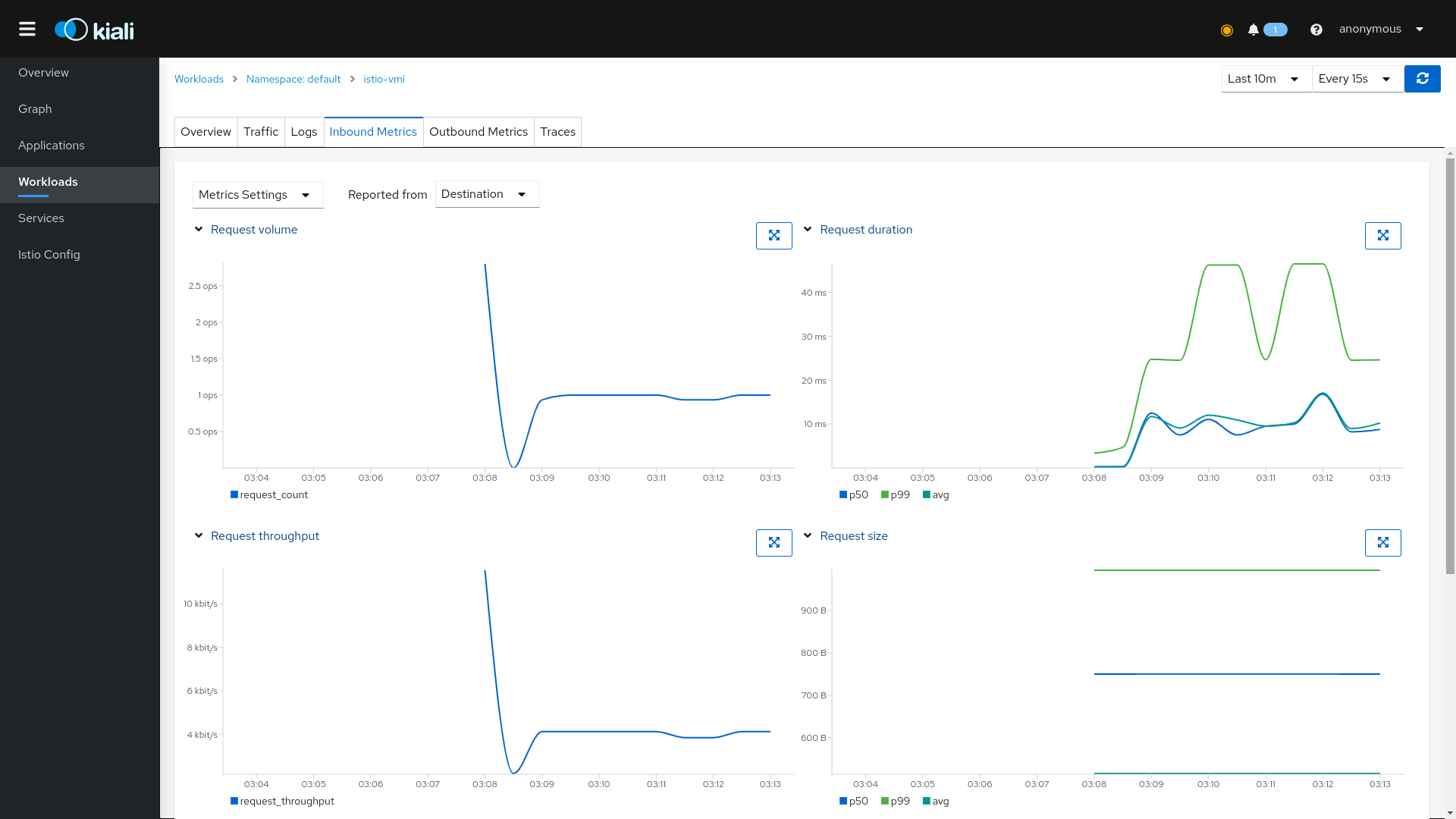
Source: KubeVirt
Native and Infrastructure-Level VMware Migration Tools
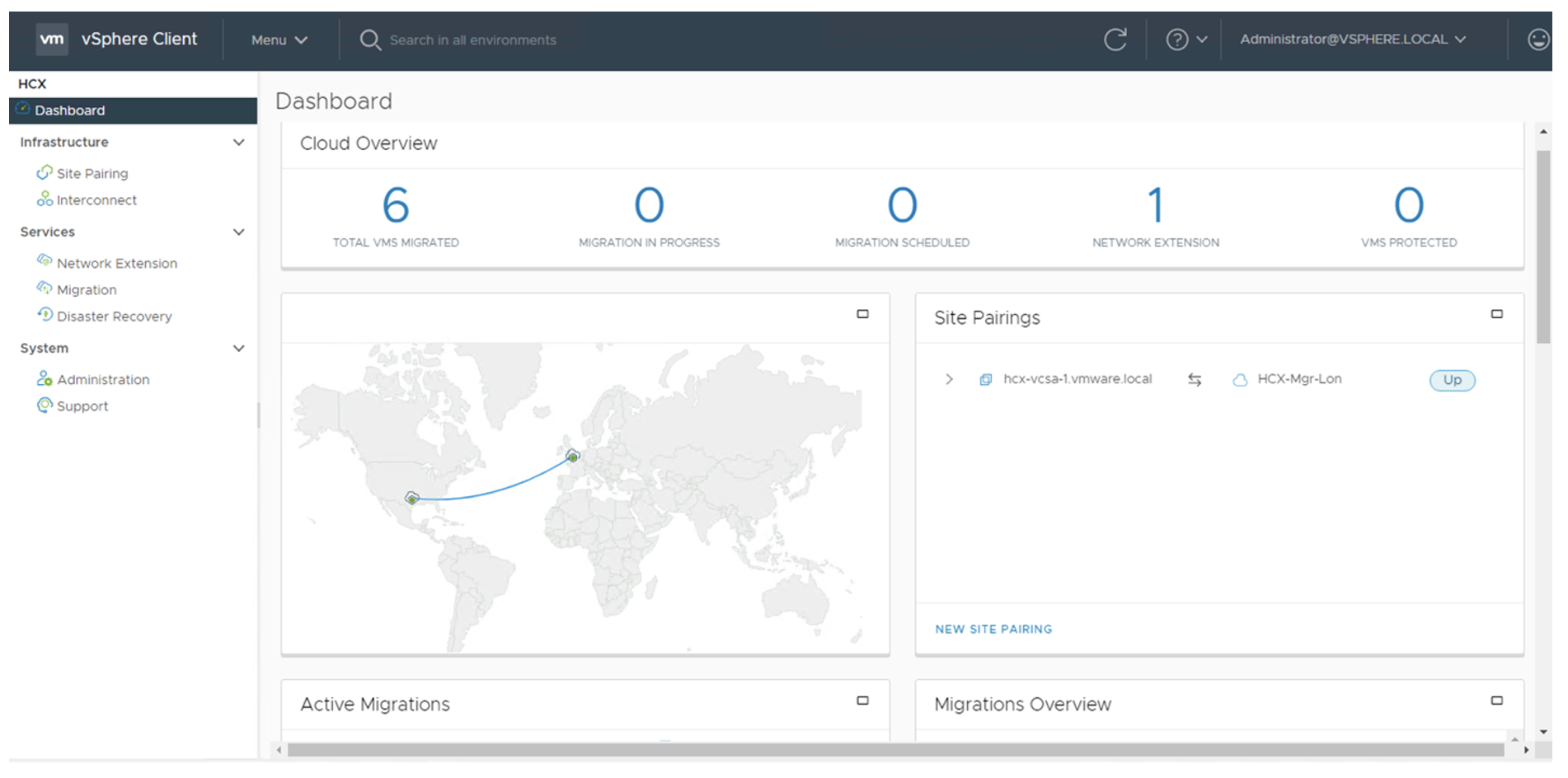
4. VMware HCX

VMware HCX is a migration and mobility platform for moving workloads across VMware environments and cloud platforms. It supports migrations between on-premises infrastructure and public or hybrid clouds. HCX includes networking and replication capabilities to maintain connectivity during migration.
Key features include:
- Any-to-any workload mobility: Supports migration across VMware platforms and environments such as VMware Cloud on AWS, Azure VMware Solution, and Google Cloud VMware Engine.
- Cross-version compatibility: Enables migration between different vSphere versions (6.5 and above).
- Multiple migration methods: Provides bulk and live migration (HCX vMotion) options.
- Large-scale migration support: Handles high-volume migrations with centralized visibility.
- Near-zero downtime migration: Supports live migration to reduce service interruption.
Source: VMware
5. Veeam Backup & Replication

Veeam Backup & Replication is a data protection and recovery platform for on-premises, virtual, and cloud environments. It combines backup, recovery, and replication features to support workload mobility and recovery across platforms.
Key features include:
- Comprehensive backup coverage: Protects virtual machines, physical systems, and cloud workloads from one platform.
- Immutable backup storage: Uses tamper-resistant storage to prevent modification or deletion of backups.
- Instant recovery capabilities: Enables rapid restoration of workloads.
- Cross-platform recovery and migration: Restores or moves workloads between hypervisors and cloud platforms.
- Ransomware protection controls: Uses zero trust access, role-based access control (RBAC), and approval workflows.

Source: Veeam
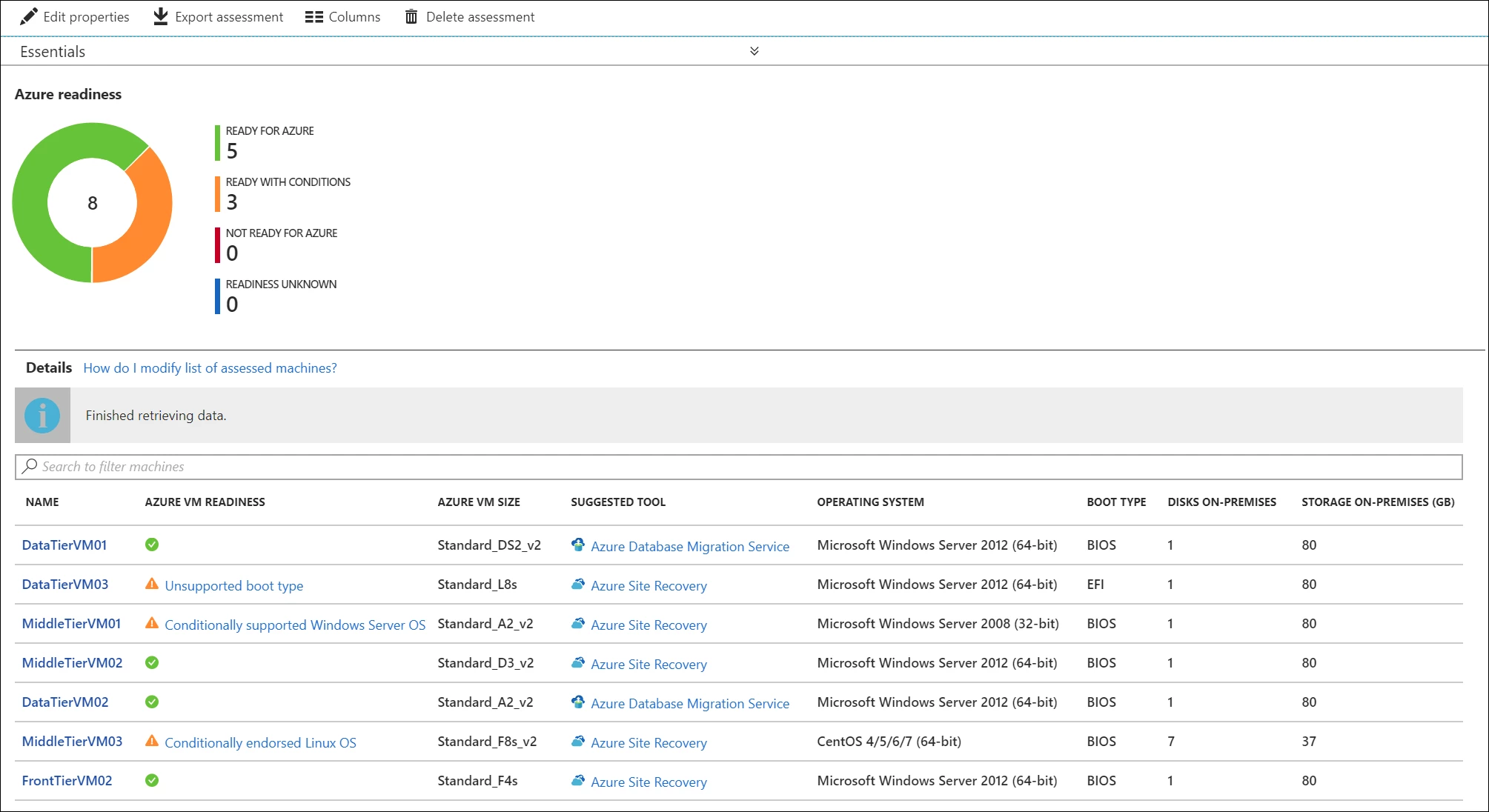
6. Azure Migrate
Azure Migrate is a service that helps organizations plan, assess, and migrate on-premises workloads to Microsoft Azure. It combines discovery, assessment, and migration tools in one platform.
Key features include:
- End-to-end migration workflow: Discovers, assesses, plans, and migrates workloads to Azure.
- Agentless and agent-based migration: Supports different migration methods for VMware environments.
- Migration execution tools: Provides built-in and partner tools to perform migrations.
- Test migration capability: Runs test migrations before production cutover.
- Scalable migration support: Handles large environments with many workloads.
Source: Azure Migrate
Common VMware Migration Challenges
Downtime Management
Downtime management is one of the most important challenges in VMware migration, especially for production systems and business-critical applications. Even when migration tools support live migration or replication-based cutover, some interruption may still occur during final synchronization, network switching, DNS updates, or application restart.
Organizations need to define acceptable downtime for each workload before migration begins. Some applications can tolerate planned maintenance windows, while others require near-zero downtime. This affects the choice of migration strategy, tooling, sequencing, and rollback plan.
To reduce downtime risk, teams should test migration runbooks in advance, perform pilot migrations, use replication where possible, and schedule cutovers during low-traffic periods. Application owners should also validate functionality immediately after migration so issues can be resolved quickly.
Network Reconfiguration
Network reconfiguration can be complex because VMware workloads often depend on specific IP addresses, VLANs, firewall rules, routing paths, DNS records, load balancers, and security policies. When workloads move to a new data center, cloud environment, or alternative platform, these network settings may need to be recreated, translated, or redesigned.
Misconfigured networking can prevent users, applications, and services from reaching migrated workloads. It can also affect authentication, monitoring, backups, integrations, and application dependencies. This is especially challenging in hybrid environments where some systems remain on-premises while others move to the cloud.
To manage this challenge, teams should map network dependencies before migration, document required ports and protocols, prepare firewall and routing changes, and test connectivity before and after cutover. Preserving network identity where possible can reduce disruption, but when changes are required, they should be planned and validated carefully.
Data Transfer Speed
Data transfer speed can significantly affect migration timelines, especially when moving large VMs, databases, file servers, or storage-heavy workloads. Limited bandwidth, high latency, storage performance constraints, and large data volumes can extend replication windows and delay migration waves.
Slow data transfer may also increase the risk of synchronization gaps, prolonged cutover windows, or performance impact on production systems. This is especially important when migrating across regions, between on-premises environments and public clouds, or over shared network links.
Organizations should assess data size, change rates, bandwidth availability, and replication requirements early in the project. Techniques such as pre-seeding data, compressing transfers, scheduling replication during off-peak hours, increasing network capacity, and prioritizing workloads by criticality can help improve migration performance and reduce delays.
VMware Migration Best Practices
Start with a Workload and Network Dependency Mapping
A successful VMware migration should begin with a detailed understanding of workloads and the network relationships between them. Many VMware environments contain applications that depend on databases, identity services, file shares, monitoring tools, backup systems, third-party integrations, and internal APIs. Migrating VMs without mapping these dependencies can lead to broken communication paths, failed applications, or unexpected downtime.
Dependency mapping should include application owners, VM inventories, IP addresses, ports, protocols, firewall rules, load balancers, DNS records, storage dependencies, and traffic flows between systems. This helps teams identify which workloads must move together and which can be migrated independently.
This step also supports better wave planning. By grouping related workloads into migration waves, organizations reduce the risk of separating tightly connected systems. It also helps define security policies, routing changes, and validation requirements before migration begins.
Preserve Network Identity During Migration
Preserving network identity means keeping important workload attributes consistent during migration, such as IP addresses, DNS names, MAC addresses, hostnames, and application connection paths where possible. This is especially important for legacy applications, hardcoded dependencies, licensing systems, and systems that rely on fixed network configurations.
When network identity changes unexpectedly, applications may fail to communicate, users may lose access, and dependent systems may require manual reconfiguration. Preserving identity helps reduce disruption and simplifies rollback planning because workloads can continue operating with familiar network settings.
In cases where IP or DNS changes are required, teams should plan them carefully and update firewall rules, routing tables, certificates, monitoring systems, and access controls before cutover. Network testing should confirm that users, applications, and services can reach the migrated workloads as expected.
Implement Zero-Trust Security Early
Zero-trust security should be planned early in the VMware migration process rather than added after workloads have moved. Migration creates an opportunity to reassess access rules, segmentation, identity controls, and workload protection. Instead of assuming that systems inside a network are trusted, zero-trust models require verification of users, devices, workloads, and traffic flows.
This includes applying least-privilege access, enforcing strong identity and authentication controls, segmenting workloads, inspecting traffic, and continuously monitoring behavior. For VMware migrations, zero-trust principles can help reduce risk when workloads move across data centers, clouds, or hybrid environments.
Starting early also prevents insecure configurations from being copied into the target environment. Security policies, access rules, and monitoring requirements should be included in migration planning, tested during pilot migrations, and validated after cutover.
Ensure Policy Continuity During Migration
Policy continuity means maintaining consistent security, networking, backup, compliance, and operational policies as workloads move from the source environment to the target environment. During migration, policies can be lost, duplicated, misconfigured, or applied inconsistently if they are not documented and translated properly.
Important policies include firewall rules, microsegmentation rules, access controls, encryption settings, backup schedules, monitoring alerts, compliance tags, storage policies, and disaster recovery requirements. These policies should be reviewed before migration and mapped to equivalent controls in the target platform.
Maintaining policy continuity reduces operational risk and helps ensure that workloads remain protected throughout the migration lifecycle. Teams should validate that policies are active before cutover, during migration execution, and after workloads are running in the new environment.
Maintain Consistent Policy Across Hybrid Environments
Many VMware migrations result in hybrid environments where workloads run across on-premises data centers, cloud-hosted VMware platforms, and sometimes native cloud services. In these environments, consistent policy management is critical because applications may span multiple locations and security boundaries.
Consistent policy helps maintain predictable access control, network segmentation, monitoring, backup, and compliance enforcement regardless of where a workload runs. Without consistency, teams may create gaps in security coverage or apply different rules to similar workloads across environments.
Organizations should use centralized management, automation, policy templates, and clear governance processes where possible. This helps ensure that new workloads, migrated workloads, and remaining on-premises systems follow the same operational and security standards. Consistency also simplifies troubleshooting, auditing, and future migration waves.
Conclusion
VMware migration is a critical strategic undertaking, driven by factors like cost reduction and cloud modernization. Success depends on choosing the right strategy, from quick rehosting to complete refactoring, based on business goals. Careful execution is essential, requiring thorough discovery, dependency mapping, and segmentation of workloads. By adhering to best practices around network continuity and security, organizations can overcome challenges and achieve a successful transition.



