









One of the blockers to moving VMs off vSphere and onto Kubernetes is losing NSX and the protection it provides. Security teams that have spent years building out distributed firewall policy look at Kubernetes and are, quite understandably, alarmed by the flat network and the fact that any workload can reach any other by default.
How will they enforce east-west traffic controls? Will they be able to replicate NSX distributed firewall rules with the same granularity? What about security groups, tiered policy, and rules that travel with the workload when it moves? These are important questions that must be answered before migration can begin.
Migrate vSphere to Kubernetes with microsegmentation intact
Calico addresses vSphere to Kubernetes security concerns with a network policy model that maps directly to key features of the NSX distributed firewall (NSX DFW). Every property NSX DFW users rely on has a direct Calico equivalent: tiered governance, workload-identity enforcement, distributed kernel-level inspection, and dynamic workload grouping. Teams coming from vSphere will recognise the pattern quickly.
Let’s walk through each one in detail.
Distributed Enforcement
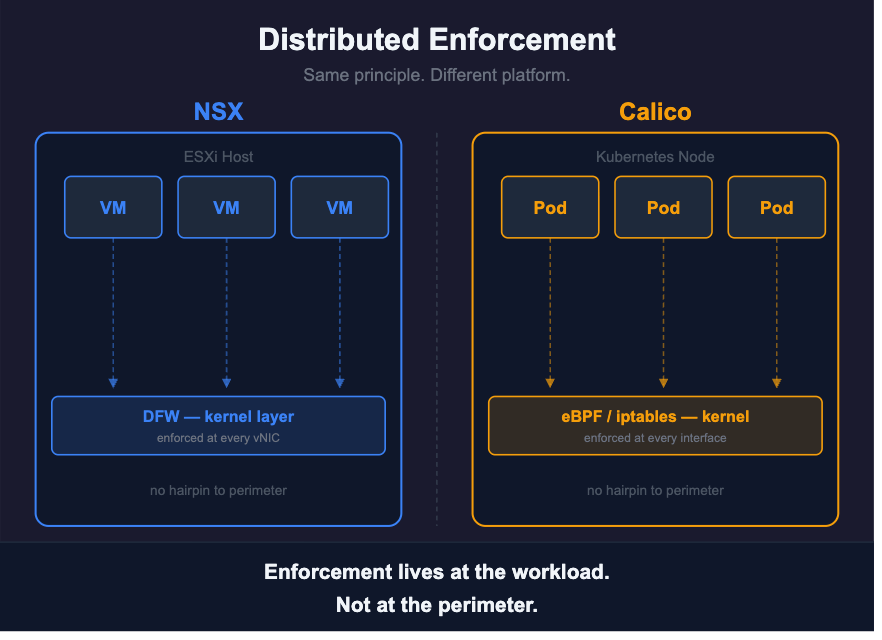
Traditional firewalls sit at the edge of the network. Traffic between workloads inside the data center has to travel out to that inspection point and back, even if the source and destination are on the same physical host. The NSX distributed firewall takes a different approach: the DFW runs in the kernel of every ESXi host and enforces policy directly at each VM’s network interface, before traffic leaves the VM.
The practical effect is that inspection happens at the source. A packet from a web server VM headed toward a database VM gets checked right where it originates, not at a central appliance somewhere else on the network. No round trip to a dedicated device. Enforcement scales automatically because it lives on every host alongside the workloads it protects.
Calico’s enforcement model is built on the same principle. On each Kubernetes node, Calico enforces policy at every workload’s network interface using eBPF or one of the Linux netfilter-based dataplanes (iptables or nftables). The mechanism differs from VMware’s kernel module, but the position in the stack is the same: enforcement happens before traffic enters or leaves the workload, not at a central inspection point somewhere else in the cluster.
eBPF is worth a brief note here. It’s a way of running purpose-built programs inside the Linux kernel without modifying the kernel itself, which means packet inspection and policy decisions happen at a very low level with very little overhead. It’s the same instinct that makes NSX DFW fast: get enforcement as close to the wire as possible.
The solution scales in the same way as well. Adding a node to the cluster adds enforcement capacity automatically because the enforcer runs on the node rather than as a separate service that all traffic routes through. Enforcement is distributed across every node, so there’s no central chokepoint that the whole cluster’s traffic has to pass through.
Workload-attached Policy
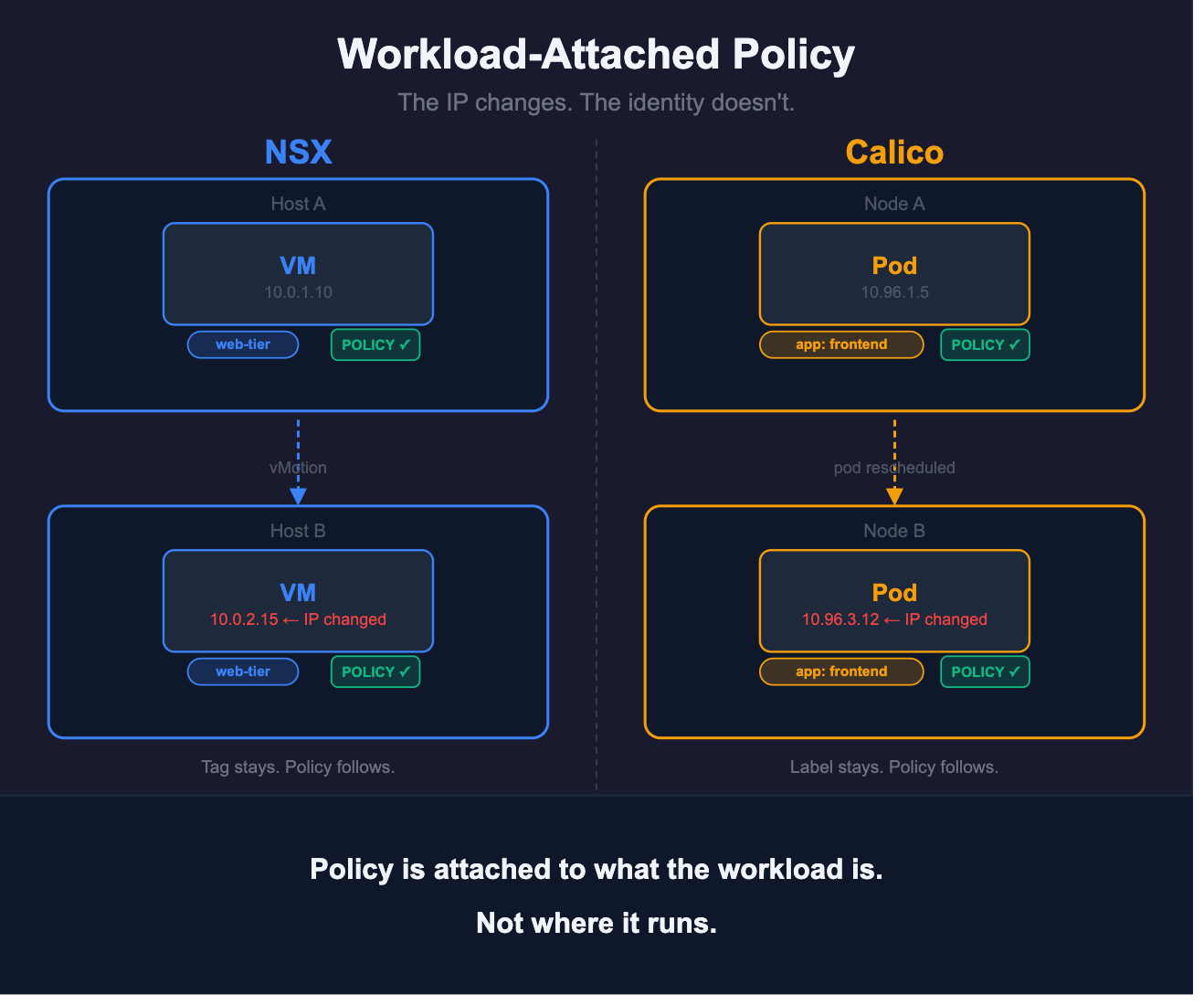
When a VM migrates between hosts via vMotion, its firewall rules move with it. The policy is attached to the workload, not the host. This is a consequential architectural choice: you can’t accidentally leave a workload unprotected by moving it to a new host with different configurations in place.
It also exposes a problem with IP-based firewall rules that becomes obvious the moment workloads start moving. Rules written against specific addresses are tied to a network location, not the workload itself. If a VM changes address after migration, those rules no longer cover it. NSX DFW avoids this by anchoring policy to security group membership instead, and security groups can be built around tags rather than addresses. A VM tagged “web-tier” carries that group membership with it regardless of which host it lands on or what IP it holds. The rule that applies to web-tier VMs follows automatically, with nothing to update.
This is exactly how Kubernetes and Calico network policies also work. Rules are declared against label selectors. When a workload moves to a different node, its labels move with it and the policy selector picks it up automatically. Nothing IP-specific lives in the policy, so there’s nothing to update when an address changes. A VM labeled env: production and tier: database picks up the right policies wherever it lands. No external mechanism needs to track it.
Tiered Precedence
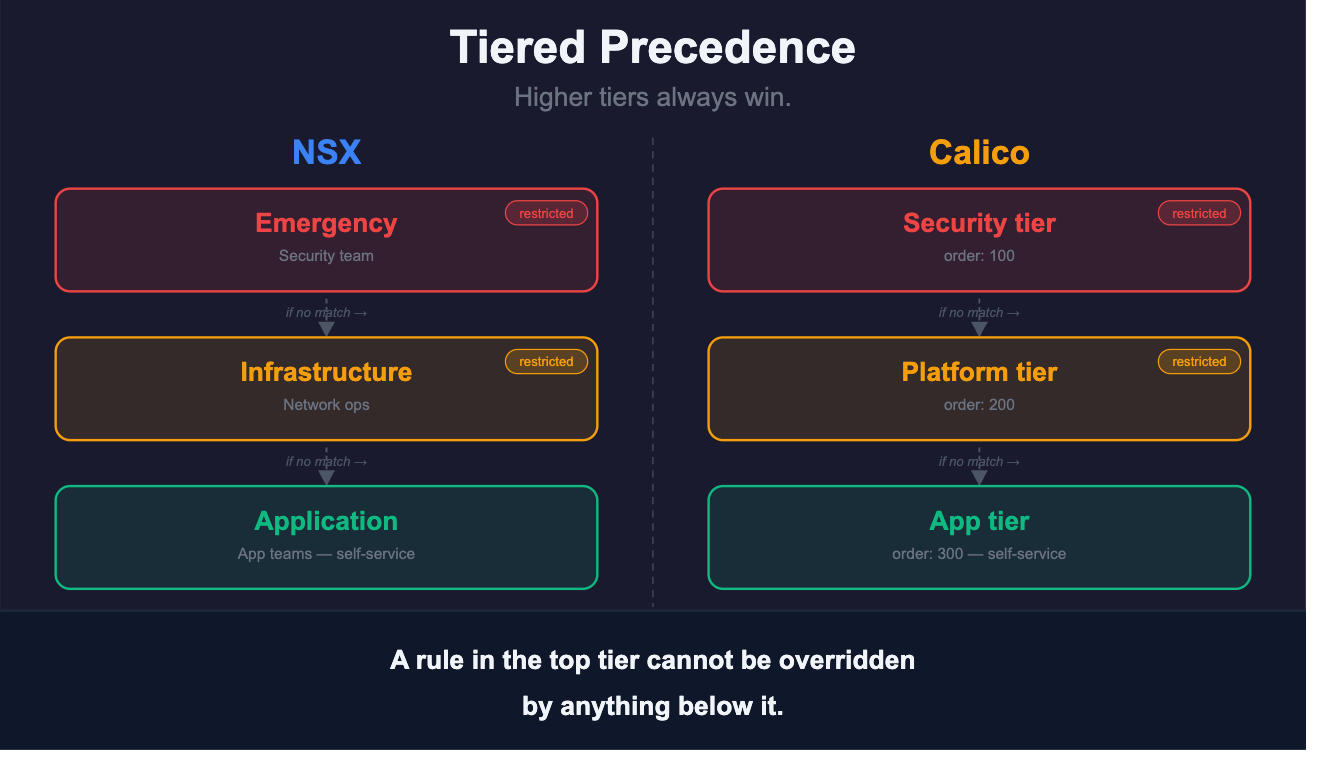
NSX also has a tiered policy model. Rules are organized into named categories with a fixed evaluation order. Emergency and quarantine rules sit at the top, infrastructure and shared service rules in the middle, and application-level rules at the bottom. Traffic is evaluated against each category in sequence, top down. A deny rule in the highest category stops evaluation immediately. Nothing below it applies.
The category structure is also where access control is enforced. NSX’s role-based access control can be scoped to specific policy categories. The evaluation order and the permission model are designed to align. Teams with the narrowest access work in the categories that run last, and no rule they write can override a higher category.
Calico tiers are designed according to the same principles. Each tier is a Kubernetes resource with an order field, a number that determines where it sits in the evaluation sequence. Lower numbers run first. A tier with order 100 is evaluated before a tier with order 200, and a deny rule in the first tier cannot be overridden by anything in the second.
Unlike NSX’s fixed category names, Calico tiers are user-defined. You name them to match your own operational model, such as “security,” “platform,” “application”, and you set the ordering. You can define as many tiers as your use cases require. Most teams structure their tiers so the security team’s policies run first, platform or infrastructure policies run second, and application or namespace-level policies run last.
Within each tier, individual policies also carry an order field, and within each policy rules are evaluated top to bottom with the first match applying. One useful behaviour worth knowing about is the pass action: a rule can explicitly pass traffic to the next tier rather than allowing or denying it. This lets each tier focus on what it’s responsible for and hand off everything else cleanly, rather than requiring every tier to have an opinion on every packet. The security tier, for example, should not have to worry about whether a specific frontend should be able to talk to a certain backend service.
For access control, Calico uses Kubernetes-native RBAC. ClusterRoles and ClusterRoleBindings govern access to cluster-scoped resources like tiers and GlobalNetworkPolicy, while Roles and RoleBindings can be used for namespace-scoped NetworkPolicy. Either way, teams can be restricted to working within their own scope with no ability to reach into tiers or namespaces they don’t own.
Attribute-based Identity
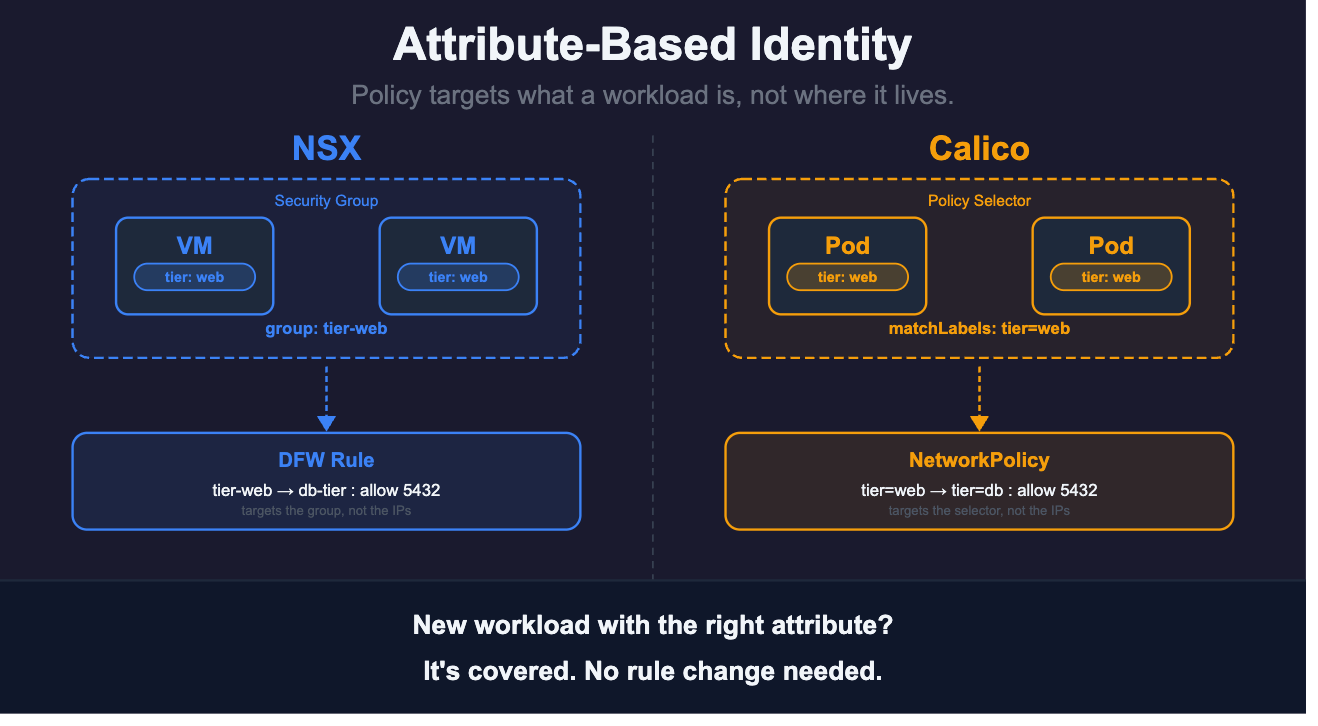
NSX uses tags for dynamic workload grouping. Tags are key-value pairs applied to VMs. You can set them manually through NSX Manager or via API, which means they can be applied at deployment time rather than added by hand after the fact. Security groups define their membership through tag-matching criteria, and that membership is live: any VM carrying the right tag combination joins the group immediately.
Tagging a VM as “PCI-in-scope” isn’t just a label. It’s a trigger. The moment that tag is applied, the VM joins every security group whose membership rule matches it, and every DFW policy targeting those groups immediately covers the new member. No change request, no waiting. The policy was already written; the workload just identified itself as falling within its scope.
The same logic works on decommission. When a tag is removed, the VM leaves the group and the rules that covered it stop applying. Orphaned firewall rules accumulating over years of manual changes are a genuine operational hazard in IP-based environments — tags sidestep the problem entirely because security group membership reflects the actual state of the environment, not a record of past changes nobody got around to cleaning up.
No manual list maintenance. No IP tracking. The tag is the identity.
NSX tags map to Kubernetes labels, and the mechanism works the same way. Labels are key-value pairs defined in a workload’s manifest and applied at deployment. A Calico network policy references them through a selector: compliance: pci in a label is picked up by any policy whose selector matches that expression. The moment a workload with that label comes online, it’s covered. No separate step, no group membership to update manually.
Labels can sit on pods, on namespaces, or on both, which gives you different levels of granularity. A policy that selects on a namespace label applies to everything running in that namespace. A policy that selects on a pod label is more specific. Combining the two lets you write rules like “allow traffic from any workload in the payments namespace that also carries the label tier: web” — the equivalent of multi-tag security group membership in NSX, expressed as a single selector.
The decommission property carries over too. When a workload is deleted, its labels go with it. Policies that targeted it stop applying automatically, with no cleanup step and no stale rules accumulating over time.
For endpoints that can’t carry labels such as external services, legacy VMs not yet migrated, third-party IP ranges, Calico’s NetworkSets handle the case directly. A NetworkSet is a named collection of IP addresses or CIDRs that can be referenced in a policy selector the same way a label can. Rather than repeating IP ranges across every policy that needs them, you reference the NetworkSet by name. When those ranges change, you update the NetworkSet and every policy that references it reflects the change automatically.
A demo that went sideways in the best way
A solutions engineer was running a demo for a team evaluating a VMware replacement. They were walking through how Calico enforces network policy when the customer’s senior network consultant stopped them.
This team had been running NSX-T for years. They had 19 T1 edges and 8 segments. During the walkthrough, the consultant started recognizing what he was looking at. Then he pointed out something that reframed the whole conversation. The T1 edges weren’t actually providing any isolation. The distributed firewall policy was doing all the security work.
What the consultant recognized was that his team had been operating a flat network with policy enforcement. They’d been using NSX tags to classify workloads and superset policies to establish rule precedence.
Both of those map directly to Calico constructs which surprised them. The assumption had been that moving from NSX to a Kubernetes-native stack meant leaving the policy model behind. It turned out the policy model was already there. They’d been building towards it without realizing it.
This is a common pattern. In NSX deployments where the DFW has been built out carefully, the network topology handles connectivity and the policy handles security. The T1 edges are default gateways. The actual security boundary is the DFW rule, not the segment boundary.
What works better on the other side
Once policy is running in Calico, a few things improve over the NSX baseline. Compliance monitoring runs continuously and generates audit-ready reports against frameworks like PCI DSS, HIPAA, SOC 2, and NIST. This replaces manual evidence assembly before each audit cycle. Policy changes tracked in version control produce evidence of reviewed, timestamped, and tamper-evident changes. Tiered RBAC means the security team’s rules are structurally unreachable by teams below, with compliance report access scoped so each team sees only what it owns.
What this all means in practice
The NSX distributed firewall may feel like one of the hardest components to replicate but it turns out to be the part that transfers most directly, because the architectural decisions behind it, distributed enforcement, workload identity, tiered governance, attribute-based grouping, are the same decisions Calico was built on.
The team in that demo was genuinely surprised when they recognized their own security model in the Calico policy framework. They’d spent years building a policy structure in NSX that was a close approximation of what Kubernetes-native policy looks like. They’d been moving toward this model without knowing they were doing it.
If your NSX security posture is built on tags and tiered rules, you’ve been thinking this way for a while. The migration is a translation project. The model is already there.
Everything covered here has a corresponding configuration reference in the Calico microsegmentation documentation. It walks through tier setup, label-based policy, RBAC, and compliance reporting in detail.
Read our migration guide for a comprehensive look at VM migration.



