










In Kubernetes, pods often need to securely communicate with external resources, such as internet services or APIs. Traditional Kubernetes network policies use IP addresses to identify these external resources. However, managing policies with IP addresses can be challenging because IPs often change, especially when dealing with dynamic websites or APIs.
Calico Enterprise addresses this challenge by extending Kubernetes network policies to support Fully Qualified Domain Names (FQDNs). This allows users to define policies using domain names instead of IP addresses, making it easier to manage and secure egress traffic. By dynamically mapping domain names to IPs, Calico ensures that policies remain up-to-date, enabling seamless and secure connectivity to external resources.
While this approach is conceptually simple, practical implementation is tricky. DNS mappings are dynamic: domain names often resolve to different IPs with each query, and wildcard support (e.g., *.example.com) adds complexity. To address this, Calico monitors DNS traffic to create and manage domain-to-IP mappings dynamically, translating high-level DNS-based rules into efficient low-level constructs like iptables, nftables, or eBPF.
Evolution of Calico DNS policy implementation
The DNS policy implementation significantly impacts performance and reliability. Currently, Calico offers three different modes to operate the DNS policy capability:
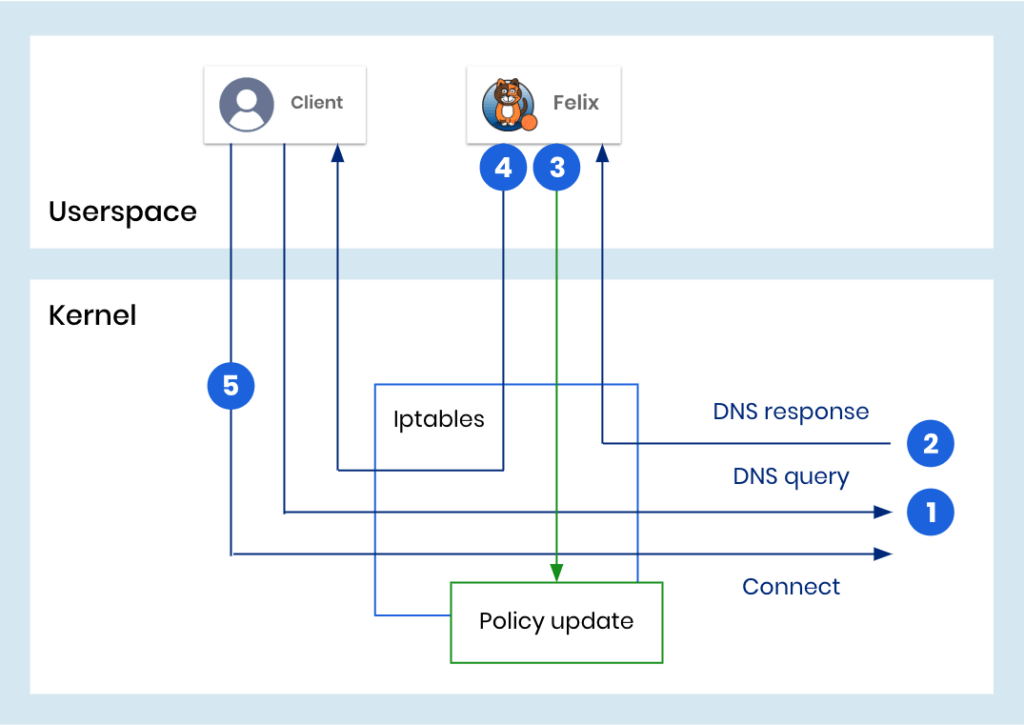
- No Delay Mode: When the data plane detects a packet containing a DNS response, it duplicates the packet and sends the copy via NFLOG to Calico’s per-node userspace daemon, Felix. Felix parses the response and updates the necessary data structures in the data plane. This process, however, takes time. Meanwhile, the original DNS response packet continues its journey to the client. Upon receiving the response, the client selects an IP address and attempts to initiate a connection. The issue arises when the policy update has not been completed by the time the client sends the first packet of the connection. In such cases, the initial packet is dropped, requiring the protocol (TCP) or application (UDP) to retransmit it. This creates latency when the connection attempt overlaps with the time needed to program the policy. The silver lining is that Calico’s approach ensures security: until the policy is fully programmed, only traffic explicitly allowed by the policy can proceed. This guarantees that nothing unintended is permitted during the update delay.
- Delay Response Mode: To address the latency issue of No Delay Mode, Calico offers an alternative mode called “delay response.” Instead of duplicating the packet, this mode places the DNS response packet into an NFQUEUE—a netfilter queue that bridges the kernel and userspace. Felix processes the packet in the queue, programs the necessary policy, and then releases the packet on its way to the client. With this approach, the client experiences a seamless connection setup since the policy is already in place when the connection is initiated. However, this mode introduces some extra latency for every connection requiring DNS resolution. While this latency is less than the delay caused by retransmissions in the previous mode, it is still a tradeoff for ensuring smooth connections.
- Delay Denied Packet Mode: The “Delay Denied Packet” mode combines the advantages of both modes. Like the “No Delay” approach, it copies the DNS response packet without introducing delays. However, if a packet initially allowed by a DNS policy is later denied by another rule, Calico temporarily delays the packet. This delay ensures that the DNS policies are fully synchronized and allows Calico to re-evaluate the packet to confirm whether it should be permitted. By doing so, this mode significantly reduces the latency seen in the “No Delay” mode without adding the extra latency of “Delay Response” every time DNS resolution is required.
These modes highlight a tradeoff between latency and policy synchronization, which can significantly affect application performance, particularly in latency-sensitive environments.
Calico eBPF introduces a New Inline Mode for DNS policy
Calico eBPF leaverages the flexibility of eBPF to introduce a new superior mode DNS policy implementation for the eBPF data plane: Inline Mode. In this mode, DNS policies are updated in real time as DNS responses are processed within the data plane, eliminating any delays.
How Does Calico eBPF Inline Mode for DNS Policy Work?
Calico’s per-node userspace daemon, Felix prepares lookup structures for the eBPF code – data structures that tell eBPF which policy requires updates from which DNS responses. When a DNS response from a trusted DNS server is detected, eBPF parses the response and directly updates the relevant ipset maps (the eBPF equivalent of netfilter constructs). This ensures that policies are updated before the client receives the DNS response, allowing the client to initiate a connection immediately without any delays or the added latency of sending packets to userspace.
Unlike other modes, Inline Mode avoids potential bottlenecks such as overfilled NFQUEUE or NFLOG mechanisms. This advancement was made possible by the bpf_loop() helper function introduced in Linux kernels 5.17+ (or 5.14+ for Red Hat). This function allows for more complex looping code to pass through the kernel’s verifier, enabling efficient in-kernel parsing.

The Outcome
The recently released Calico Enterprise 3.20 eBPF Inline Mode offers the lowest latency DNS policy mechanism available. By streamlining the process and avoiding unnecessary delays, Calico’s eBPF data plane is the clear choice for performance-critical Kubernetes environments. If you’re looking for the fastest and most efficient DNS policy solution, Inline Mode delivers unparalleled performance and reliability.
About Calico eBPF and How to Use It
Calico’s eBPF data plane replaces traditional kube-proxy networking with a high-performance, low-latency alternative. Key features include:
- Native Service Handling: Efficiently manages Kubernetes services without kube-proxy.
- Enhanced Network Policies: Leverages eBPF to optimize policy enforcement.
- Traffic Optimization: Improves throughput and pod-to-pod communication speeds.
Getting Started
- Enable eBPF Mode:
- Ensure your nodes support eBPF (Linux kernel 5.3+ recommended).
- Follow the Enable the eBPF dataplane guide
- Monitor and Debug:
- Use built-in tools like
calicoctlto monitor metrics and edit configurations. - Follow the Troubleshoot eBPF mode guide or reach out at GitHub or Slack.
- Use built-in tools like
By adopting Calico’s eBPF data plane, you can achieve unparalleled network performance while simplifying DNS policy management.
Want to learn more about Calico’s DNS policy implementation or Calico eBPF? Schedule a demo.



