









Planning a migration off NSX usually starts with a networking conversation. Segments, VLANs, routing topology and BGP peering are not things that map cleanly to Kubernetes-native constructs the way the NSX distributed firewall maps to Calico’s tiered microsegmentation. NSX virtualizes the network layer in ways that Kubernetes doesn’t replicate by default. There is no native concept of a Layer 2 segment or VLAN, for instance. Pods simply receive IP addresses on a flat, routed network, with no built-in way to give a workload L2 adjacency to external devices or attach it to a specific broadcast domain.
This is usually where teams start to worry. They can see exactly what NSX is doing for them, but they have no obvious Kubernetes equivalent to point at. The natural question becomes how they will run the networking they depend on once their VMs live in a cluster.
Achieving the same routing, isolation, and connectivity outcomes, however, is well within reach. It just requires a bit of a mental shift.
The rest of this blog will cover the details of what that mental shift entails.
How NSX handles segments
Before we get into recreating NSX networking outcomes for VMs in Kubernetes, let’s set the stage by looking at what it is we are trying to recreate.
NSX is a network virtualization platform that creates software-defined networks (switching, routing, firewalling, load balancing) in a layer that runs on top of existing physical networks. It allows you to provision and segment networks programmatically without reconfiguring switches or routers.
The building block in all of this is the segment, the logical network a workload attaches to. A segment is not one fixed thing. How it behaves depends on how it is designed. It can be backed by an overlay or tied to a physical VLAN. It reaches the rest of the network either by routing through a Tier-1 gateway or by being advertised externally through a Tier-0 gateway. The backing type is what matters most when you move workloads to Kubernetes, so the two are worth looking at on their own.
VLAN-backed segments connect to a physical VLAN tag. VMs have L2 adjacency to anything on that VLAN, including physical servers and external devices. The traffic follows the physical VLAN.
Overlay segments use encapsulation to tunnel L2 frames across a routed underlay, decoupling logical topology from physical VLANs entirely. VMs on the same overlay segment see a flat L2 domain regardless of which hosts they’re on.
Both types give VMs an IP address, a default gateway, a broadcast domain, and a network identity the rest of the infrastructure can interpret.
How each segment type maps to Calico
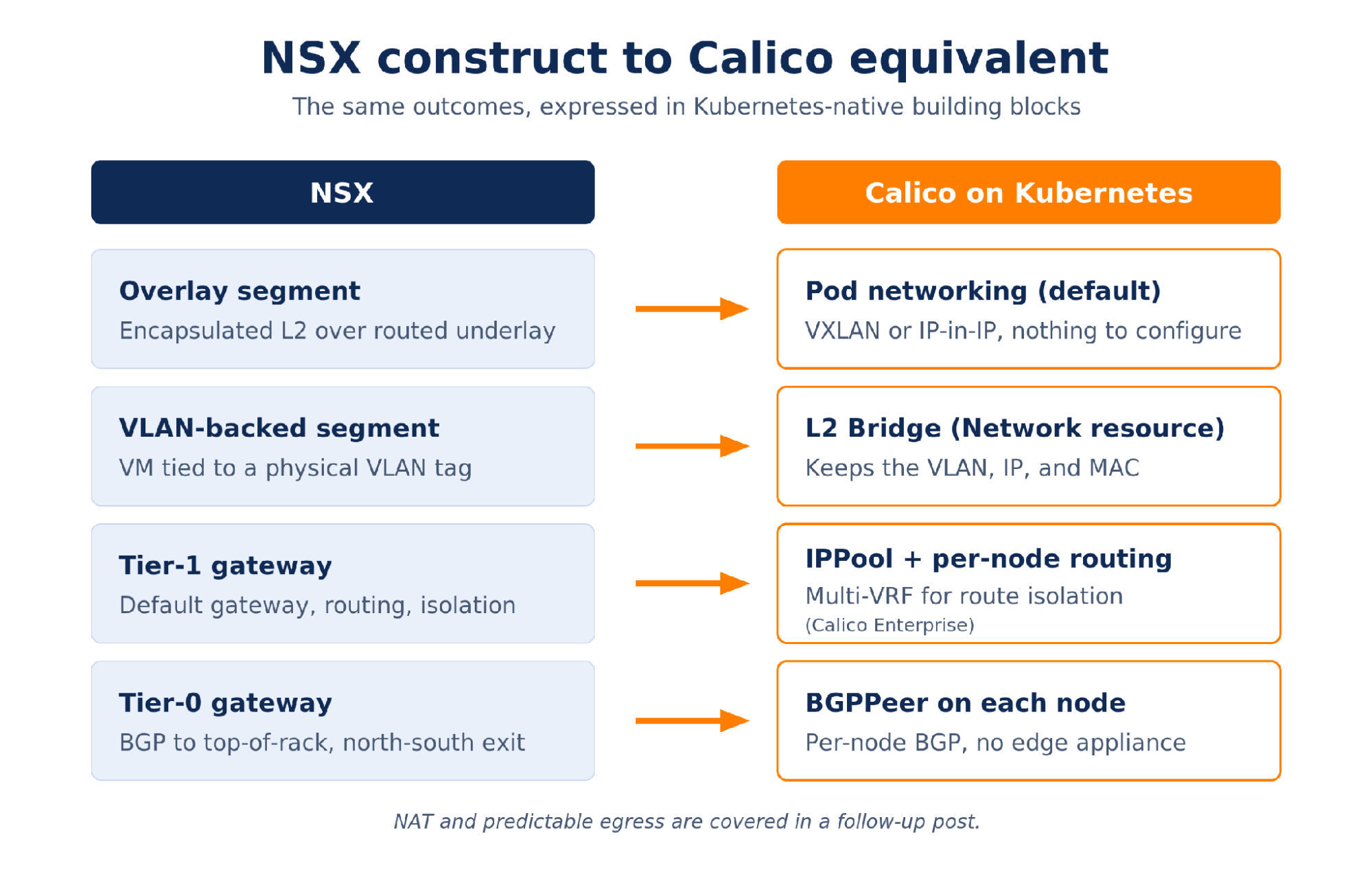
Overlay segments are the straightforward case. The NSX overlay model, encapsulating L2 traffic and carrying it across a routed underlay, is the same architectural pattern Calico uses for its default pod network, with VXLAN or IP-in-IP as the encapsulation format. VMs and pods communicate across nodes as if they shared a flat L2 domain, the physical network carries UDP, and the details are handled below the application layer. For workloads that were on NSX overlay segments and have no hard dependencies on specific VLANs or IP ranges, the migration to Calico pod networking is largely mechanical. There is nothing to configure specifically for the overlay. It is the default.
There is one real difference behind that smooth mapping, and it is worth understanding before you migrate. An NSX overlay segment gives workloads a true Layer 2 domain. Calico’s pod network looks flat to the application, but traffic between nodes is actually routed at Layer 3. For almost everything, that distinction never surfaces. The exception is any application that leans on Layer 2 broadcast or multicast to discover its peers, such as some older clustering protocols. Those are the ones to identify up front rather than after the move.
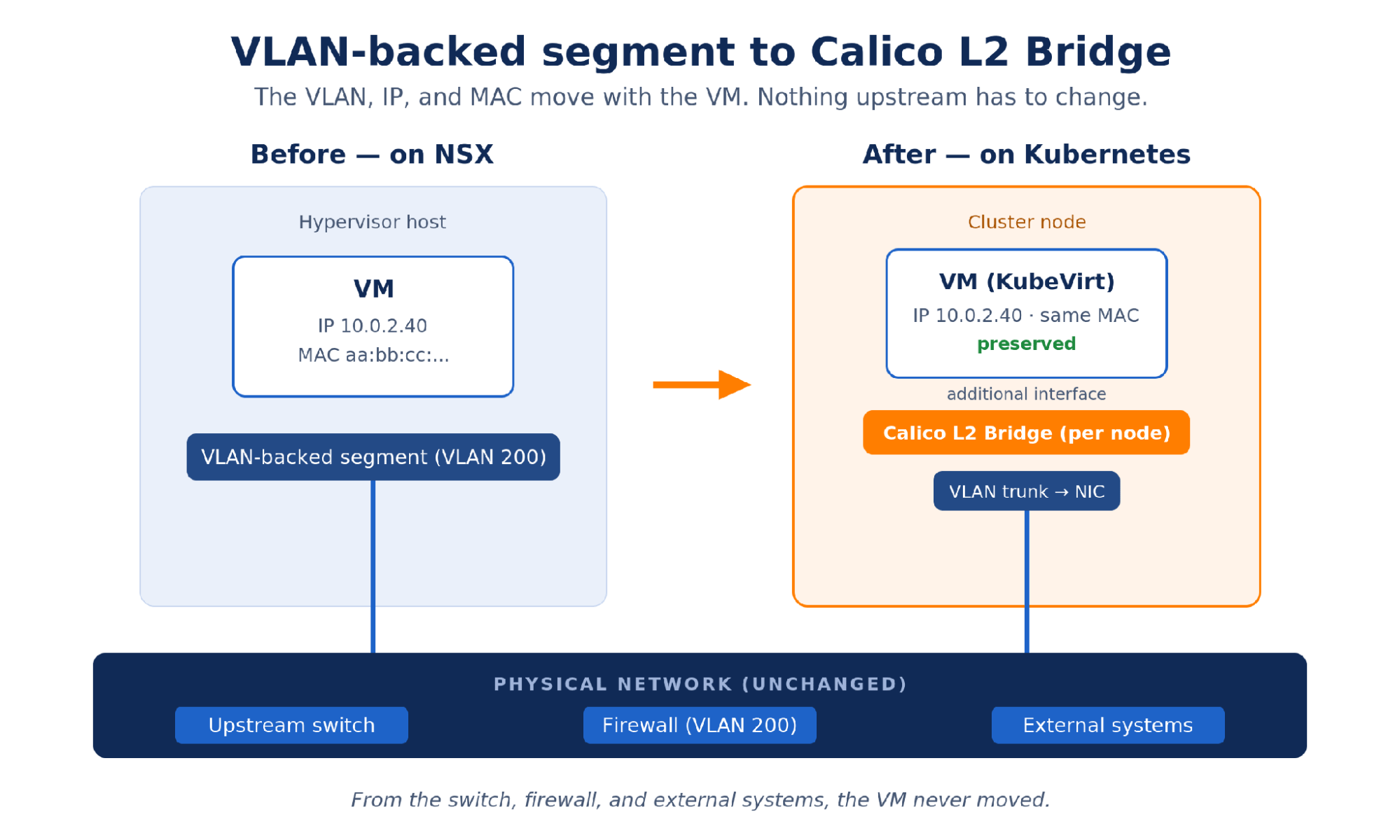
VLAN-backed segments are where most migration discussions get complicated, and they are often the most common case, because moving off them takes time and effort that teams under pressure rarely have. A VLAN-backed segment is not just a network assignment. It often carries compliance scope, upstream firewall rules, and IP ranges that legacy systems have relied on for years. Telling a security team that the PCI VLAN is going away requires evidence that the workload’s regulatory scope is preserved by some other mechanism. Telling an external system to update its allowlist requires coordination and change windows. These are organizational constraints as much as technical ones.
Calico’s answer for environments where VMs need to stay on their VLANs is L2 Bridge mode, configured through a Calico Network resource. It stretches your existing VLAN into the Kubernetes cluster the VM now runs in, so that as far as your network is concerned, the VM is still in its old home with all its dependencies intact. Calico creates a bridge on each cluster node and connects it to the VLAN trunk on the node’s NIC, then attaches the VM to that bridge through an additional interface. The VM sees the same VLAN it was on before the migration. It keeps its IP address. It keeps its MAC address. From the perspective of the upstream switch, the firewall, and any external system talking to that VM, nothing moved.
The implementation is different but the outcome is the same. Your migrated VM runs on the same VLAN it always did, with the added advantage of now treating your infrastructure as code, with all the version control and management consistency that brings.
What about my subnets?
NSX has something called a Tier-1 gateway. It is not a subnet, though it is the closest thing to the gateway behind one. It is the routing tier that segments attach to, and it does a few jobs: it provides the default gateway for workloads on those segments, routes between them and upward toward the Tier-0, keeps tenants isolated at the routing layer, and can hand a workload a fixed source IP via SNAT for allowlisting.
In Calico, none of this is a single appliance. The IP ranges those segments carried map to the IPPool, the custom resource that defines the CIDRs workloads draw from. The default gateway needs no equivalent: every node already routes for the workloads it hosts, so the T1’s routing simply happens on the nodes. Connectivity between workloads and out to the physical network rides Calico’s own routing instead of a gateway in the path.
Route isolation, where a T1 keeps one tenant’s routes out of another’s, is handled in Calico Enterprise by Multi-VRF, implemented through a custom resource called ExternalNetworks. Each ExternalNetwork is an independent routing table on the node with its own BGP peering, so routes in one domain stay invisible to another. It is the tool for cases a single routing table cannot handle, such as reaching external services with overlapping address ranges.
So the Tier-1 equivalent is not one thing you deploy. It is a combination of an IPPool, per-node routing, Multi-VRF where isolation is required, and policy. That is a real shift in thinking, and it works in your favor: no appliance to size, patch, or treat as a single point of failure, routing that scales with the cluster, and every piece a declarative, version-controlled Kubernetes resource rather than a separate box to keep in sync.
Connecting a segment to the outside world
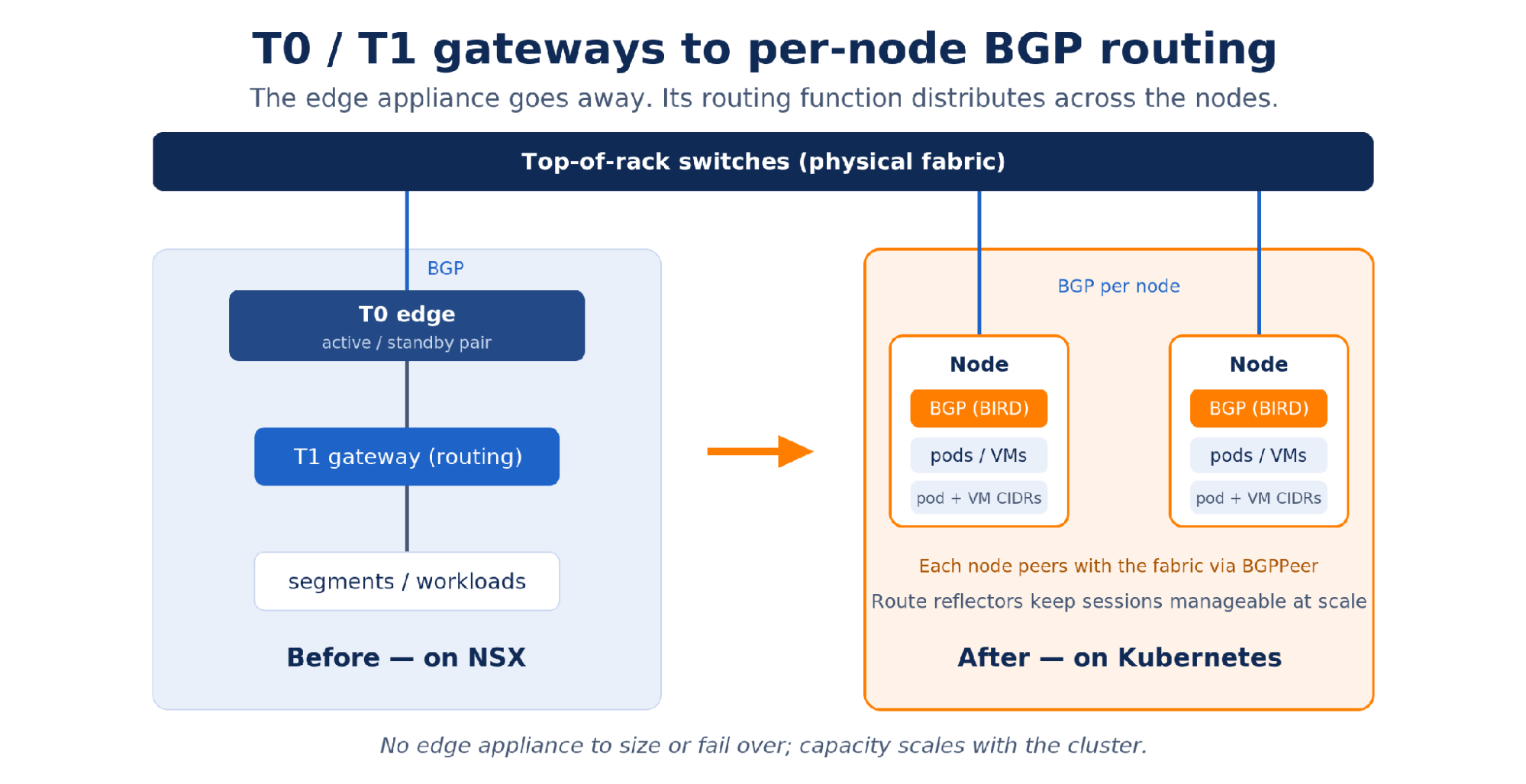
The NSX Tier-0 gateway is the border between the NSX overlay and the physical network. Its main job is BGP peering with the top-of-rack switches, advertising the overlay subnets into the physical routing fabric so the rest of the data center knows how to reach NSX-hosted workloads. It is also the exit point for traffic leaving the fabric entirely. The T0 usually runs on a dedicated edge node or edge cluster, often as an active and standby pair, which makes it a concentration point for all north-south traffic. NAT and edge firewalling are T0 functions too, and those can be saved for a follow-up post.
In Calico, that routing role moves directly onto the cluster nodes. Each node runs a BGP daemon (BIRD) and peers with the physical switching infrastructure through the BGPPeer custom resource, which specifies the peer address, the AS number, and, through a node selector, which nodes participate. Calico advertises pod and VM CIDRs into the fabric exactly as the T0 advertised the overlay subnets. The switches learn routes to cluster workloads and forward to them with no extra configuration on the physical side.
At scale you do not peer every node with every switch. Calico supports BGP route reflectors, where a small set of nodes hold the peerings and the rest peer with them. This keeps the number of sessions manageable as the cluster grows. Either way, the T0 appliance goes away and the function it performed is distributed across the nodes.
As with the Tier-1, this is a shift from a box to a behavior, and the trade works in your favor. There is no edge appliance pair to size or fail over, north-south routing no longer funnels through a single concentration point, and capacity scales as you add nodes. The peering itself is declarative which again means that the BGPPeer resource lives in version control and is reviewed like any other part of the cluster.
What this means in practice
The networking layer is where a migration off NSX looks most different. The segment topology, the gateway appliances, and the BGP configuration do not have one-to-one equivalents on the Kubernetes side, and the first look can be unsettling.
What carries over is the logic underneath. Overlay segments become Calico pod networking with no special configuration. VLAN-backed segments map to L2 Bridge Networks, so a VM keeps its VLAN, its IP, and its MAC through the move. The T0’s BGP peering moves to the cluster nodes through the BGPPeer resource, and the T1’s routing is absorbed into per-node routing with nothing dedicated to replace it. Where separate routing tables are genuinely needed, Calico Enterprise’s Multi-VRF provides that isolation without a gateway appliance.
The shape changes but the outcomes do not. Once you stop looking for the appliance and start looking at what it was actually doing, most NSX topologies carry fewer hard dependencies than they first appear, and each of those jobs has a Kubernetes-native home that is declarative, version-controlled, and scales with the cluster. The practical next step is to map your own environment the same way. List what each segment and gateway is really providing. Once that list exists, the Calico equivalents are usually easy to identify. That requirements audit is where most migrations should start, and it is a good conversation to have before the first VM moves.
If you want to go further, check our our ebook: Calico Enterprise for NSX Administrators. And when you are ready to try the mapping yourself, you can request a Calico Enterprise trial license.
Ready to migrate VM-centric architectures to Kubernetes platforms? Read our ebook, Calico Enterprise for NSX Administrators.



