







What Is Lift and Shift Migration?
A “lift and shift” migration (also known as rehosting) is a cloud migration strategy that involves moving applications and data from an on-premises environment to the cloud exactly as they are, without redesigning the application architecture or rewriting the code.
The “Lift and shift” approach:
Also known as rehosting, this strategy treats the cloud as just another data center. Instead of breaking down an application to make it “cloud-native” (like converting to microservices), your team simply replicates your current setup—such as the operating systems, databases, and dependencies—and shifts those workloads directly into a cloud provider like Amazon Web Services (AWS), Microsoft Azure, or Google Cloud.
Why choose it?:
Organizations favor lift and shift when they need to vacate an expiring data center contract rapidly or are looking to quickly shift IT budgets from capital expenses (buying hardware) to operational expenses (cloud services):
- Speed: It is the fastest way to migrate, often taking weeks instead of months or years.
- Lower upfront cost: It requires less specialized developer labor, consulting, and redesign work initially.
- Minimal disruption: Because the application behaves exactly as it did on-premises, your IT teams don’t have to learn completely new business processes, monitoring, or management interfaces right away.
- Reversibility: Because the architecture hasn’t been permanently altered, if the cloud environment doesn’t suit your needs, it is much easier to migrate the workloads back to your own servers.
This is part of a series of articles about VMware migration.
In this article:
- How Lift and Shift Migration Works
- Why Choose Lift and Shift Migration Approach
- Potential Challenges of Lift and Shift Migration
- Tutorial: VMware Lift and Shift Migration
- Lift and Shift Migration Best Practices
How Lift and Shift Migration Works
Here’s an overview of the lift and shift process.
1. Application and Infrastructure Assessment
Before migration, it is critical to assess the existing applications and infrastructure to identify components suitable for lift and shift. This involves:
- Cataloging workloads
- Evaluating dependencies
- Determining compatibility with the target cloud environment
A thorough assessment helps organizations pinpoint potential challenges, such as unsupported software versions or tightly coupled legacy systems, which could complicate the migration process. Additionally, this phase includes identifying resource requirements (such as compute, storage, and network needs) for each workload. Organizations must also consider licensing constraints, compliance requirements, and performance baselines.
2. Cloud Environment Setup
Setting up the cloud environment involves configuring the target platform to accommodate migrated workloads. This includes:
- Provisioning virtual machines
- Setting up networking, storage, and security controls
- Establishing connectivity between on-premises and cloud environments
Proper cloud environment setup ensures that the infrastructure can support the incoming workloads without compatibility issues or resource bottlenecks. It is also important to implement foundational cloud services, such as monitoring, logging, and identity management, during this phase. These services provide visibility into migrated workloads and help maintain operational control.
3. Data and Workload Migration
Once the cloud environment is ready, the actual migration of data and workloads begins. This process typically involves replicating virtual machines or application instances from the on-premises environment to the cloud. Migration tools and services can automate much of this process, ensuring data consistency and minimizing downtime during cutover.
During this phase, organizations must validate data integrity and application functionality in the cloud environment. It is also essential to synchronize any ongoing changes in the on-premises systems until the final cutover occurs. Proper planning and execution during this stage ensure a seamless transition with minimal disruption to business operations.
4. Post-Migration Validation
After migration, it is essential to validate that workloads function as expected in the new cloud environment. This involves:
- Comprehensive testing of application performance, network connectivity, and integration points with other systems.
- Verifying that service levels, security controls, and compliance requirements are met in the cloud.
- Monitoring for issues that may arise due to subtle differences between on-premises and cloud environments, such as latency or configuration mismatches.
By thoroughly validating workloads after migration, organizations can ensure a stable and reliable cloud deployment and address any issues before fully decommissioning the old infrastructure.
Related content: Read our guide to Kubernetes security.
Why Choose Lift and Shift Migration Approach
This approach is often preferred for the following reasons.
Speed
The lift and shift migration approach is known for its rapid execution. Because it requires minimal changes to existing applications or their architecture, organizations can transfer workloads to the cloud in a fraction of the time required for more complex migration strategies. This quick turnaround enables businesses to respond to market demands faster. Speed is particularly important for organizations facing urgent data center exits, hardware refresh cycles, or regulatory deadlines.
Lower Upfront Cost
Lift and shift migration typically involves lower upfront costs compared to re-platforming or re-architecting. Since applications are moved as-is, there is no need to invest heavily in redesign, refactoring, or retraining development teams. Organizations can leverage existing skill sets and tools, further minimizing migration expenses. The cost savings extend to project planning and execution. With fewer stakeholders and simpler workflows, organizations can avoid costly delays and overruns.
Minimal Disruption
Lift and shift migration minimizes disruption to business operations by preserving application behavior and interfaces. Since applications are moved without significant changes, end-users experience little to no impact during the transition. This is particularly important for mission-critical systems or legacy applications that cannot tolerate extended downtime or functional changes. The approach also reduces the learning curve for IT staff and end-users.
Reversibility
One of the unique advantages of lift and shift migration is its reversibility. Because workloads are replicated rather than rewritten, organizations can keep the original on-premises environment running and revert to it if issues arise before cutover. This provides a safety net for organizations concerned about cloud performance, security, or compliance. Reversibility also allows organizations to conduct pilot migrations or phased rollouts with minimal risk. If unexpected challenges are encountered, workloads can be moved back.
Tips from the Expert
In my experience, here are tips that can help you get more value from lift and shift migrations while avoiding common pitfalls:
Right-size workloads on real usage, not documented specs before migration:
Many organizations migrate servers exactly as they run today, carrying years of overprovisioning. The assessment phase captures required resources; go one step further and measure actual CPU, memory, and storage usage before you migrate, then provision to that. This is the cheapest cost saving you'll ever make, because it happens before the meter starts.
Treat lift and shift as a first step, not the final destination:
Rehosting gets workloads moved quickly, but the fastest migration is rarely the cheapest to run. Once the environment is stable, identify candidates for modernization, such as managed databases, containers, or serverless, and replatform the workloads where it pays off.
Establish cloud governance before migrating:
Define standards for networking, identity management, tagging, monitoring, and cost management before workloads arrive in the cloud. Retrofitting governance across a live estate is far harder than setting it up on an empty one.
Validate disaster recovery in the cloud before you decommission:
Do not assume on-premises recovery procedures carry over. Test backup, failover, and restore in the new environment while the source is still running, so on-premises remains your fallback until cloud DR is proven.
Monitor cloud costs from day one:
Right-sizing controls the starting point; monitoring controls the drift. Unlike owned hardware, cloud workloads bill continuously, so set up cost monitoring and alerting the moment workloads land and watch for idle or oversized instances.

Potential Challenges of Lift and Shift Migration
While lift and shift is one of the most popular migration approaches, it also has some potential drawbacks:
- Higher long-term costs: Moving legacy, monolithic applications as-is means you miss out on cloud-native optimizations (like serverless computing). You may end up over-provisioning resources, leading to higher-than-expected monthly cloud bills.
- Lack of scalability: Simply “rehosting” limits your ability to take advantage of cloud elasticity, as the app wasn’t designed to scale automatically up or down based on traffic.
- Missed efficiencies: Your team won’t immediately gain the full agility, automated resilience, and performance benefits that true cloud-native applications enjoy.
Tutorial: VMware Lift and Shift Migration
VMware provides lift and shift migration capabilities through Migration Coordinator, a tool built into NSX that helps organizations migrate from NSX for vSphere to NSX. In this approach, the target NSX environment runs on a separate set of hardware, giving administrators full control over when workloads are moved and how northbound connectivity is designed.
Related content: Compare Migration Coordinator to other VMware migration tools for lift and shift projects.
Step 1: Choose a Lift and Shift Migration Mode
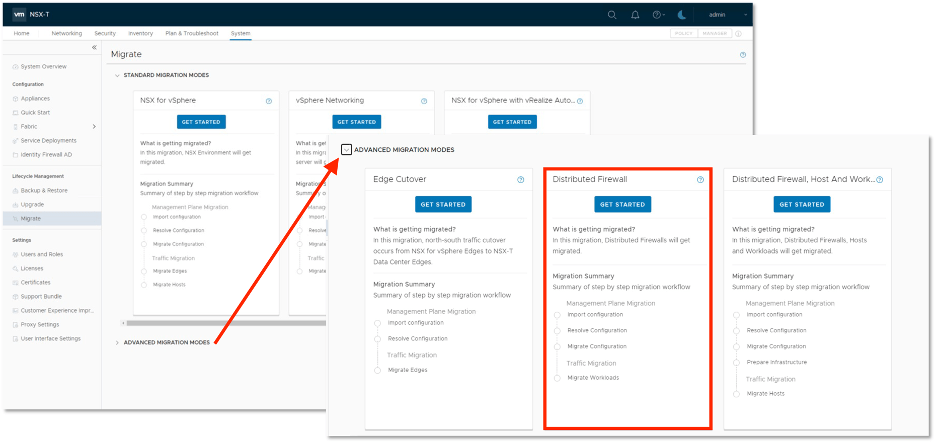
Migration Coordinator supports several lift and shift modes, each designed for different migration requirements:
- Distributed Firewall Mode: Migrates only distributed firewall configuration to the new NSX environment.
- User-Defined Topology – Configuration Migration: Migrates configuration while allowing administrators to customize network connectivity.
- User-Defined Topology – Configuration and Edge Migration: Adds built-in bridging support and allows workload migration using either vMotion or HCX.
- Global Manager Configuration Migration: Supports cross-vCenter deployments migrating into an NSX Federation environment.
The choice depends on whether the goal is to migrate only security policies, migrate configuration, or also simplify workload movement through built-in bridging features.
Source: VMware
Step 2: Prepare the Target NSX Environment
Before running Migration Coordinator, deploy the required NSX infrastructure on the destination hardware. Depending on the selected migration mode, this typically includes:
- NSX Manager instances
- NSX Edge nodes
- Optional HCX components
- Optional bridging services
Administrators must also configure north-south network connectivity and create Tier-0 gateways. In some modes, additional network segments must be created before migration begins.
Step 3: Configure Networking
Networking preparation is a critical part of VMware lift and shift migrations. Administrators should:
- Configure north-south connectivity in the new NSX environment.
- Create the required Tier-0 gateways.
- Create segments as needed.
- In Distributed Firewall mode, ensure segment IDs match the VNI values used by existing NSX for vSphere logical switches.
This preparation allows migrated workloads to connect correctly once they are moved to the new environment.
Step 4: Configure Connectivity Between Old and New Environments
Because workloads may remain distributed across both environments during migration, connectivity must be maintained throughout the process.
Depending on the migration mode and migration duration, connectivity can be provided through:
- NSX native bridging
- HCX-based bridging
- Built-in bridging capabilities available in certain migration modes
Bridging helps maintain communication between workloads that have already migrated and workloads that are still running in the original environment.
Step 5: Run Configuration Migration
After the target environment is ready, Migration Coordinator can migrate supported NSX configuration components. In lift and shift migrations, configuration migration typically includes items such as distributed firewall policies and other objects below the Tier-0 layer.
Northbound configuration, including external routing connectivity, should be prepared beforehand because it is not automatically migrated.
Step 6: Migrate Workloads
Unlike VMware’s in-place migration modes, lift and shift modes do not automatically move workloads. Workload migration is performed separately using:
- vMotion in all lift and shift modes
- HCX in the Configuration and Edge Migration mode
This separation gives administrators precise control over workload migration timing, which is useful in multi-tenant environments or phased migration projects.
Related content: See how VMware live migration compares to a lift and shift approach for moving workloads between environments.
Step 7: Validate Connectivity and Complete Migration
After workloads are migrated, verify:
- Network connectivity between workloads
- Distributed firewall behavior
- Routing and northbound connectivity
- Application functionality
Once validation is complete and all workloads have been moved, the legacy NSX for vSphere environment can be retired. This approach enables a controlled migration process while preserving flexibility around workload movement and network design.
Related content: Explore the leading VMware NSX alternatives.
Lift and Shift Migration Best Practices
Here are some of the ways that organizations can ensure a successful migration when using the lift and shift approach.
1. Assess Workload Dependencies Before Migration
Before migrating workloads, it is essential to identify and document all application dependencies. This includes databases, storage systems, network connections, and integration points with other applications or services. A comprehensive dependency assessment helps prevent migration failures caused by missing or misconfigured components in the cloud environment. Dependency mapping also allows organizations to sequence migrations effectively and avoid service interruptions.
How to implement:
- Create a dependency map showing application, database, storage, and network relationships.
- Identify shared services that support multiple workloads and plan their migration carefully.
- Group dependent workloads into migration waves to reduce disruption and connectivity issues.
2. Apply Zero Trust Network Controls Early
Organizations should implement zero trust principles before or during migration rather than treating security as a post-migration task. Every workload, user, and service should be authenticated and authorized based on least-privilege access policies. This reduces the risk of unauthorized lateral movement if a system is compromised during the migration process.
Cloud environments often introduce new network paths and communication patterns that can expand the attack surface. Applying microsegmentation, identity-based access controls, and continuous traffic inspection early helps maintain security consistency and prevents inherited trust relationships from the on-premises environment from becoming security gaps in the cloud.
How to implement:
- Enforce least-privilege access policies for users, applications, and services.
- Implement microsegmentation to restrict unnecessary workload-to-workload communication.
- Continuously verify identities and inspect traffic between workloads and cloud services.
3. Segment Workloads by Application, Environment, and Risk Level
Workloads should be grouped and isolated based on their function, environment, and sensitivity. Production, development, and testing systems should reside in separate network segments, while critical applications should be isolated from lower-risk workloads. This approach limits the impact of security incidents and simplifies policy management. Segmentation also improves visibility and compliance. Security teams can apply controls that match the risk profile of each workload instead of relying on broad network-level rules.
How to implement:
- Separate production, development, and test environments into distinct network segments.
- Isolate high-risk or sensitive workloads using dedicated security policies.
- Apply segmentation rules based on application function and data sensitivity.
4. Control Egress Traffic After Migration
Many organizations focus primarily on inbound security controls, but outbound traffic should also be monitored and restricted. After migration, workloads may gain access to internet-connected services that were previously unavailable in the on-premises environment. Uncontrolled egress traffic can increase security and compliance risks. Implementing egress filtering, traffic inspection, and approved destination policies helps prevent data exfiltration and unauthorized communications.
How to implement:
- Implement egress filtering to restrict outbound traffic to approved destinations.
- Inspect outbound traffic for data exfiltration attempts and unauthorized communications.
- Establish clear rules for external connectivity.
- Continuously monitor outbound traffic to identify suspicious activity and enforce governance requirements.
Related content: Learn how to manage outbound traffic with an egress gateway.
5. Standardize Security Policy Across Hybrid and Multi-Cluster Environments
During lift and shift migrations, organizations often operate workloads across on-premises infrastructure, cloud environments, and multiple clusters simultaneously. Maintaining separate security models for each environment can create inconsistencies, configuration errors, and policy gaps. A centralized policy framework helps ensure that security controls are applied consistently regardless of workload location. Standardized rules for access control, segmentation, monitoring, and compliance simplify operations.
How to implement:
- Use centralized policy management tools to apply consistent controls across environments.
- Standardize access control, segmentation, and monitoring policies regardless of workload location.
- Regularly audit configurations to identify and remediate policy drift across platforms.
Increasingly, lift and shift does not stop at cloud VMs. Using KubeVirt, organizations can rehost virtual machines directly onto Kubernetes, where each VM runs as a Kubernetes workload alongside containers. This keeps the VM intact, no rewrite, while placing it on a platform that can enforce consistent security policy across every environment the workloads land in. That is where Calico applies.
Securing Migrated Workloads Across Hybrid and Multi-Cloud Environments with Calico
A lift and shift migration frequently leaves organizations operating workloads simultaneously across on-premises infrastructure, hybrid setups, and multiple cloud environments—exactly the conditions that make consistent security difficult to maintain. Calico, from Tigera, provides multi-cloud security with unified controls for centralized protection across on-premises, hybrid, and multi-cloud environments on any Kubernetes distribution or data plane, helping teams enforce a single, consistent security posture as workloads move and remain distributed.
Key capabilities of Calico:
- Unified multi-cloud protection: Purpose-built for on-premises, hybrid, and multi-cloud environments, Calico delivers uniform enforcement of security policy and compliance requirements for centralized, multi-cluster workload protection and observability, with improved visibility for troubleshooting policy gaps and violations.
- Cluster mesh for multi-cluster policy: Deploy security policy to protect traffic between pods in multi-cluster environments, and easily apply security policies to a single application distributed across multiple clusters to meet regulatory and organizational requirements.
- Any cloud, any Kubernetes distribution: Operate a single active security platform across cloud providers and Kubernetes distributions, so security controls remain consistent regardless of where workloads land after migration.
- Pluggable data planes: Choose the data plane that fits your environment—pure Linux eBPF, standard Linux networking, or Windows HNS—using standard primitives that system administrators are already familiar with to enforce networking and security.
- Centralized repository: Maintain a single source of information across multiple clusters for monitoring, alerting, authentication, and logging.
Ready to keep your migrated workloads protected across every environment?
Next Steps
- Lift-and-Shift VMs to Kubernetes with Calico L2 Bridge Networks – technical walkthrough of how Calico L2 Bridge Networks preserve VLANs and IPs during migration and across live migration between nodes.
- KubeVirt Networking: How to Preserve VM IP Addresses During Migration – interface-level detail on how Calico attaches the secondary net1 interface and tracks VM IPs through the virt-launcher pod.
- VM Migration to Kubernetes: What Breaks and How to Prevent It – comparison of L2 and L3 networking models for VM migration and the operational implications for live migration on day 2.



