The eBPF data plane differs from traditional Linux data plane in many ways, with its structure largely dictated by the location of the so-called eBPF hooks inside the kernel – locations where developers can inject their eBPF programs to change default kernel behavior. Unlike iptables (or nftables) networking, which sits virtually at the center of the host network space of Kubernetes nodes, surrounded by all of the node’s interfaces, eBPF is scattered across the periphery, attached directly to the individual devices.
Unlike in iptables, where rules are injected based on whether they should process traffic that is from/to the host or being forwarded, etc., and then the rules decide whether they are interested in the traffic they see or not, eBPF programs are primarily attached to the devices. This means Calico needs to decide which interfaces it should monitor and what are the roles of those interfaces. If it does not attach to some interfaces, it would miss traffic that goes through those devices, if it is attached to all, it would perhaps unnecessarily process traffic that it should not. For example, some management link, devices that connect unrelated VMs, etc.
Additionally, programs at different interfaces play a different role. For instance, programs at the main host interfaces handle NodePort traffic, tunnel devices manage internal traffic, and both enforce policies for host endpoints. Meanwhile, programs at the pods’ interfaces handle policies for individual workload endpoints.

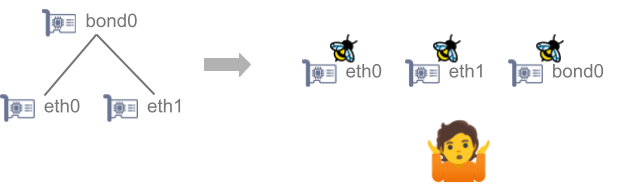
Therefore, Calico has a configuration option bpfDataIfaceRegexp that allows users to select which interfaces to include or exclude. This option is a regular expression with a default value set to match most commonly used host interface names and thus it is usually unnecessary to modify it. However, if your nodes have eth0 and eth1 and you only want eth0 to be controlled by Calico, you have to change that default configuration.
It’s usually not that simple
Things may get even more complicated if there are multiple devices that form some sort of a hierarchy. For instance, imagine that there are two physical interfaces, eth0 and eth1 that are bonded into bond0. Should the traffic be processed at the ethX devices or at the bond0 or at all of them? In addition, what if you have a vlan device on top of that?
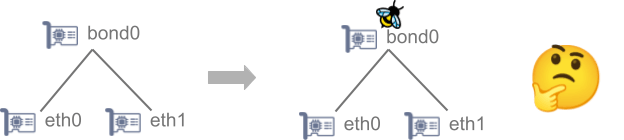
In such a complex environment, the idea was to attach to the top of the hierarchy. For example, if the top VLAN device name is bond.1001, the regular expression would need to match on this device and not bond0 and neither eth0 or eth1. In theory, it would be possible to attach to the eth0 and eth1 only, but that comes with a bunch of issues.
First, Calico eBPF does not have support to parse VLAN packets, but even if it had, processing on the eth devices would fail if bpfEnforceRPF was set to Strict*. The reason is that the reverse routing would point to the top of the hierarchy and not to the physical devices.
*Reverse path filtering aka RPF makes sure that packets arrive from the device where reverse traffic would go. Calico in eBPF mode enforces it on its own.
What is the solution?
Since these complex environments are fairly common at our users’ sites, Calico is changing its approach and autodetects such configurations. At the moment, Calico 3.29 detects bonds and the upcoming 3.30 will also detect VLANs and can handle fairly arbitrary topologies.
With the new releases Calico checks devices that match the regular expression while also considering their hierarchical relationships. It then attaches to the highest-level device in the hierarchy.
For example:
- If eth0, eth1 and bond0 all match, Calico attaches to bond0.
- If only eth0 and eth1 match, Calico skips bond0 and attaches directly to the Ethernet devices.
- If only bond0 matches and its worker devices (eth0 and eth1) don’t, Calico attaches to bond0.
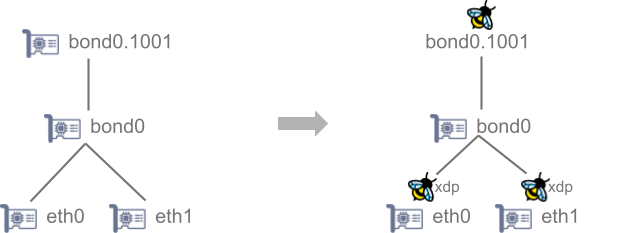
- If a higher-level device like bond.1001 also matches, Calico attaches to bond.1001 and skips bond0, as bond0 is in the middle of the hierarchy.
This approach allows users to include or exclude devices with a single pattern.
What happens to XDP and DDoS protection?
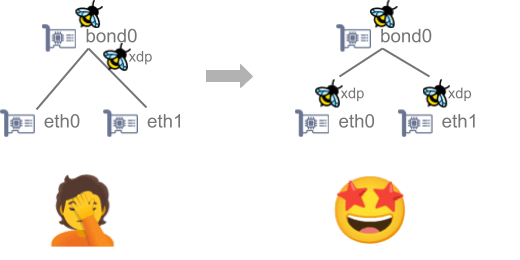
Up to this point, we implicitly discussed attaching to the tc (traffic control) hooks at the devices since this is the most commonly used hook. However, to process doNotTrack policies efficiently, Calico also uses XDP hooks. That is the earliest point where a packet can be processed and it is the most efficient for protecting against DDoS attacks. Attaching XDP high up in the hierarchy to a virtual device would lose much of the benefits. Therefore, the automation attaches XDP at the bottom. If we look at the bond0 example again, latest Calico releases attach XDP programs to execute doNotTrack policies to the physical ethernet devices (eth0 and eth1) instead of to the bond0 or bond0.1001 if all of the interfaces match bpfDataIfaceRegexp. The end result is that each type of program is attached at the most efficient and logical location.
Trust but verify
On the practical side, this is how you can check whether the eBPF programs are attached where you expect them to be by running bpftool net command on your nodes or inside the calico-node pods, which provides it for your convenience.
kubectl exec -it -n calico-system ds/calico-node -- bpftool netWhen eBPF programs are attached to your interfaces you should see a result similar to the following:
xdp:
enp1s0f0np0(2) driver id 965
enp1s0f1np1(4) driver id 968
tc:
lo(1) clsact/ingress cali_tc_preambl:[804] id 804
lo(1) clsact/egress cali_tc_preambl:[805] id 805
bond0.1001(6) clsact/ingress cali_tc_preambl:[974] id 974
bond0.1001(6) clsact/egress cali_tc_preambl:[976] id 976
bpfout.cali(7) clsact/ingress cali_tc_preambl:[844] id 844
bpfout.cali(7) clsact/egress cali_tc_preambl:[843] id 843
cali662a7526402(9) clsact/ingress cali_tc_preambl:[894] id 894
cali662a7526402(9) clsact/egress cali_tc_preambl:[895] id 895
vxlan.calico(10) clsact/ingress cali_tc_preambl:[823] id 823
vxlan.calico(10) clsact/egress cali_tc_preambl:[822] id 822
cali596936e74c1(11) clsact/ingress cali_tc_preambl:[896] id 896
cali596936e74c1(11) clsact/egress cali_tc_preambl:[889] id 889
calie500d5708cd(12) clsact/ingress cali_tc_preambl:[890] id 890
calie500d5708cd(12) clsact/egress cali_tc_preambl:[891] id 891
You can see that Calico attached programs only to the bond0.1001 vlan while the physical devices the bond0 bonds are enp1s0f0np0 and enp1s0f1np1. The physical devices handle xdp.
1: lo: <LOOPBACK,UP,LOWER_UP> mtu 65536 qdisc noqueue state UNKNOWN mode DEFAULT group default qlen 1000
    link/loopback 00:00:00:00:00:00 brd 00:00:00:00:00:00
2: enp1s0f0np0: <BROADCAST,MULTICAST,SLAVE,UP,LOWER_UP> mtu 1500 qdisc mq master bond0 state UP mode DEFAULT group default qlen 1000
    link/ether 10:70:fd:86:ea:12 brd ff:ff:ff:ff:ff:ff
3: enp1s0f1np1: <BROADCAST,MULTICAST,SLAVE,UP,LOWER_UP> mtu 1500 qdisc mq master bond0 state UP mode DEFAULT group default qlen 1000
    link/ether 10:70:fd:86:ea:12 brd ff:ff:ff:ff:ff:ff permaddr 10:70:fd:86:ea:13
4: bond0: <BROADCAST,MULTICAST,MASTER,UP,LOWER_UP> mtu 1500 qdisc noqueue state UP mode DEFAULT group default qlen 1000
    link/ether 10:70:fd:86:ea:12 brd ff:ff:ff:ff:ff:ff
5: vxlan.calico: <BROADCAST,MULTICAST,UP,LOWER_UP> mtu 1450 qdisc noqueue state UNKNOWN mode DEFAULT group default qlen 1000
    link/ether 66:08:c6:91:03:fc brd ff:ff:ff:ff:ff:ff
8: cali0de37d2ec85@if2: <BROADCAST,MULTICAST,UP,LOWER_UP> mtu 1450 qdisc noqueue state UP mode DEFAULT group default qlen 1000
    link/ether ee:ee:ee:ee:ee:ee brd ff:ff:ff:ff:ff:ff link-netnsid 0
9: bpfout.cali@bpfin.cali: <BROADCAST,MULTICAST,UP,LOWER_UP> mtu 1450 qdisc noqueue state UP mode DEFAULT group default qlen 1000
    link/ether 3a:24:ac:bc:8f:71 brd ff:ff:ff:ff:ff:ff
10: bpfin.cali@bpfout.cali: <BROADCAST,MULTICAST,UP,LOWER_UP> mtu 1450 qdisc noqueue state UP mode DEFAULT group default qlen 1000
    link/ether 8a:ec:ae:f5:3d:aa brd ff:ff:ff:ff:ff:ff
It is also important to mention that there are a few other related configuration options:
bpfL3IfacePattern– This option acts similarly tobpfDataIfaceRegexp, however, devices that match it are treated as the co-called L3 devices. That means, the first header Calico expects to see on such devices is IP (L3). For instance,wireguard.caliis treated as such implicitly as it is created by Calico. But historically, if you had your nodes on your own WireGuard overlay, there had to be a way to tell Calico about it. Starting with 3.29 Calico tries to detect the kind of a device and falls back to this option if it cannot determine its kind.interfacePrefix– Tells Calico which interfaces should be treated as workload/pod interfaces. It precedes the eBPF data plane and thus is shared with iptables/nftables mode. Its default value iscaliand is changed automatically by the operator if the workload devices are created by some other CNI like the ones provided by managed Kubernetes like EKS, AKS, etc.
About Calico eBPF and How to Use It
Calico’s eBPF data plane replaces traditional kube-proxy networking with a high-performance, low-latency alternative. Key features include:
- Native Service Handling: Efficiently manages Kubernetes services without kube-proxy.
- Enhanced Network Policies: Leverages eBPF to optimize policy enforcement.
- Traffic Optimization: Improves throughput and pod-to-pod communication speeds.
Getting Started:
- Ensure your nodes support eBPF (Linux kernel 5.3+ recommended).
- Follow the Enable the eBPF dataplane guide
Want to learn more about Calico eBPF and see it in action? Schedule a demo.


Join our mailing list
Get updates on blog posts, workshops, certification programs, new releases, and more!