







What Is an Istio Ingress Gateway?
Istio Ingress Gateway is a core component of the Istio service mesh that manages external traffic entering a Kubernetes cluster. Unlike native Kubernetes ingress controllers, Istio Ingress Gateway uses Envoy proxies to manage HTTP, HTTPS, and TCP traffic. It provides routing, security, and observability features by acting as a point of entry for all incoming connections and forwarding requests to the appropriate services within the mesh.
The Ingress Gateway operates at the edge of the mesh, offering capabilities like TLS termination, protocol transformation, and authentication. By defining Gateway and VirtualService resources, operators can control which hosts and ports are exposed, set up route rules, and enforce security policies. Istio Ingress Gateways enable organizations to handle complex traffic management needs while maintaining consistent policy enforcement and monitoring across applications.
In this article:
- Why Use an Istio Ingress Gateway?
- How Istio Ingress Gateways Work
- Key Considerations When Using Istio Ingress Gateways
- Implementing Istio Ingress Gateways: 3 Tutorials to Get You Started
- Best Practices for Managing Istio Ingress Gateway
Why Use an Istio Ingress Gateway?
Using an Istio Ingress Gateway provides more control and flexibility compared to standard Kubernetes ingress controllers. It helps manage traffic, enhance security, and improve visibility for applications running within a service mesh:
- Traffic routing: Supports fine-grained traffic control using VirtualService configurations, enabling features like path-based routing, header-based routing, traffic splitting, and fault injection.
- Layer 7 load balancing: Uses Envoy as a proxy to perform intelligent load balancing based on application-layer data, allowing more precise traffic distribution.
- Secure ingress with TLS termination: Handles TLS at the edge, offloading the responsibility from applications and simplifying certificate management.
- Integrated authentication and authorization: Works with Istio’s authentication policies and authorization rules to enforce security at the ingress point, including support for JWT validation and mutual TLS.
- Observability and telemetry: Automatically collects metrics, logs, and traces for ingress traffic, integrating with tools like Prometheus, Grafana, and Jaeger to provide visibility into traffic patterns and performance.
- Protocol support: Beyond HTTP and HTTPS, it can handle TCP and other protocols, offering a unified entry point for diverse application protocols.
- Consistency across environments: Provides a standard way to manage ingress across dev, test, and production environments, ensuring consistent behavior and policy enforcement.
How Istio Ingress Gateways Work
When a client sends a request to a service inside a Kubernetes cluster, the Istio Ingress Gateway acts as the first point of contact. This gateway is typically implemented as a Kubernetes Deployment running an Envoy proxy, which listens on predefined ports (such as 80 or 443) for incoming traffic.
The gateway’s behavior is controlled through Istio’s Gateway and VirtualService resources. A Gateway defines how traffic enters the mesh, for example, which hosts and ports to accept and whether TLS is required. The VirtualService defines how that traffic is routed to internal services, allowing for precise rules based on paths, headers, or other request attributes.
Once a request reaches the Envoy proxy at the gateway, it matches the request against the routing rules. Envoy then forwards the request to the correct destination service, applying configured policies like retries, timeouts, or header modifications along the way. If authentication or authorization policies are in place, these are enforced before the request proceeds.
The Ingress Gateway also integrates with Istio’s observability stack. It collects metrics, logs, and traces for all incoming traffic, enabling monitoring and troubleshooting. Since it operates at layer 7, it can inspect and manipulate HTTP-level data, which is useful for advanced traffic control and security enforcement.
Key Considerations When Using Istio Ingress Gateways
Relying solely on the Istio Ingress Gateway introduces some operational and architectural trade-offs:
- Increased complexity: Managing Gateway and VirtualService resources, especially in large deployments, adds configuration overhead. Teams must be familiar with Istio’s CRDs and traffic management model.
- Resource consumption: Envoy proxies at the ingress layer consume CPU and memory. For high-throughput environments, this can lead to higher infrastructure costs compared to lightweight ingress controllers.
- Operational overhead: Istio introduces additional components that require monitoring, upgrading, and troubleshooting. Teams must handle version compatibility and potential issues with mesh-wide policies affecting ingress.
- Startup latency: Istio’s configuration propagation can introduce delay when deploying or updating routes. This may affect time-sensitive rollout strategies if not planned carefully.
- Learning curve: Teams new to Istio face a steep learning curve due to the number of abstractions and options. Misconfiguration can lead to outages or unintended behavior at the ingress point.
Implementing Istio Ingress Gateways: 3 Tutorials to Get You Started
The tutorials below are adapted from the official Istio documentation.
Tutorial #1: Configuring Istio Ingress Using a Gateway
This tutorial walks through exposing a service outside the Istio service mesh using an Istio Gateway and VirtualService. We’ll use the sample httpbin service to demonstrate ingress configuration.
Prerequisites
Before starting, make sure you have:
- A running Kubernetes cluster with a LoadBalancer service type available (or a NodePort fallback).
- Istio 1.22 or later installed. The tutorials use the networking.istio.io/v1 API, which requires 1.22+.
- istioctl and kubectl on your path.
- The Istio release directory downloaded and set as your working directory — the samples/ paths below are relative to it.
If Istio is not yet installed with an ingress gateway, install it now:
istioctl install --set profile=default
The default profile deploys istio-ingressgateway into the istio-system namespace. Verify it is running before continuing:
kubectl -n istio-system get pods -l istio=ingressgatewayStep 1: Deploy the Sample Application
First, deploy the httpbin sample app. This service will respond to various HTTP requests and serve as the backend.
kubectl apply -f samples/httpbin/httpbin.yaml
The httpbin service does not require sidecar injection and can run either inside or outside the mesh.
Step 2: Create the Istio Gateway
Define an Istio Gateway resource to configure which ports and hosts are exposed at the mesh edge. This example listens for HTTP traffic on port 80 and accepts requests to httpbin.example.com.
apiVersion: networking.istio.io/v1
kind: Gateway
metadata:
  name: httpbin-gateway
spec:
  selector:
    istio: ingressgateway
  servers:
    - port:
        number: 80
        name: http
        protocol: HTTP
      hosts:
        - "httpbin.example.com"
Apply the configuration:
kubectl apply -f httpbin-gateway.yaml
The selector matches the label on the istio ingress gateway pods (commonly istio=ingressgateway), and the hosts field defines which hostnames this gateway will accept.
Step 3: Configure Routing with a VirtualService
Create a VirtualService to define routing rules for requests entering through the gateway. This configuration routes requests for /status and /delay to the httpbin service on port 8000.
apiVersion: networking.istio.io/v1
kind: VirtualService
metadata:
  name: httpbin
spec:
  hosts:
    - "httpbin.example.com"
  gateways:
    - httpbin-gateway
  http:
    - match:
        - uri:
            prefix: /status
        - uri:
            prefix: /delay
      route:
        - destination:
            host: httpbin
            port:
              number: 8000
Apply the routing configuration:
kubectl apply -f httpbin-virtualservice.yaml
This setup ensures that only requests matching the defined URI prefixes and hostname are forwarded to the service. All others will return a 404 error.
Step 4: Set Ingress Environment Variables
Ensure that Istio Ingress is installed. If not, you can execute the following command to install it:
istioctl install \
  --set profile=ambient \
  --set components.ingressGateways[0].name=istio-ingressgateway \
  --set components.ingressGateways[0].enabled=true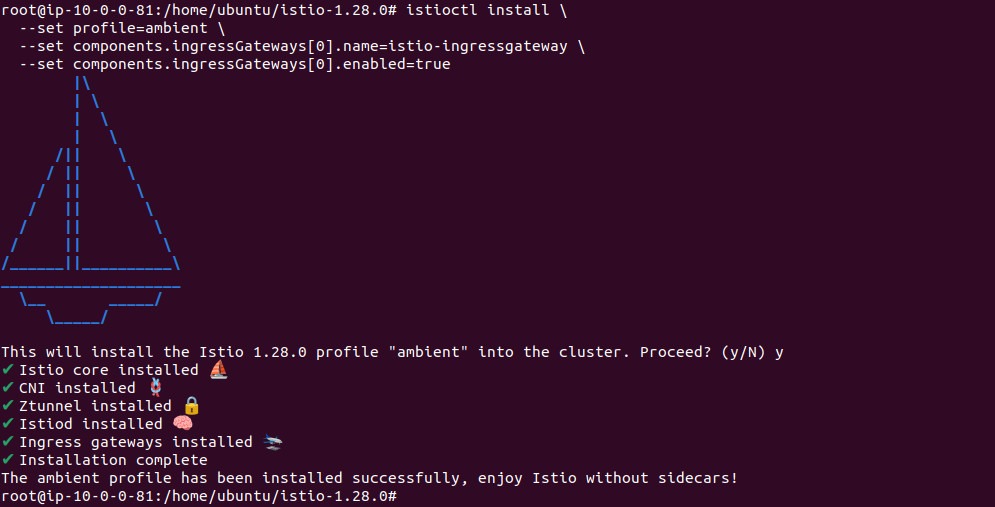
Identify the external IP and ports for the ingress gateway. Set the following environment variables to use in test commands:
export INGRESS_NAME=istio-ingressgateway
export INGRESS_NS=istio-system
export INGRESS_HOST=$(kubectl -n "$INGRESS_NS" get service "$INGRESS_NAME" \
  -o jsonpath='{.status.loadBalancer.ingress[0].ip}')
export INGRESS_PORT=$(kubectl -n "$INGRESS_NS" get service "$INGRESS_NAME" \
  -o jsonpath='{.spec.ports[?(@.name=="http2")].port}')
If the IP is not available and your cluster supports hostnames instead, set INGRESS_HOST using:
export INGRESS_HOST=$(kubectl -n "$INGRESS_NS" get service "$INGRESS_NAME" \
  -o jsonpath='{.status.loadBalancer.ingress[0].hostname}')
Step 5: Test Access to the Service
Use curl to verify that the configured paths are accessible through the gateway. Set the Host header to match the configured hostname:
curl -s -I -HHost:httpbin.example.com “http://$INGRESS_HOST:$INGRESS_PORT/status/200”
You should receive a 200 OK response, indicating the request was successfully routed.

Try accessing an undefined path:
curl -s -I -HHost:httpbin.example.com "http://$INGRESS_HOST:$INGRESS_PORT/headers"This should return a 404 Not Found, since /headers weren’t included in the route rules.

Tutorial #2: Configuring Istio Ingress Gateways to Securely Expose Services
This tutorial demonstrates how to expose services over HTTPS using Istio ingress gateways with TLS and mutual TLS (mTLS). You’ll configure the Istio Gateway and VirtualService resources to support secure access, including using custom TLS certificates and enforcing client authentication.
Step 1: Generate TLS Certificates
Start by creating a root CA and the certificates it signs, all with openssl. A single CA issues everything used in this tutorial: the httpbin and helloworld service certificates, a client certificate for the mutual TLS step, and a renewed httpbin certificate used to demonstrate rotation.
mkdir example_certs1
# Root CA
openssl req -x509 -sha256 -nodes -days 365 \
  -newkey rsa:2048 \
  -subj '/O=example Inc./CN=example.com' \
  -keyout example_certs1/example.com.key \
  -out example_certs1/example.com.crt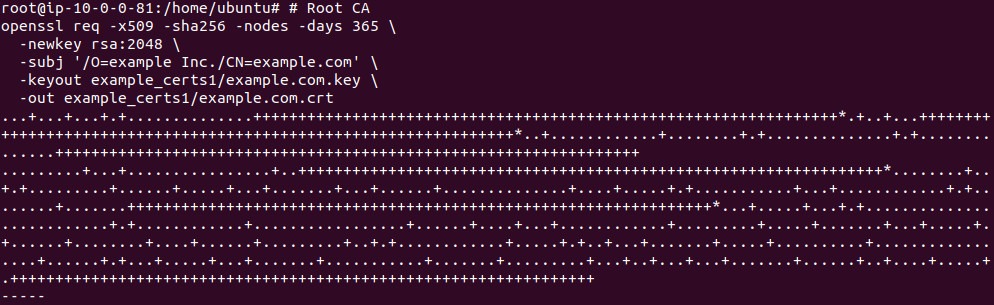
# Service certificate for httpbin.example.com
openssl req -newkey rsa:2048 -nodes \
  -keyout example_certs1/httpbin.example.com.key \
  -out example_certs1/httpbin.example.com.csr \
  -subj "/CN=httpbin.example.com/O=httpbin organization"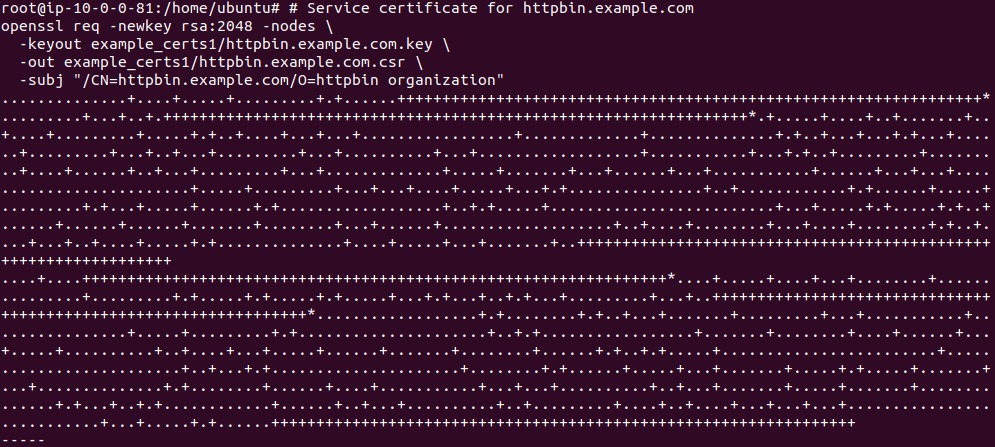
openssl x509 -req -sha256 -days 365 \
  -CA example_certs1/example.com.crt \
  -CAkey example_certs1/example.com.key \
  -set_serial 0 \
  -in example_certs1/httpbin.example.com.csr \
  -out example_certs1/httpbin.example.com.crt
# Client certificate, signed by the same root CA - used in the mutual TLS step
openssl req -newkey rsa:2048 -nodes \
  -keyout example_certs1/client.example.com.key \
  -out example_certs1/client.example.com.csr \
  -subj "/CN=client.example.com/O=client organization"
openssl x509 -req -sha256 -days 365 \
  -CA example_certs1/example.com.crt \
  -CAkey example_certs1/example.com.key \
  -set_serial 1 \
  -in example_certs1/client.example.com.csr \
  -out example_certs1/client.example.com.crt
# Certificate for helloworld.example.com, signed by the same root CA
openssl req -newkey rsa:2048 -nodes \
  -keyout example_certs1/helloworld.example.com.key \
  -out example_certs1/helloworld.example.com.csr \
  -subj "/CN=helloworld.example.com/O=helloworld organization"
openssl x509 -req -sha256 -days 365 \
  -CA example_certs1/example.com.crt \
  -CAkey example_certs1/example.com.key \
  -set_serial 2 \
  -in example_certs1/helloworld.example.com.csr \
  -out example_certs1/helloworld.example.com.crt
Finally, issue a second certificate for httpbin from the same root CA. Step 7 uses it to demonstrate rotation. Only the serial number distinguishes it from the first:
openssl req -newkey rsa:2048 -nodes \
  -keyout example_certs1/httpbin.example.com.renewed.key \
  -out example_certs1/httpbin.example.com.renewed.csr \
  -subj "/CN=httpbin.example.com/O=httpbin organization"
openssl x509 -req -sha256 -days 365 \
  -CA example_certs1/example.com.crt \
  -CAkey example_certs1/example.com.key \
  -set_serial 3 \
  -in example_certs1/httpbin.example.com.renewed.csr \
  -out example_certs1/httpbin.example.com.renewed.crt
Step 2: Deploy the Sample Application
Deploy the sample httpbin service which will serve as the backend.
kubectl apply -f samples/httpbin/httpbin.yamlStep 3: Create TLS Secret
Create a Kubernetes TLS secret containing the service certificate and private key.
kubectl create -n istio-system secret tls httpbin-credential \
  --key=example_certs1/httpbin.example.com.key \
  --cert=example_certs1/httpbin.example.com.crt
Step 4: Configure the Ingress Gateway for HTTPS
Define a Gateway resource that listens on port 443 and uses the TLS certificate stored in the secret.
apiVersion: networking.istio.io/v1
kind: Gateway
metadata:
  name: mygateway
spec:
  selector:
    istio: ingressgateway
  servers:
    - port:
        number: 443
        name: https
        protocol: HTTPS
      tls:
        mode: SIMPLE
        credentialName: httpbin-credential
      hosts:
        - httpbin.example.com
Apply the configuration:
kubectl apply -f mygateway.yaml
Step 5: Configure Routing with VirtualService
Create a VirtualService to route HTTPS traffic to the httpbin service:
apiVersion: networking.istio.io/v1
kind: VirtualService
metadata:
  name: httpbin
spec:
  hosts:
    - httpbin.example.com
  gateways:
    - mygateway
  http:
    - match:
        - uri:
            prefix: /status
        - uri:
            prefix: /delay
      route:
        - destination:
            host: httpbin
            port:
              number: 8000
Apply the resource:
kubectl apply -f httpbin-virtualservice.yaml
Step 6: Send HTTPS Request
Set environment variables to access the ingress gateway:
export INGRESS_NAME=istio-ingressgateway
export INGRESS_NS=istio-system
export INGRESS_HOST=$(kubectl -n "$INGRESS_NS" get svc "$INGRESS_NAME" \
  -o jsonpath='{.status.loadBalancer.ingress[0].ip}')
export SECURE_INGRESS_PORT=$(kubectl -n "$INGRESS_NS" get svc "$INGRESS_NAME" \
  -o jsonpath='{.spec.ports[?(@.name=="https")].port}')
Send a request to the service using HTTPS:
curl -v -HHost:httpbin.example.com \
  --resolve "httpbin.example.com:$SECURE_INGRESS_PORT:$INGRESS_HOST" \
  --cacert example_certs1/example.com.crt \
  "https://httpbin.example.com:$SECURE_INGRESS_PORT/status/418"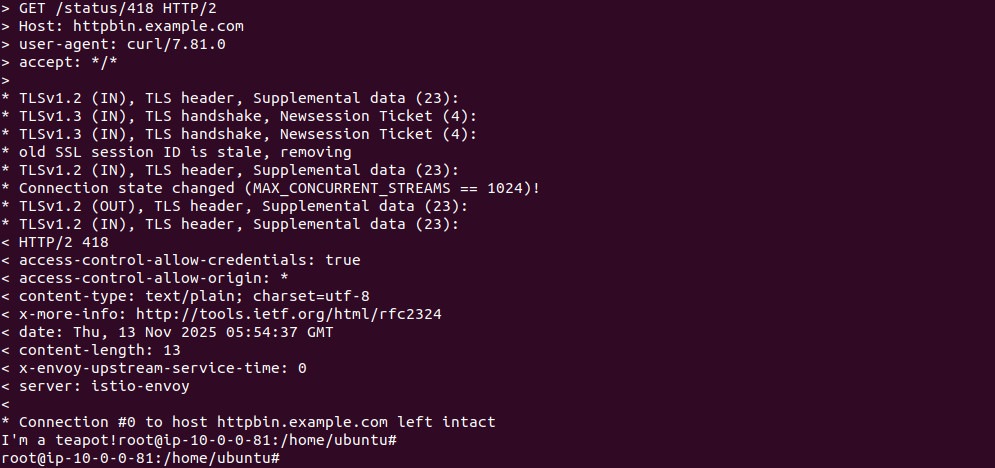
You should see an HTTP 418 “I’m a teapot” response.
Step 7: Switch TLS Certificate at Runtime
To rotate certificates, replace the existing secret:
kubectl -n istio-system delete secret httpbin-credential
kubectl create -n istio-system secret tls httpbin-credential \
  --key=example_certs2/httpbin.example.com.key \
  --cert=example_certs2/httpbin.example.com.crt
Verify that only requests with the new CA certificate succeed:
# Succeeds
curl -v -HHost:httpbin.example.com \
  --resolve "httpbin.example.com:$SECURE_INGRESS_PORT:$INGRESS_HOST" \
  --cacert example_certs2/example.com.crt \
  "https://httpbin.example.com:$SECURE_INGRESS_PORT/status/418"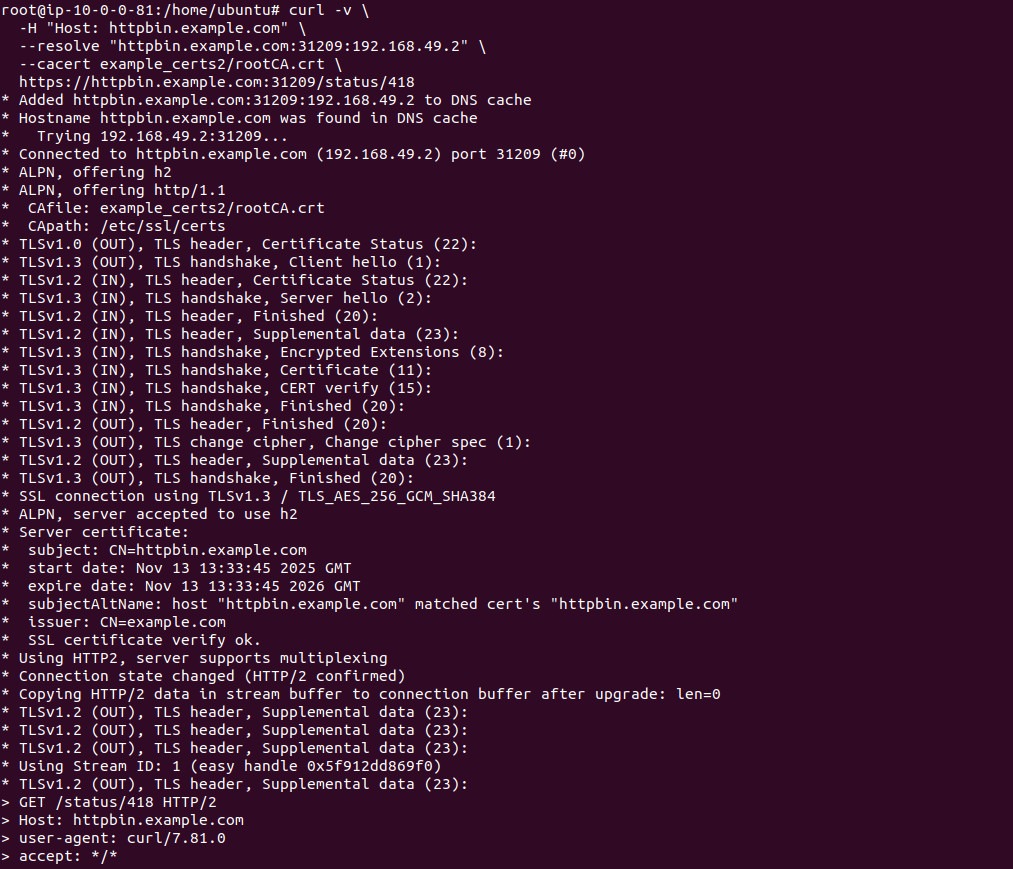
# Fails with old cert
curl -v -HHost:httpbin.example.com \
  --resolve "httpbin.example.com:$SECURE_INGRESS_PORT:$INGRESS_HOST" \
  --cacert example_certs1/example.com.crt \
  "https://httpbin.example.com:$SECURE_INGRESS_PORT/status/418"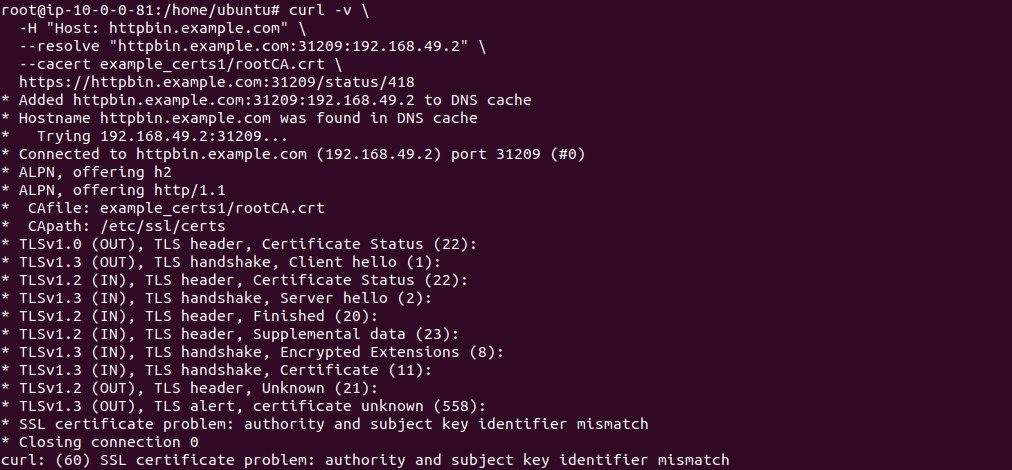
Step 8: Support Multiple Hosts
You can expose multiple services with different TLS credentials using one gateway.
# Create secret for helloworld.example.com
kubectl create -n istio-system secret tls helloworld-credential \
  --key=example_certs2/helloworld.example.com.key \
  --cert=example_certs2/helloworld.example.com.crt
# Deploy helloworld service
kubectl apply -f samples/helloworld/helloworld.yaml -l service=helloworld
kubectl apply -f samples/helloworld/helloworld.yaml -l version=v1
Update your gateway to handle multiple TLS hosts:
apiVersion: networking.istio.io/v1
kind: Gateway
metadata:
  name: mygateway
spec:
  selector:
    istio: ingressgateway
  servers:
    - port:
        number: 443
        name: https-httpbin
        protocol: HTTPS
      tls:
        mode: SIMPLE
        credentialName: httpbin-credential
      hosts:
        - httpbin.example.com
    - port:
        number: 443
        name: https-helloworld
        protocol: HTTPS
      tls:
        mode: SIMPLE
        credentialName: helloworld-credential
      hosts:
        - helloworld.example.com
Store it in mygateway.yaml and apply it using the following command:
kubectl apply -f mygateway.yaml
Configure routing for helloworld:
apiVersion: networking.istio.io/v1
kind: VirtualService
metadata:
  name: helloworld
spec:
  hosts:
    - helloworld.example.com
  gateways:
    - mygateway
  http:
    - match:
        - uri:
            exact: /hello
      route:
        - destination:
            host: helloworld
            port:
              number: 5000
Store the above code in a my-virtualservice.yaml. You can apply it using the following command:
kubectl apply -f my-virtualservice.yaml
Apply both resources and verify:
# Access helloworld
curl -v -HHost:helloworld.example.com \
  --resolve "helloworld.example.com:$SECURE_INGRESS_PORT:$INGRESS_HOST" \
  --cacert example_certs2/example.com.crt \
  "https://helloworld.example.com:$SECURE_INGRESS_PORT/hello"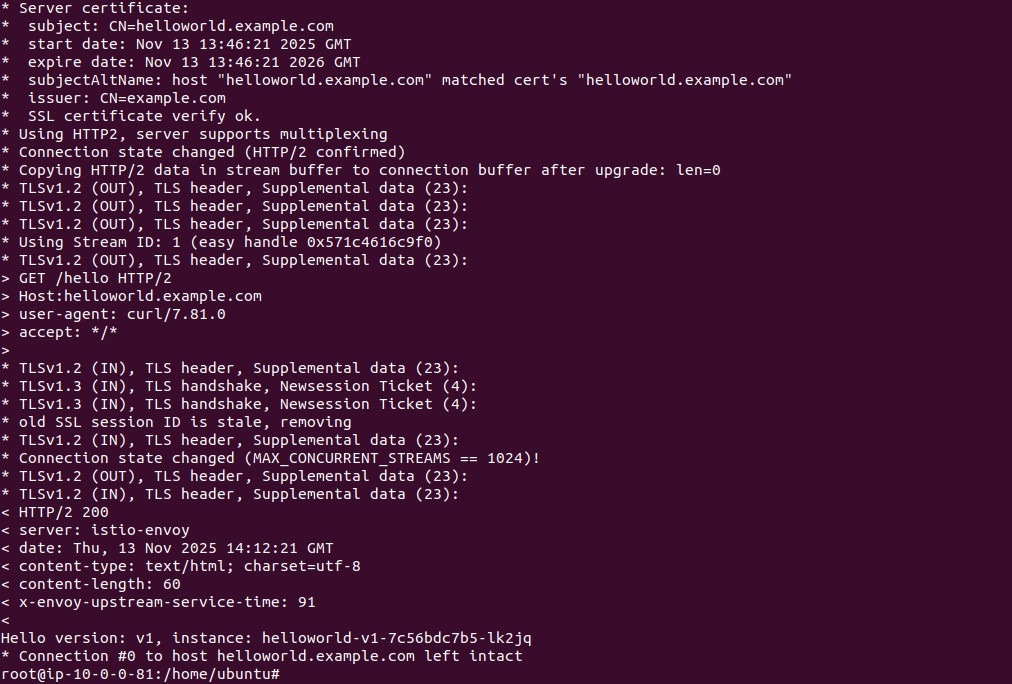
# Access httpbin
curl -v -HHost:httpbin.example.com \
  --resolve "httpbin.example.com:$SECURE_INGRESS_PORT:$INGRESS_HOST" \
  --cacert example_certs2/example.com.crt \
  "https://httpbin.example.com:$SECURE_INGRESS_PORT/status/418"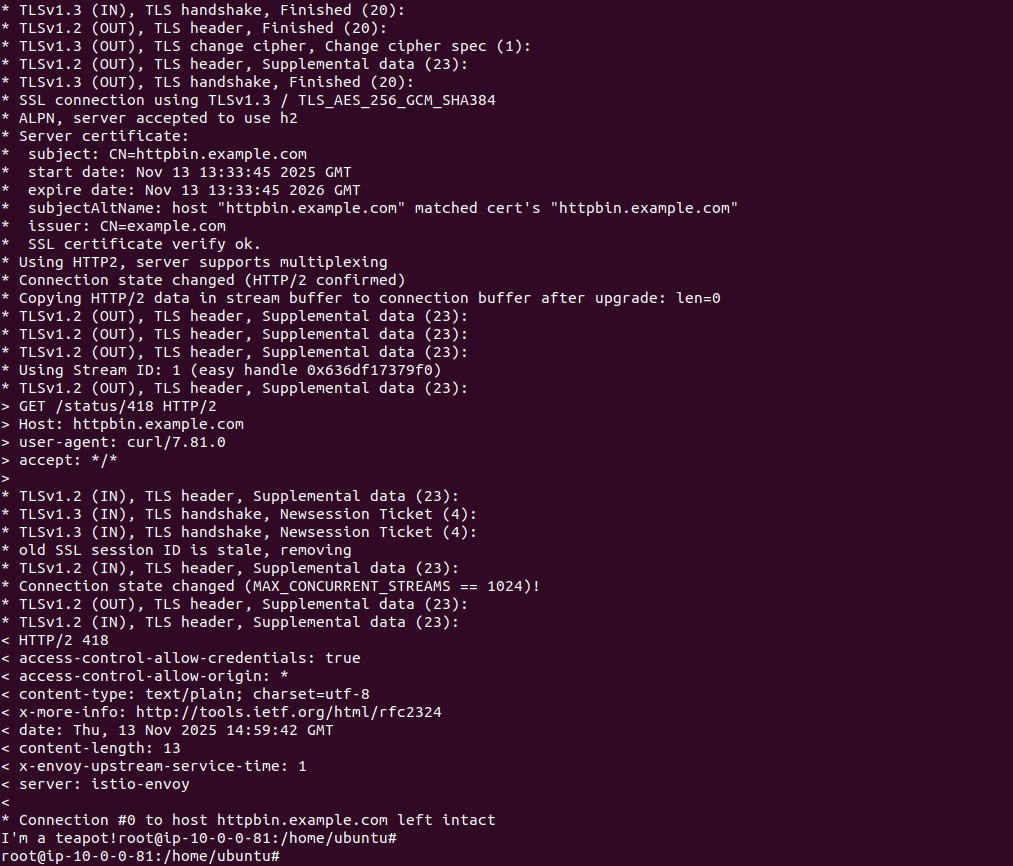
Step 9: Enable Mutual TLS
To enable client authentication, update the TLS secret to include the CA certificate:
kubectl -n istio-system delete secret httpbin-credential
kubectl create -n istio-system secret generic httpbin-credential \
  --from-file=tls.key=example_certs1/httpbin.example.com.key \
  --from-file=tls.crt=example_certs1/httpbin.example.com.crt \
  --from-file=ca.crt=example_certs1/helloworld.example.com.crt
Update the gateway’s TLS mode to MUTUAL:
apiVersion: networking.istio.io/v1
kind: Gateway
metadata:
  name: mygateway
spec:
  selector:
    istio: ingressgateway
  servers:
    - port:
        number: 443
        name: https
        protocol: HTTPS
      tls:
        mode: MUTUAL
        credentialName: httpbin-credential
      hosts:
        - httpbin.example.com
Attempt a request without client cert:
curl -v -HHost:httpbin.example.com \
  --resolve "httpbin.example.com:$SECURE_INGRESS_PORT:$INGRESS_HOST" \
  --cacert example_certs1/example.com.crt \
  "https://httpbin.example.com:$SECURE_INGRESS_PORT/status/418"
This should fail with a certificate error.
Now retry with a valid client certificate:
curl -v -HHost:httpbin.example.com \
  --resolve "httpbin.example.com:$SECURE_INGRESS_PORT:$INGRESS_HOST" \
  --cacert example_certs2/rootCA.crt \
  --cert example_certs2/httpbin.example.com.crt \
 --key example_certs2/httpbin.example.com.key \
  https://httpbin.example.com:31209/status/418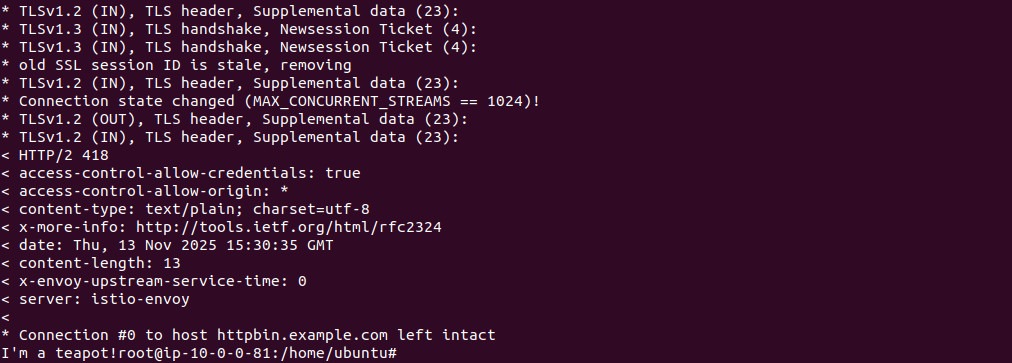
Tutorial #3: Configuring External Service Access with Kubernetes Ingress in Istio
Istio’s recommended direction for new ingress configuration is the Kubernetes Gateway API, but it also supports the older Kubernetes Ingress API for compatibility with existing manifests. This tutorial shows how to expose an internal service such as httpbin to external traffic using a Kubernetes Ingress resource handled by the Istio ingress gateway. Support here is deliberately basic: Istio implements the core Ingress spec without the controller-specific annotations that ingress-nginx users often rely on, so treat this as a migration bridge rather than a destination.
Step 1: Deploy the Sample Application
Deploy the httpbin service to simulate a backend application:
kubectl apply -f samples/httpbin/httpbin.yaml
Step 2: Set Up Environment Variables for Ingress Access
Determine the external IP and ports of the Istio ingress gateway and export them as environment variables:
export INGRESS_NAME=istio-ingressgateway
export INGRESS_NS=istio-system
export INGRESS_HOST=$(kubectl -n "$INGRESS_NS" get service "$INGRESS_NAME" \
  -o jsonpath='{.status.loadBalancer.ingress[0].ip}')
export INGRESS_PORT=$(kubectl -n "$INGRESS_NS" get service "$INGRESS_NAME" \
  -o jsonpath='{.spec.ports[?(@.name=="http2")].port}')
Step 3: Configure the Ingress Resource
Create both an IngressClass and an Ingress resource. The IngressClass tells Kubernetes that Istio should handle ingress traffic.
apiVersion: networking.k8s.io/v1
kind: IngressClass
metadata:
  name: istio
spec:
  controller: istio.io/ingress-controller
---
apiVersion: networking.k8s.io/v1
kind: Ingress
metadata:
  name: ingress
spec:
  ingressClassName: istio
  rules:
  - host: httpbin.example.com
    http:
      paths:
      - path: /status
        pathType: Prefix
        backend:
          service:
            name: httpbin
            port:
              number: 8000
Apply the configuration:
kubectl apply -f httpbin-ingress.yaml
In this setup:
- The ingressClassName: istio ensures that Istio’s ingress controller handles this Ingress.
- The pathType: Prefix means all paths starting with /status will be routed to the httpbin service.
Step 4: Test the Ingress Routing
Use curl to test routing through the Istio-managed Kubernetes Ingress.
curl -s -I -HHost:httpbin.example.com "http://$INGRESS_HOST:$INGRESS_PORT/status/200"Expected response:
HTTP/1.1 200 OK
server: istio-envoy
…
Try accessing a path that hasn’t been defined in the Ingress rules:
curl -s -I -HHost:httpbin.example.com "http://$INGRESS_HOST:$INGRESS_PORT/headers"Expected response:
HTTP/1.1 404 Not Found
This confirms that only the defined path (/status) is routed to the backend service.
This tutorial demonstrates how to expose internal services to the internet using standard Kubernetes Ingress objects within an Istio service mesh. This approach is useful when you are moving existing Ingress manifests onto Istio without rewriting them. For new work, the Gateway API offers more expressive routing and is where Istio’s investment is going. The next section covers that path.
Best Practices for Managing Istio Ingress Gateway
Organizations should keep the following practices in mind when using an Istio Ingress Gateway.
Configuration Best Practices
Keep Gateway Configurations Minimal and Modular
By keeping Gateway configurations minimal, you limit the surface area for errors and unexpected behaviors. Define only the necessary hosts, ports, and protocols for each Gateway. Avoid combining unrelated routing logic or access policies within a single Gateway specification, as this leads to confusion and complicated troubleshooting processes down the line.
Modular configurations also support better team collaboration. Assign ownership of specific Gateway and VirtualService definitions to separate teams or environments. Use namespaces to isolate these resources, ensuring changes in one area do not disrupt another. This structure enables safer rollouts and easier compliance with organizational standards.
Use Separate Gateways for Internal and External Traffic
For security and clarity, always isolate internal and external traffic by creating distinct Gateway resources. External Gateways should be exposed to the public internet with strict TLS and authentication settings, while internal Gateways should only be accessible within the cluster or through private networks. This separation helps apply tailored security settings and reduces the risk of accidental exposure of internal services.
Structuring Gateways in this way also simplifies monitoring and policy enforcement. You can apply differentiated logging, rate limiting, and security measures based on traffic origin. Operators can quickly identify and react to misconfigurations or threats, as the paths for incoming and intra-mesh traffic are clearly delineated, minimizing the blast radius of potential incidents.
Security Best Practices
Secure All Entry Points with mTLS Segmentation
Mutual TLS (mTLS) provides strong, cryptographic verification of both clients and servers, eliminating unauthorized access through spoofed identities or man-in-the-middle attacks. Enable mTLS on all Ingress Gateway entry points by configuring PeerAuthentication and DestinationRule resources. This ensures all connections between clients and services are encrypted and authenticated, even when traversing untrusted networks.
Enforcing mTLS at the gateway not only strengthens perimeter defenses but also facilitates uniform traffic encryption within the service mesh. Clients that fail to present trusted certificates are denied access, and the system logs all failed attempts. This approach is essential for regulatory compliance and meeting enterprise security requirements.
Control Egress Traffic to Reduce Risk
While Istio primarily focuses on managing ingress traffic, controlling egress is equally important to prevent unauthorized access to external services and data exfiltration. Use EgressGateway configurations to explicitly define and monitor which external services workloads can access. This allows for policy enforcement and traffic auditing for outbound connections.
Apply ServiceEntry resources to whitelist approved domains or IP ranges, and configure DestinationRule policies to enforce TLS where applicable. Combine this with AuthorizationPolicy rules to restrict egress based on service identity, namespace, or request metadata. Avoid allowing unrestricted access to the internet, as this can introduce security gaps and hinder incident response efforts.
Automation and Validation Best Practices
Automate Validation and Testing of Ingress Rules
Manual configuration of gateways and ingress rules is prone to errors, especially in complex environments. To address this, implement automated validation using CI/CD pipelines that lint and verify YAML manifests before they are applied. Tools like kubeval or istioctl analyze submitted configurations for common mistakes and policy violations, reducing deployment failures and downtime.
Automated tests should also be conducted post-deployment to confirm ingress rules function as intended. Use synthetic monitoring and integration tests that simulate real user traffic against published endpoints. Automating both validation and testing helps teams catch misconfigurations early, maintaining a more stable and predictable ingress layer.
Regularly Audit Configurations and Maintain Granular Visibility Over Policy Enforcement
Over time, Istio configurations can become stale, inconsistent, or misaligned with organizational policies. Regular audits help ensure that gateways, virtual services, and policies remain accurate, secure, and aligned with evolving business needs. Use tools like istioctl analyze or custom scripts to detect misconfigurations, deprecated fields, or unused resources.
Enable detailed logging and telemetry at the gateway and mesh level. Use observability tools such as Prometheus, Grafana, and Kiali to visualize policy enforcement, track anomalies, and ensure that rate limits, authentication, and routing rules are working as intended. Fine-grained metrics also support proactive capacity planning and threat detection.
Edge Protection Best Practices
Integrate Advanced API Protection (WAF, DDoS Prevention) at the Edge
Standard Ingress Gateway configurations are not sufficient to block sophisticated threats such as API abuse, bot traffic, or distributed denial-of-service (DDoS) attacks. To protect against these, deploy a web application firewall (WAF) in front of the Istio Ingress Gateway or integrate WAF rules directly through service mesh proxies where supported.
For high-traffic environments, consider placing the Istio Gateway behind a cloud-based DDoS mitigation service or a Layer 7 load balancer with built-in protection features. Use rate limiting policies and anomaly detection to throttle abusive patterns before they reach backend services.
API gateways and service mesh filters can also inspect payloads for threat signatures or enforce schema validation.
Why Calico Complements Istio for Complete Kubernetes Networking
While an Istio Ingress Gateway provides robust Layer 7 control at the edge, a truly production-grade microservices architecture requires a security posture that extends deep into the networking layer. This is where Calico provides the critical foundation that Istio needs to deliver a complete, zero-trust environment.
Bridging the Gap Between Layer 3 and Layer 7
Istio excels at application-level traffic management, but it relies on the underlying Container Network Interface (CNI) to handle the actual plumbing of the cluster. Calico complements Istio by providing:
- Unified Policy Enforcement: Calico allows you to define security policies that span from the network layer (IPs and ports) to the service level (identities and paths). This “defense-in-depth” approach ensures that even if a high-level proxy is bypassed, your north-south and east-west traffic remains protected by kernel-level enforcement.
- High-Performance Load Balancing: While Istio handles application-level load balancing, Calico optimizes the data plane using eBPF. This ensures that packets reach the Istio Ingress Gateway with minimum latency and maximum throughput, reducing the “sidecar tax” often associated with service meshes.
- Istio Ambient Mode Support: As discussed in our tutorials, managing sidecars can be complex. Calico is uniquely designed to support Istio Ambient Mode, providing a sidecarless experience that simplifies operational overhead while maintaining the granular security Istio is known for.
- Advanced Egress Control: Istio manages service-to-service communication, but Calico provides the DNS-based policy enforcement needed to secure traffic leaving the cluster to external APIs or legacy databases, preventing data exfiltration at the source.
Full-Stack Observability
By combining Calico with Istio, platform teams gain a “single pane of glass” for troubleshooting. While Istio provides traces and application metrics, Calico provides the flow logs and raw network data needed to identify if a performance bottleneck is occurring at the application code level or within the Kubernetes network fabric itself.
Next Steps & Deep Dives
To learn more about optimizing your Istio and Calico environment, explore these resources:
- Sidecarless Efficiency: Read An In-Depth Look at Istio Ambient Mode with Calico to see how to run a mesh without the overhead.
- Security Architecture: Explore our guide on Service Mesh with eBPF to understand how the underlying data plane impacts your security.



