







What Is the Istio Dashboard?
The Istio dashboard is a visualization and monitoring interface that provides insights into service mesh operations. Built on data collected from Istio’s control and data planes, it consolidates telemetry such as request rates, success/failure rates, and latency distributions into interactive graphs and tables. A centralized dashboard helps operators understand application health, performance, and security within the service mesh.
Dashboards for Istio are commonly implemented using platforms like Grafana and Kiali. Grafana focuses on metrics aggregation and visualization, while Kiali offers a near real-time view of application topologies and traffic flows. Together, these dashboards assist teams in troubleshooting, capacity planning, incident detection, and policy enforcement by turning raw telemetry into actionable data.
In this article:
- Use Cases of Istio Dashboards
- Essential Istio Dashboard Metrics
- Understanding the Default Istio Grafana Dashboards
- Visualizing Your Istio Mesh with Kiali
- Best Practices for Managing Istio Dashboards
- Limitations of Using Istio Dashboards Without a Full Observability Solution
Use Cases of Istio Dashboards
Security and Compliance Monitoring
Istio dashboards enable security and compliance monitoring. By visualizing mutual TLS status, authorization policy enforcement, and rate limits, platform teams can ensure that east-west traffic adheres to organizational security standards. The dashboards highlight anomalies such as unauthorized access attempts and suspicious spikes in request failures, making it easier to trigger alerts or automate responses for incident handling.
These visualizations are also vital for compliance requirements. The dashboards can show audit trails of service-to-service communications and integrate custom labels or logs for regulatory audits. Security and compliance teams benefit from quick access to usage patterns and exception reporting, supporting audits for frameworks like PCI DSS, HIPAA, and GDPR.
Troubleshooting
Dashboards accelerate troubleshooting by centralizing views of key metrics like error rates, response times, and traffic bottlenecks. When incidents occur, operators can quickly identify problematic services and trace failing requests through the mesh. Time-series visualizations of relevant metrics enable rapid root cause analysis, reducing mean time to resolution for operational problems.
Visual correlation across metrics, logs, and topology maps helps engineers pinpoint cascading failures and misconfigurations. By layering network, application, and protocol insights, Istio dashboards allow teams to perform targeted investigations.
Capacity Planning and Scaling
Effective capacity planning depends on the clear presentation of workload patterns across services. Istio dashboards visualize resource consumption, request rates, and saturation points, offering the data necessary for scaling decisions. Consistent monitoring highlights trends such as load growth, sudden spikes, or resource contention, prompting teams to expand infrastructure before bottlenecks impact customers.
Dashboards also enable the evaluation of autoscaling policies within the service mesh. By tracking horizontal and vertical scaling metrics alongside contextual information (like CPU, memory, and network utilization), operators can refine scaling thresholds.
Application Observability and SLO Monitoring
Istio dashboards support comprehensive application observability by visualizing key indicators tied to service health, behavior, and performance. This includes real-time data on request paths, service dependencies, latency, and error responses, allowing teams to trace how requests propagate and where they fail.
Service level objectives (SLOs) rely on consistent measurement of metrics such as availability, latency thresholds, and error budgets. Dashboards enable continuous SLO monitoring by surfacing relevant metrics in aligned formats—e.g., burn rate graphs, uptime gauges, and latency heatmaps. Engineers can define alerting thresholds based on these visualizations or use observability tools like Kiali to enrich Istio dashboards with topological views of services.
Essential Istio Dashboard Metrics
1. Request Volume and Traffic Patterns
A foundational metric shown on Istio dashboards is request volume, which enables teams to track service throughput over time. Visualizing request patterns across different endpoints, clusters, or namespaces uncovers usage trends and highlights abnormal surges or drops. By presenting request data with granular labels (e.g., HTTP routes, methods), dashboards support in-depth analysis and accurate forecasting.
These visualizations aid in capacity planning and anomaly detection. Sudden changes in traffic patterns, like flash crowd events or drops caused by configuration errors, can be quickly identified, enabling operators to react before end-user disruption occurs. Trending data supports long-term planning and automated scaling strategies.
2. Latency and Duration Distributions
Monitoring application latency at both service and cluster levels is vital for user experience and SLA compliance. Istio dashboards display latency percentiles (such as P50, P95, and P99), showing how quickly requests are processed and identifying outliers. Duration histograms and cumulative distribution graphs reveal performance bottlenecks and service degradation.
Analyzing latency distributions over time enables proactive optimization. Persistent increases or sudden spikes may point to infrastructure problems, network issues, or application regressions. Consistent visibility into these metrics equips teams to address latency-sensitive workloads.
3. Error Rates and 5xx Upstream Failures
Tracking error rates, specifically HTTP 4xx and 5xx response codes, gives immediate feedback on application health. Istio dashboards provide breakdowns of failed requests by type and origin, offering fast identification of misbehaving services. High 5xx rates indicate upstream failures or crashing dependencies, while a spike in 4xx errors often points to bad requests or client-side issues.
When error rates increase, dashboard visualizations highlight affected services and the flow of failed requests through the mesh. This contextual awareness is key for rapid triage, root cause analysis, and ensuring reliability standards are maintained across distributed systems.
4. TCP Connection Behavior and Network Metrics
Beyond HTTP traffic, dashboards also present TCP-level metrics such as connection counts, durations, and byte throughput. Granular data on network-level connections supports the visibility of protocols and workloads not based on HTTP/REST. This is essential for operators overseeing gRPC, database, or legacy protocols traversing the mesh.
TCP metric visualizations help detect network saturation, dropped connections, or protocol misconfigurations. They are invaluable for diagnosing infrastructure-level issues affecting service availability and identifying network patterns that may impact system reliability.
5. Destination Service Request Totals
Aggregating request totals per destination service is crucial for understanding dependency relationships and distributed application load. Dashboards break down traffic by destination, namespace, or workload, exposing hotspots and under-utilized services within the mesh.
This information guides resource allocation, scaling policy adjustments, and capacity investments. Operators also use these totals to spot dependency drift or changes in traffic that might indicate evolving application behavior, configuration errors, or the onset of incidents.
6. Envoy Proxy Metrics (L7 Metrics Origin)
The underlying source for Istio’s telemetry is the Envoy proxy, which intercepts and measures traffic at the application (Layer 7) level. Istio dashboards surface these L7 metrics, collected from Envoy sidecars, offering fine-grained visibility into HTTP, gRPC, and TCP traffic.
These metrics include detailed request and response data such as headers, response codes, route matches, and retry counts. Because Envoy operates inline with service traffic, it provides accurate timing and routing data for every request, making it the foundation for metrics like latency percentiles, request volumes, and error distributions.
7. L3/L4 Network Health Metrics
While Istio dashboards offer detailed visibility into Layer 7 traffic and mesh-specific behaviors, they do not natively surface Layer 3/4 networking metrics outside the mesh. This includes critical information such as pod-to-pod connectivity, DNS resolution issues, IP routing failures, and dropped packets at the network level.
Operators often need metrics like packet loss, interface errors, connection tracking failures, and IP-level latency to troubleshoot infrastructure issues that fall below the application layer. These are especially relevant when diagnosing problems involving kube-proxy, CNI plugins, or cluster-wide network policies. Because Istio assumes a functioning network, it cannot detect or visualize issues such as pod sandboxing failures, ARP conflicts, or node-level congestion.
Tips from the Expert
In my experience, here are tips that can help you better leverage and secure your Istio dashboard ecosystem:
Correlate service health with policy enforcement metrics:
Extend dashboards to correlate error rates and latency spikes with policy evaluations (e.g., AuthorizationPolicy decisions, mTLS negotiation failures). This helps isolate whether issues stem from network problems or from misconfigured security rules.
Visualize egress traffic visibility gaps:
Standard dashboards often lack visibility into traffic leaving the mesh. Use Grafana panels to chart egress gateway traffic alongside direct pod-to-internet flows (from node-level telemetry or eBPF tools), exposing unauthorized or unintended paths.
Integrate configuration drift visualizations:
Augment dashboards with panels tracking deviations between live Istio config (e.g., VirtualService, Gateway) and GitOps source-of-truth. Use tools like Argo CD or Flux with Grafana plugins to show drift trends and reduce misconfiguration incidents.
Highlight noisy neighbors in shared environments:
Build panels that detect when one workload (based on cluster or namespace tags) is causing a disproportionate share of errors or resource usage. This helps enforce service SLOs and provides evidence for tenant isolation improvements.
Create per-policy dashboards for Authorization and Rate Limiting:
Break out dashboards by policy rather than service. For example, visualize the hit rate, deny rate, and audit logs per AuthorizationPolicy or EnvoyFilter rate-limiting config. This allows fine-grained tuning of enforcement boundaries.

Understanding the Default Istio Grafana Dashboards
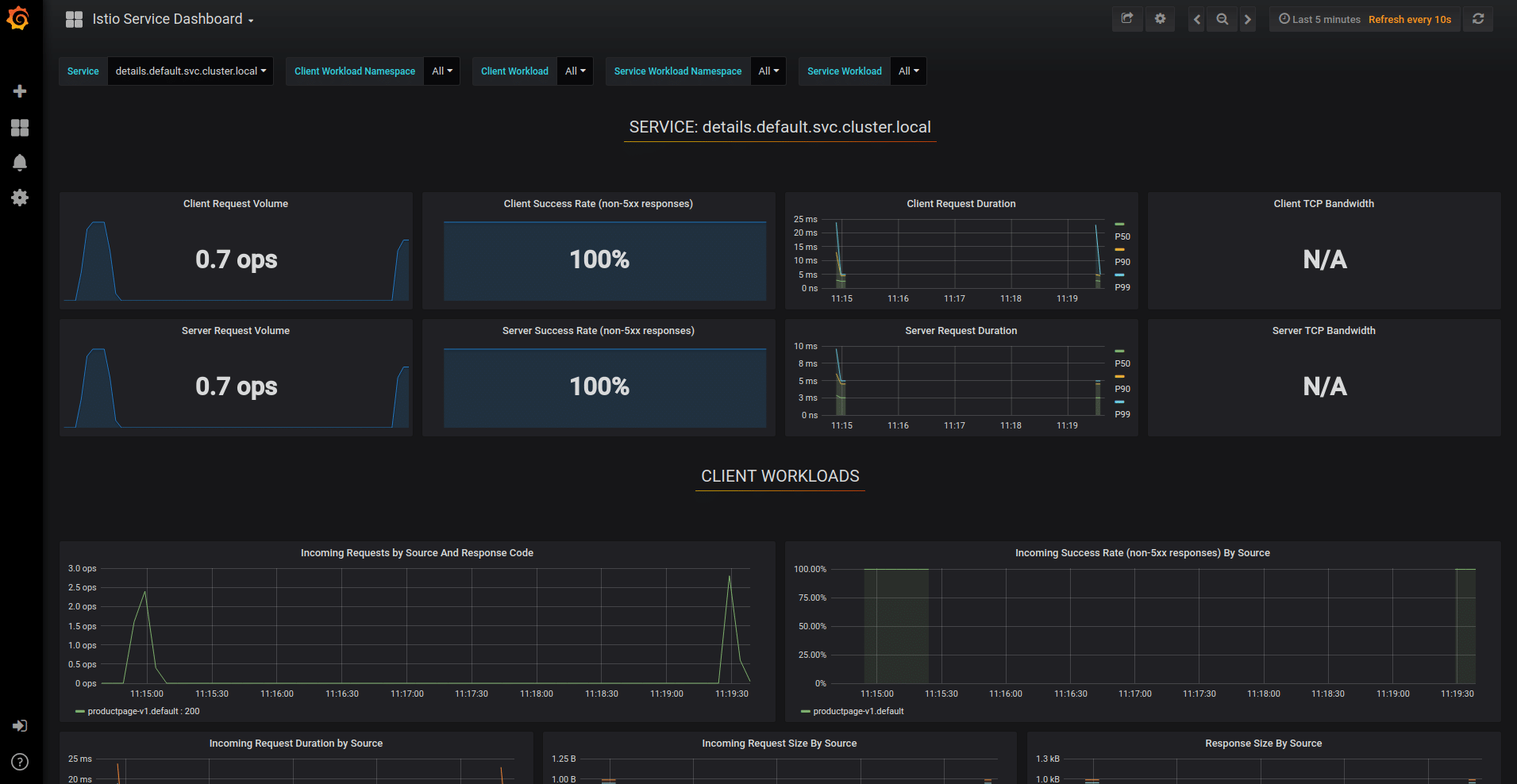
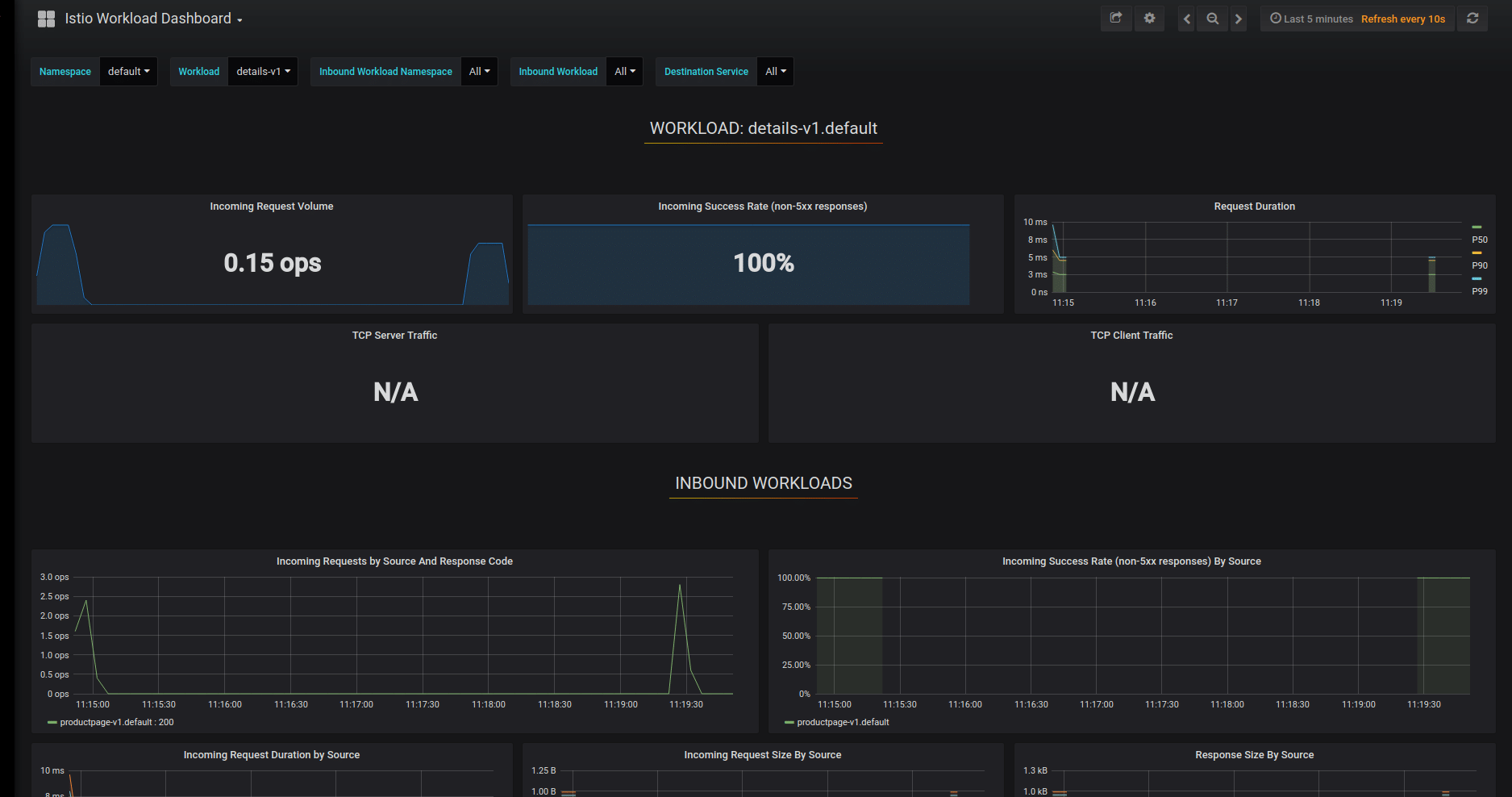
The default Istio Grafana dashboards provide a structured, visual overview of the service mesh’s operation, built on telemetry collected by Prometheus. These dashboards are organized into three primary views: mesh-wide summary, service-specific metrics, and workload-specific insights. Together, they help operators monitor traffic, performance, and network behavior across different levels of the mesh.
Mesh Summary View
The mesh summary view gives a high-level perspective of the entire service mesh. It displays metrics across all HTTP/gRPC and TCP workloads, including traffic volumes, success and error rates, and protocol-specific behaviors. This global overview is useful for identifying widespread issues or confirming overall system health.
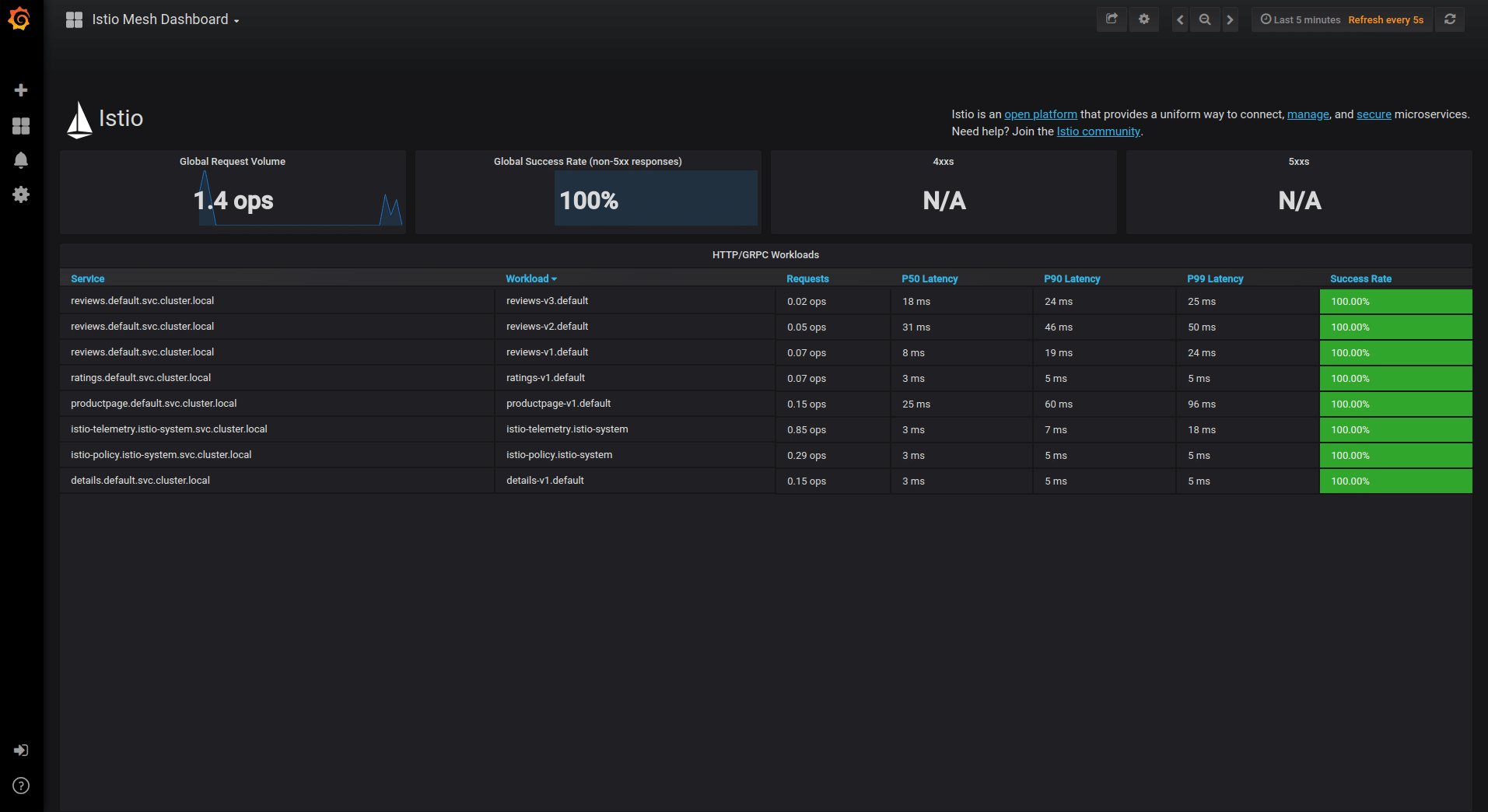
Source for this and the following images: Istio
Service Dashboard
The Istio service dashboard presents metrics for individual services, such as request rates, error codes, and response times. It also shows data for related workloads: both clients calling the service and workloads providing the service. Users can select a service from the dashboard’s dropdown menu to drill down into performance and interaction patterns, aiding in service-level monitoring and debugging.
Workload Dashboard
The workload dashboard focuses on individual workloads and their communication patterns. It breaks down inbound traffic from calling workloads and outbound traffic to dependent services. This view is especially useful for tracing traffic paths, understanding workload behavior, and isolating problems at the workload level.
These dashboards become meaningful after generating traffic through the mesh. For example, with the Bookinfo sample application, users can simulate real-world usage by sending requests to the productpage endpoint. As data flows into Prometheus, the dashboards update in near real time, enabling visual exploration of traffic patterns and performance characteristics.
Operators can access these dashboards through the Grafana UI by running istioctl dashboard grafana, which launches the interface locally. From there, navigating to different dashboards provides focused views for system-wide status, individual services, and workloads.
Visualizing Your Istio Mesh with Kiali
Kiali provides a graphical interface to observe and manage the Istio service mesh. Once installed and launched using istioctl dashboard kiali, users are presented with an overview page showing all namespaces that have services within the mesh. This offers a high-level entry point for understanding traffic distribution, health status, and configuration issues across environments.
How Kiali Lets You Visualize Istio Data
To explore traffic flow within a namespace, users can generate a real-time service graph. This graph is based on telemetry collected by Istio and visually represents interactions between workloads and services. Selecting any node or edge in the graph reveals detailed metrics in a sidebar, including request rates, error percentages, and latency.
Kiali supports multiple graph views to match different analysis needs:
- App graph: Aggregates all versions of an app into a single node, simplifying the view for service-level monitoring.
- Versioned app graph: Displays each version of an app as separate nodes grouped under the same app, useful for version-based traffic routing analysis.
- Workload graph: Shows a node per workload, regardless of labels, providing a direct view of raw deployment topology.
- Service graph: Focuses on service-level traffic patterns, offering a simplified view of how services interact.
Kiali also helps manage advanced routing scenarios like traffic shifting. Using the built-in wizard, operators can define precise percentages of traffic distribution between workloads (e.g., routing 90% of traffic to ratings-v2 and 10% to ratings-v1). This feature automatically generates and applies the corresponding Istio configuration, which can then be validated and visualized in the updated graph.
Validation of Istio Configurations
Kiali flags configuration errors and warnings directly in the UI, helping users detect and fix issues such as incorrect port naming or invalid virtual service references. Problematic resources are marked with error icons, and users can inspect detailed validation messages by hovering over these indicators.
For hands-on YAML editing, Kiali includes a built-in editor that highlights validation issues inline. This allows operators to troubleshoot and correct misconfigurations directly through the UI, with instant feedback.
Kiali’s Strengths and Limitations
Kiali excels at visualizing service mesh behavior and Envoy-provided telemetry. Its topology graphs are effective for understanding real-time service interactions, traffic flows, and application-level metrics within the mesh. Operators can drill down into Envoy-level stats such as request rates, HTTP response codes, and latency distributions, which are critical for observing L7 traffic and debugging mesh configuration.
The tool also simplifies the management of Istio routing features like canary deployments and traffic mirroring. Through wizards and visual aids, Kiali reduces the complexity of creating Istio resources and provides immediate validation to catch common errors.
However, Kiali is limited to what Istio can observe. It does not offer visibility into cluster-level networking or L3/L4 data plane activity outside the mesh. For example, it cannot show pod-to-pod connectivity problems, DNS resolution failures, or visualize network policies enforced at the Kubernetes level.
There is also no native support for eBPF-based data plane introspection, which means operators lack visibility into low-level flow events or node-level congestion outside the service mesh.
Best Practices for Managing Istio Dashboards
Organizations should keep the following practices in mind when working with dashboards in Istio.
1. Standardize Panel Naming and Layouts
Consistent naming conventions and standardized layouts are critical for readable, navigable dashboards. Each panel should have a clear, descriptive title, and layouts should group related metrics together. This reduces confusion, shortens onboarding for new team members, and ensures dashboards scale with growing infrastructure.
Standardization enables easier automation and dashboard version control. By establishing guidelines for naming, grouping, and layout, teams can automate the deployment of dashboards across environments and avoid misalignment during upgrades or incidents.
2. Validate Prometheus Retention and Cardinality Limits
Istio dashboards rely on Prometheus as the metrics backend, so it is crucial to validate storage retention policies and cardinality constraints. Retention defines how long historical data is available for analysis, while high cardinality in labels increases storage needs and query load. Regular reviews prevent queries from becoming slow or losing valuable historical context.
Configuring Prometheus carefully helps avoid out-of-memory failures or degraded performance. Dashboards should be tuned to surface low-cardinality, high-value metrics and avoid overloading panels with excessive label dimensions that complicate analysis and increase infrastructure costs.
3. Use Templating to Support Multiple Clusters
Supporting multiple clusters with unified dashboards requires robust templating. Istio dashboards can leverage Grafana’s variables and template features to allow operators to switch contexts seamlessly. Templating enables single dashboards to display data from different clusters, namespaces, or environments with simple dropdown selectors.
This approach simplifies fleet management, troubleshooting, and compliance review across organizational boundaries. With effective templating, teams avoid dashboard sprawl, maintain a single source of truth, and ensure a consistent user experience regardless of deployment topology.
4. Regularly Review and Tune Configurations
Dashboard panels, queries, and threshold settings should be revisited periodically. As the mesh evolves, application traffic, error patterns, and scaling requirements shift. Regular reviews ensure dashboards remain aligned with operational needs and performance expectations. Outdated configurations can cause missed incidents or alert fatigue.
Tuning also includes refining visualization parameters, thresholds, and alert conditions. These adjustments help dashboards remain performant and actionable. Automation can be employed to flag drifting metrics or alert definitions that fall out of tune as environments change.
5. Implement Access Control and Audit for Observability Tools
Securing dashboard access is a necessity, particularly in regulated or multi-tenant environments. Integrating dashboard platforms with enterprise authentication (LDAP, SSO, OIDC) ensures that only authorized users can view or modify sensitive data. Role-based access controls (RBAC) restrict editing and data export to trusted roles.
In addition, auditing access to dashboards and observability data is important for compliance and forensics. Logging dashboard logins, configuration changes, and query executions creates an auditable trail. This helps organizations monitor for suspicious activity, enforce least-privilege access, and meet regulatory requirements for data access transparency.
6. Align Mesh Dashboards with Network-Level Dashboards for Cross-Layer Observability
Service mesh dashboards provide detailed visibility into application-layer traffic, but they do not capture issues rooted in the underlying network stack. To achieve full observability, teams should integrate Istio dashboards with dashboards covering L3/L4 infrastructure metrics. This alignment enables correlation between service-level anomalies and network-level root causes.
For example, a spike in 5xx errors in Istio may coincide with dropped TCP connections, DNS failures, or CNI plugin issues visible only at the network layer. Teams should standardize labeling (e.g., namespace, workload, node) across mesh and network dashboards to support unified filtering and correlation.
Limitations of Using Istio Dashboards Without a Full Observability Solution
Istio dashboards provide strong visibility into service-to-service communication within the mesh, but they are inherently limited to data that Istio, and by extension, Envoy, can observe. These dashboards do not capture events or conditions outside the mesh, which creates blind spots in several operational areas:
- Istio dashboards do not show L3/L4 network-level issues such as IP packet drops, DNS resolution failures, or routing anomalies. Problems originating from the host network, CNI plugin, or kube-proxy layer will go undetected. As a result, debugging connectivity issues that fall outside Envoy’s path requires separate tooling.
- Istio telemetry is generated only for workloads participating in the mesh. Any traffic involving non-mesh services, external APIs, or system components without sidecars will be invisible in Istio-based dashboards. This partial coverage can obscure dependencies or bottlenecks in hybrid environments.
- Istio dashboards lack native support for eBPF-based insights, kernel-level performance data, and node-level metrics. This makes it hard to detect infrastructure-related latency, CPU throttling, or file system I/O issues that impact application behavior but are not visible at the application or proxy layer.
- Istio dashboards are not a replacement for security observability tools. They provide basic insights into mTLS and policy enforcement but do not expose full network policy flows, lateral movement attempts, or container-level threat activity.
To address these limitations, organizations often combine Istio dashboards with other observability and security platforms that provide node, network, and runtime-level visibility.
Full-Stack L3-L7 Observability for Istio Environments with Calico
Calico’s integration with Istio Ambient Mode pairs the sidecarless mesh data plane — a per-node zTunnel proxy for L4 identity and mTLS, and an optional per-namespace Waypoint proxy for L7 routing and authorization — with Calico’s existing network policy enforcement and flow telemetry. A modified zTunnel preserves the original destination port so existing Kubernetes and Calico policies continue to work without rewrites, and L7 telemetry from the Waypoint proxy can be correlated with Calico’s L3/L4 flow logs for end-to-end visibility across the stack.
Specifically, this combined model provides:
- Mesh-wide mTLS by default, with automatic certificate issuance and rotation, and identity bound to the workload rather than to transient pod IPs.
- Policy compatibility without rewrites, since the modified zTunnel preserves the original destination port so existing Kubernetes NetworkPolicy and Calico GlobalNetworkPolicy resources continue to enforce on the real application port.
- Layered L4 and L7 enforcement, combining Calico L3/L4 policy with Istio AuthorizationPolicy rules that can match on workload identity, HTTP method and path, headers, and JWT claims at the Waypoint proxy.
- L7 traffic control including canary rollouts, A/B testing, blue/green cutovers, traffic mirroring, retries, timeouts, circuit breakers, and outlier detection.
- Unified L4 + L7 observability, with OpenTelemetry-based metrics, traces, and logs from the Waypoint proxy correlated with Calico’s flow data to expose request paths, mTLS status per hop, latency distributions, and authorization denials.
- Operator-managed lifecycle, where mesh components are installed, upgraded, and patched through the Tigera Operator, and namespaces are onboarded with a single label rather than sidecar injection.
Next steps:
- Sidecarless Mesh: Read An In-Depth Look at Istio Ambient Mode with Calico to learn how to eliminate the sidecar tax.
- Innovation at the Edge: Check out the Tigera News from KubeCon 2025 to see how Calico is simplifying service mesh troubleshooting.
- eBPF Integration: Discover how Service Mesh with eBPF provides a more secure and performant data plane for your microservices.



