TL;DR: VMware migration tools move virtual machines, applications, and data off VMware to other platforms. Best for Kubernetes networking and security: Calico; for OpenShift VMs: Red Hat; for a VMware-style private cloud: Platform9; for AWS rehosting: AWS Transform MGN.
What Are VMware Migration Tools?
VMware migration tools are specialized software solutions that support the transition of workloads, data, and applications from VMware environments to alternative platforms or infrastructure. These tools automate and streamline the process of moving virtual machines, applications, configurations, and other assets, minimizing downtime and reducing the complexity involved in large-scale migrations.
By handling intricate dependencies and providing robust orchestration, VMware migration tools enable organizations to shift their IT assets with greater confidence and predictability. The core functionality of these tools often includes discovery, assessment, planning, and execution phases. They can analyze existing VMware deployments, map dependencies, and recommend optimal migration strategies.
Additionally, most migration tools provide monitoring, error handling, and rollback capabilities to ensure data integrity and business continuity. As organizations pursue digital transformation, VMware migration tools have become essential for IT teams seeking to modernize infrastructure, reduce costs, or adopt new cloud-native technologies.
In this article:
- VMware Migration Tools at a Glance
- Why Are Organizations Migrating VMware Workloads?
- What Can VMware Migration Tools Move?
- Common VMware Migration Destinations
- Notable VMware Migration Tools
VMware Migration Tools at a Glance
The table below summarizes the key differences between the tools covered in this article. We explore each of them in more detail in the sections that follow.
| Category | Solution | Best For | Key Strengths | Things to Consider |
| Kubernetes and Container Platform Migration | Calico (Tigera) | Securing and connecting workloads moved onto Kubernetes | Consistent policy across containers, VMs, and bare metal; NSX alternative | Policy design assumes Kubernetes and networking knowledge |
| Kubernetes and Container Platform Migration | Red Hat OpenShift Virtualization | Running migrated VMs alongside containers on OpenShift | Unified VM and container platform with a migration toolkit | Setup and administration carry a steep learning curve |
| Kubernetes and Container Platform Migration | Platform9 vJailbreak | Automated migration off VMware to a private cloud | In-place cluster conversion that reuses existing hardware | Some configuration and interface areas still maturing |
| Cloud and Hypervisor Migration | AWS Transform MGN | Lift-and-shift rehosting of servers to Amazon EC2 | Automated block-level replication with minimal downtime | Rehosting to AWS only, not for refactoring |
| Cloud and Hypervisor Migration | Microsoft Azure Migrate | Assessing and migrating on-premises workloads to Azure | Unified discovery, assessment, and migration in one portal | Oriented toward Azure as the destination |
| Cloud and Hypervisor Migration | Google Migrate to Virtual Machines | Migrating VMs to Google Cloud Compute Engine | Agentless replication with test clones before cutover | Targets Google Cloud Compute Engine only |
| Cloud and Hypervisor Migration | VMware HCX | Large-scale workload mobility across VMware environments | Zero-downtime bulk and live migration with network extension | Non-vSphere and public cloud sources are limited |
| Cloud and Hypervisor Migration | Nutanix Move | Migrating VMs to Nutanix AHV without refactoring | Automated, low-downtime migration with network mapping | Migrates into Nutanix, not back out to other hypervisors |
Why Are Organizations Migrating VMware Workloads?
Changes Following the Broadcom Acquisition
The acquisition of VMware by Broadcom has introduced changes in licensing, support, and product strategy. Many organizations have reported increased licensing costs and uncertainty regarding the future direction of VMware’s product portfolio. This shift has prompted IT leaders to reevaluate their reliance on VMware, especially if new terms no longer align with their business needs or budgets. As a result, migration to alternative platforms has become a strategic consideration for minimizing risk and maintaining operational flexibility.
Broadcom’s focus on large enterprise customers has also raised concern among smaller and mid-sized organizations that previously relied on VMware’s support and feature set. Some customers have experienced delays in support response times or changes in partnership agreements. These factors drive organizations to seek more predictable solutions, fueling the trend of migrating VMware workloads to other platforms.
Reducing Vendor Lock-In
Vendor lock-in occurs when organizations become heavily dependent on a single technology provider, making it difficult to switch to alternatives without significant cost or disruption. VMware’s position in virtualization has led many enterprises into this situation, limiting their agility and bargaining power. Migration tools help organizations move workloads to platforms including open-source and multi-cloud environments.
Modernizing Legacy Infrastructure
Many enterprises still operate on legacy VMware infrastructure that may no longer meet current performance, security, or scalability requirements. Migration tools provide a pathway to upgrade these environments, allowing organizations to adopt more efficient and cost-effective platforms. This modernization often includes moving to cloud-native solutions, hyperconverged infrastructure, or updated virtualization technologies.
The modernization process also involves rethinking application architectures, automation, and management. VMware migration tools can identify dependencies and incompatibilities, supporting a smoother transition. As a result, organizations can reduce technical debt, improve resource utilization, and prepare for future growth.
Expanding Hybrid and Multi-Cloud Strategies
Hybrid and multi-cloud strategies are central to IT planning as organizations seek to optimize costs, improve resilience, and use different cloud services. VMware workloads are often a significant component of on-premises infrastructure, but migrating these workloads enables organizations to extend or shift operations across public clouds, private clouds, and edge environments. Migration tools coordinate this movement without disrupting ongoing operations.
By enabling workload mobility, organizations can use features such as:
- Elastic scaling
- Managed services
- Global reach
This flexibility supports disaster recovery, regulatory compliance, and workload optimization. The ability to run applications in the most appropriate environment, whether on-premises, in the cloud, or across multiple clouds, improves both performance and cost efficiency.
What Can VMware Migration Tools Move?
1. Virtual Machines and VM Images
The primary function of VMware migration tools is to move virtual machines (VMs) and their associated images from VMware environments to new platforms. This process involves copying the full state of a VM, including its operating system, configurations, and data, to the target infrastructure. Some tools can automate compatibility adjustments so the VM operates correctly in its new environment, whether that is a different hypervisor, cloud platform, or container infrastructure.
Migrating VMs can be complex, especially for large-scale or mission-critical systems. Tools must handle differences in hardware abstraction, network settings, and storage formats. They often provide features such as incremental sync, live migration, and rollback capabilities to minimize downtime and reduce risk.
2. Applications and Application Dependencies
In addition to moving VMs, migration tools transfer applications and their dependencies. This includes configuration files, libraries, and runtime environments that applications need to function in the destination platform. Tools often perform dependency mapping during the assessment phase to identify the components required for migration.
Application-centric migration helps reduce post-migration issues such as missing libraries or incompatible configurations. Some tools can refactor applications for cloud-native deployment, containerization, or integration with orchestration platforms. By migrating both the application and its dependencies, organizations can maintain operational continuity.
3. Databases and Persistent Data
Databases and persistent data stores are critical assets in any IT environment. Migration tools must ensure the integrity, consistency, and security of data during the move from VMware-based storage to new platforms. This involves copying databases, maintaining transactional consistency, and validating data after migration to prevent loss or corruption.
Handling persistent data often requires techniques such as data replication, synchronization, and verification. Some tools offer features for minimizing downtime, such as change data capture (CDC) or near-zero-downtime migrations. Reliable migration of databases and persistent data is a priority during any migration project.
4. Network Configurations
Migrating workloads also requires replicating network configurations. VMware migration tools can capture and translate network settings, including IP addresses, subnets, firewalls, and load balancer configurations, so migrated workloads remain accessible and secure in the new environment. Accurate network migration is necessary for preserving connectivity and minimizing disruptions.
Translating network configurations between platforms can be complex, especially when moving to environments with different network architectures or security models. Migration tools often include network mapping and validation features to detect potential issues before cutover.
5. Storage Volumes and Snapshots
Storage migration is another aspect of moving VMware workloads. Migration tools transfer storage volumes, including disks attached to VMs, as well as associated snapshots used for backup or disaster recovery. These tools ensure that storage structures are preserved and aligned with the target platform.
Migrating snapshots is important for maintaining historical data and rollback capabilities. Some migration tools can automate the conversion of storage formats and manage synchronization of ongoing changes during the migration process.
Common VMware Migration Destinations
Public Cloud Platforms
Public cloud platforms such as Amazon Web Services (AWS), Microsoft Azure, and Google Cloud Platform (GCP) are common destinations for VMware workload migrations. These clouds offer scalable infrastructure and managed services. Migration tools automate VM conversion, network adaptation, and storage reconfiguration for cloud compatibility.
Cloud providers also offer native services, such as AWS Migration Hub, Azure Migrate, and Google Migrate for Compute Engine, that integrate with third-party migration tools to simplify migrations. By moving workloads to the public cloud, organizations can use on-demand resources and reduce the overhead of managing physical data centers.
Kubernetes and Container Platforms
Kubernetes and container platforms are increasingly becoming targets for VMware migrations, especially for organizations adopting cloud-native architectures. Migration tools can help convert VMs and applications into containerized workloads, enabling more flexible development and deployment practices.
Migrating to Kubernetes often requires re-architecting workloads and integrating with new orchestration, monitoring, and security frameworks. Some migration tools support this process by automating dependency mapping, resource allocation, and network integration.
Red Hat OpenShift Virtualization
Red Hat OpenShift Virtualization enables organizations to run both virtual machines and containerized workloads on a unified platform. This makes it a migration target for organizations looking to consolidate infrastructure and simplify management. Migration tools that support OpenShift Virtualization can automate the conversion and transfer of VMware VMs.
By adopting OpenShift Virtualization, organizations gain access to Red Hat’s ecosystem, including automation, security, and DevOps tools. The platform’s support for both traditional and cloud-native workloads allows for gradual modernization and phased migration.
Microsoft Hyper-V and Azure Stack HCI
Microsoft Hyper-V and Azure Stack HCI are common VMware migration destinations for organizations that have standardized on the Microsoft ecosystem. Hyper-V provides virtualization capabilities for on-premises environments, while Azure Stack HCI combines virtualization, software-defined storage, and networking with integration into Azure management and monitoring services. Many VMware migration tools support automated conversion of VMware virtual machines to the Hyper-V format.
Migrating to Hyper-V or Azure Stack HCI typically requires converting virtual disks, mapping virtual networking, and validating guest operating system compatibility. Migration tools can automate much of this work and synchronize changes before cutover to minimize downtime. For organizations already using Windows Server, Active Directory, System Center, or Azure services, these platforms provide a familiar operational model and a path to hybrid cloud deployments while reducing dependence on VMware.
Notable VMware Migration Tools
How we selected these tools: We shortlisted VMware migration tools based on their ability to move virtual machines, applications, data, and network configurations off VMware to cloud, container, and alternative hypervisor platforms.
Kubernetes and Container Platform Migration Tools
1. Calico (Tigera)

Best for: Securing and connecting workloads moved onto Kubernetes.
Strengths: Consistent security policy across containers, VMs, and bare metal.
Things to consider: Policy design assumes Kubernetes and networking knowledge.
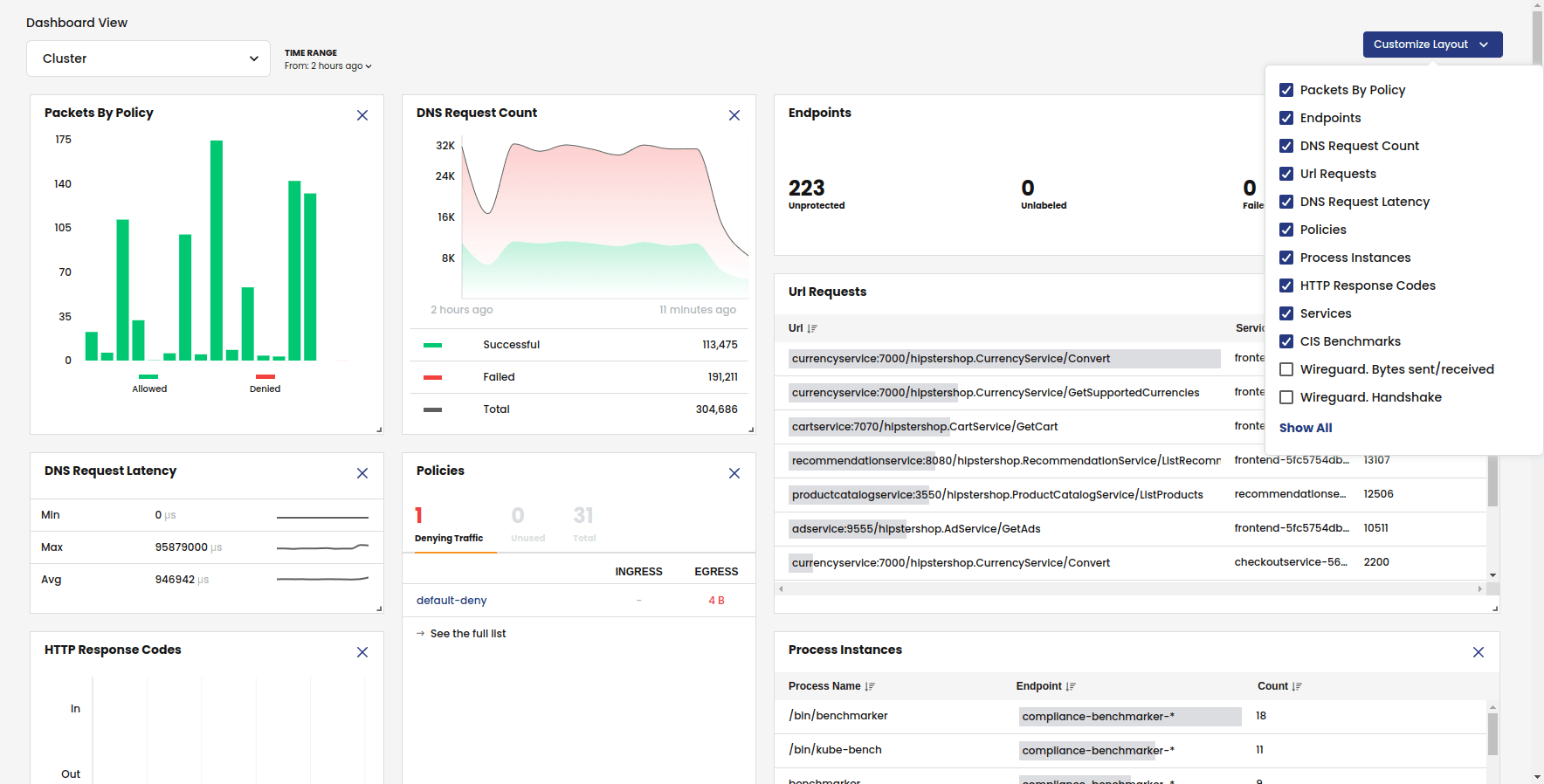
Calico, from Tigera, is a networking, network security, and observability solution for Kubernetes that works across distributions. When organizations move VMware workloads onto Kubernetes or OpenShift, Calico provides the network layer and security policy for the migrated containers and virtual machines. It extends network security to virtual machines and bare metal servers alongside containers, so a single policy framework can cover the whole environment.
The Calico platform is positioned as an alternative to NSX for connecting, securing, and observing VMs running on Kubernetes, letting teams move off NSX without rearchitecting the network. Calico runs on-premises, in public cloud, and in hybrid environments.
Key features include:
- Pluggable data planes: Calico supports a choice of data plane, including eBPF, iptables, nftables, Windows, and VPP.
- Full Kubernetes network policy: It implements the full Kubernetes network policy API, including AdminNetworkPolicy and BaselineAdminNetworkPolicy, plus Calico policy tiers, global policies, network sets, and deny-and-log actions.
- Workload interoperability: Calico applies consistent network security policy across Kubernetes containers, virtual machines, and bare metal hosts.
- Observability with Whisker: Whisker is a visual UI for flow logs that shows service-to-service traffic.
- Data-in-transit encryption: Calico creates and manages WireGuard tunnels between nodes to encrypt pod-to-pod traffic.
- Staged policies: Staged policies let teams test how a network policy would behave before enforcing it.
Limitations (as reported by users on G2):
- Learning curve for policy design: Some users note that constructing network policies requires Kubernetes and networking knowledge.
- Interface suited to hands-on users: Some reviewers would like the UI and monitoring views to be more intuitive for those who prefer visual tools over command-line configuration.
- Occasional upgrade compatibility: Some users report that upgrading between versions can surface minor compatibility issues.
Source: Tigera
2. Red Hat OpenShift Virtualization

Best for: Running migrated VMs alongside containers on OpenShift.
Strengths: Unified platform for VMs and containers with migration tooling.
Things to consider: Setup and administration carry a steep learning curve.
Red Hat OpenShift Virtualization is a feature of Red Hat OpenShift that runs virtual machine workloads on the same platform as containers and serverless applications. It provides a path to migrate VMs and manage them alongside cloud-native applications on a single hybrid cloud foundation. The included Migration Toolkit for Virtualization helps assess existing VMs and move them from other hypervisors with minimal downtime.
Key features include:
- Migration toolkit for virtualization: The toolkit helps assess existing VMs and build a migration plan.
- Unified VM and container platform: Virtual machines run alongside containerized and serverless applications on a single hybrid cloud foundation.
- Standalone virtualization option: Red Hat OpenShift Virtualization Engine provides a virtualization-only entry point.
- Automation with Ansible: Red Hat Ansible Automation Platform automates the VM lifecycle and day-to-day management.
- Management and monitoring: Red Hat Advanced Cluster Management monitors security and performance of VMs on OpenShift.
- Migration assessment and partners: A Virtualization Migration Assessment with Red Hat Consulting produces a roadmap and timeline, and integrated partners cover storage, networking, and backup and disaster recovery.
Limitations (as reported by users on G2):
- Steep learning curve: Users mention that the platform requires significant training to master.
- Setup and maintenance complexity: Reviewers note complexity in installation and maintenance, especially on bare metal servers.
- Pricing predictability: Some users find the core-count subscription model and range of related products make it hard to predict renewal cost.
- Update process: Some reviewers describe the update process between versions as lengthy and occasionally disruptive.

Source: Red Hat
3. Platform9 vJailbreak

Best for: Automated migration off VMware to a private cloud.
Strengths: In-place cluster conversion that reuses existing hardware.
Things to consider: Some configuration and interface areas are still maturing.
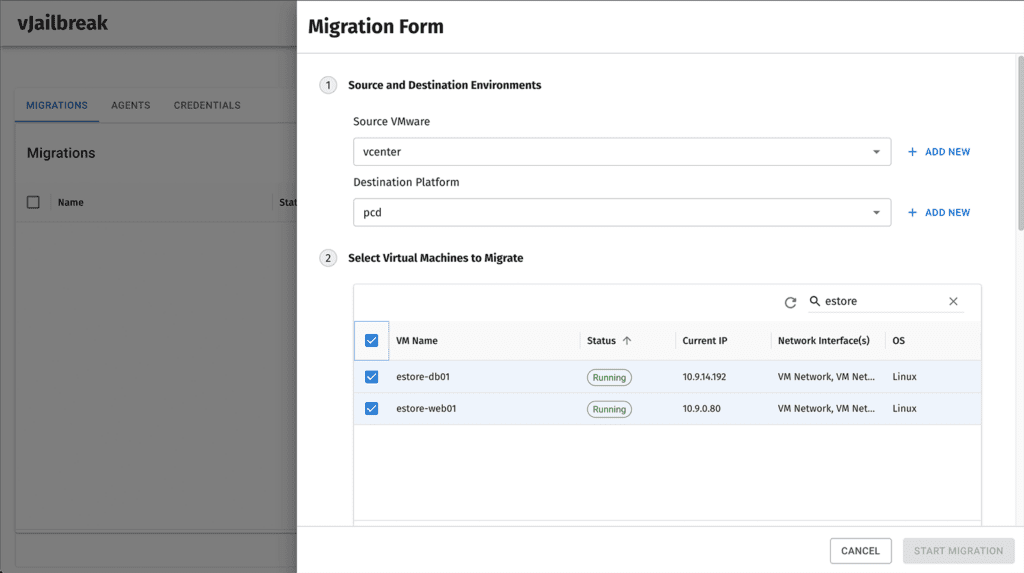
vJailbreak is Platform9’s free, open-source VMware migration tool that moves virtual machines from VMware to Platform9 Private Cloud Director. It is designed to migrate an entire VMware environment with minimal downtime while preserving expected virtualization behavior. vJailbreak can also reimage ESXi hosts as Private Cloud Director servers, converting clusters in place without additional hardware.
Key features include:
- Automated data sync: vJailbreak keeps source and target VM disks in sync using Change Block Tracking.
- Automatic discovery and conversion: It discovers VMs and converts guest tools, devices, and drivers.
- In-place cluster conversion: vJailbreak can reimage ESXi hosts into Private Cloud Director hosts.
- Scalable parallel migration: The architecture scales out to run parallel migrations across many VMs.
- Seamless cutover: It preserves system identifiers, network configuration, and external storage connections.
- Flexible, GUI-driven workflow: A GUI supports automated migration or controlled cutover.
Limitations (as reported by users on G2):
- Interface refinement: Some users say error messages could be more informative and the web interface more polished.
- Configuration exposed in the console: Some settings are not yet available directly in the control panel.
- On-premises component gaps: Some users mention missing pieces for on-premises deployments.
- User management: Reviewers note that user management through the interface could be improved.
Source: Platform9
Cloud and Hypervisor Migration Tools
4. AWS Transform MGN
Best for: Lift-and-shift rehosting of servers to Amazon EC2.
Strengths: Automated block-level replication with minimal downtime.
Things to consider: Rehosting to AWS only, not for refactoring.
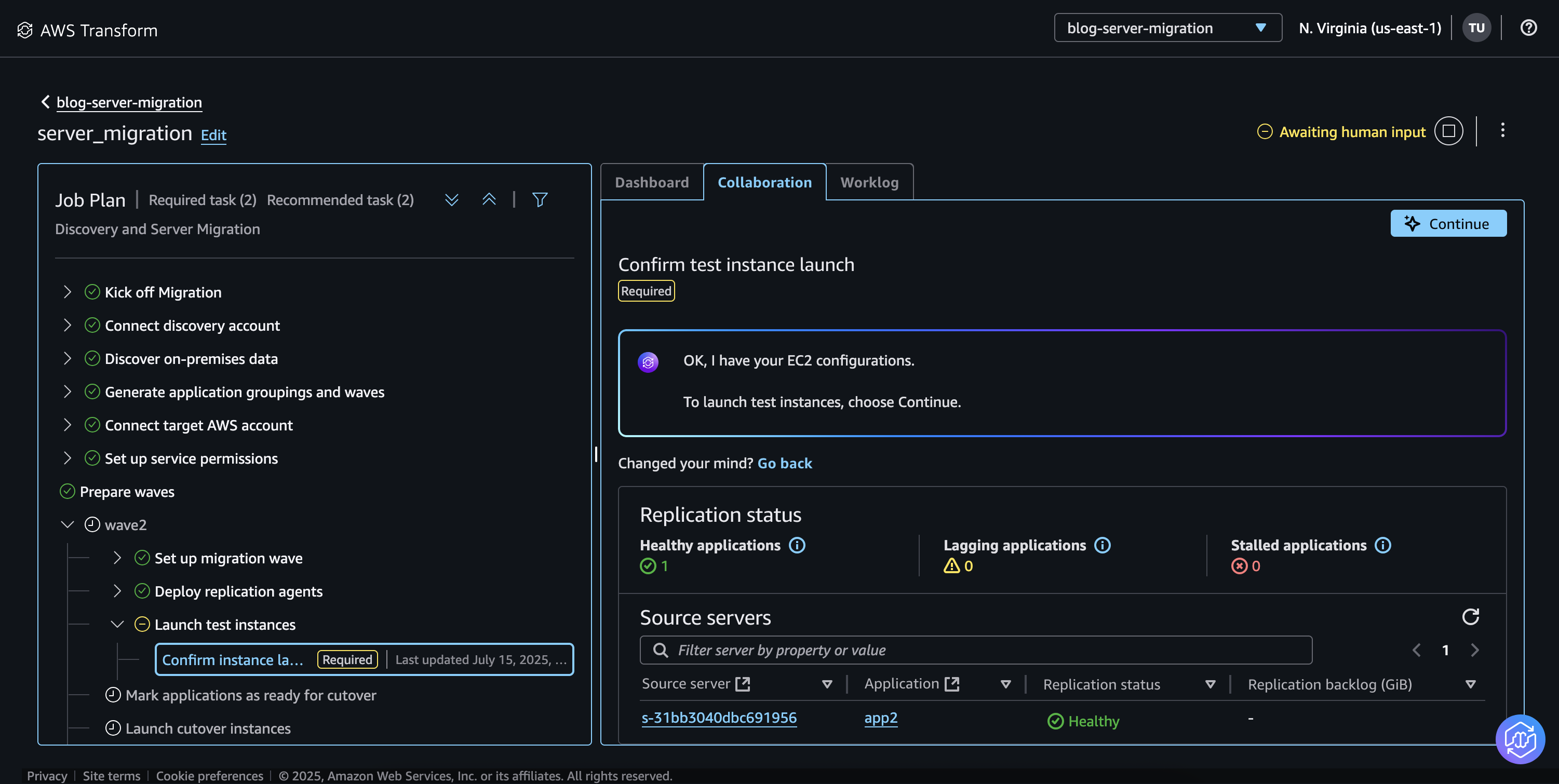
AWS Transform MGN, formerly AWS Application Migration Service, is AWS’s rehosting service that converts source servers into native Amazon EC2 instances. It handles continuous block-level replication, automated machine conversion, and orchestrated cutover so workloads move with minimal downtime. MGN operates within a broader migration workflow that also covers discovery, wave planning, and network migration.
Key features include:
- Continuous block-level replication: MGN replicates source servers at the block level into a staging area.
- Automated machine conversion: It converts source servers to run on Amazon EC2.
- Two rehost paths: An agent-driven path via AWS Transform and a self-directed path through the MGN console use the same replication and cutover engine.
- Broad source support: It migrates applications such as SAP, Oracle, and SQL Server from physical servers and multiple hypervisors.
- Modernization during migration: Built-in and custom actions include cross-Region disaster recovery and Windows Server version upgrades.
- Cross-Region and cross-account moves: It can move Amazon EC2 workloads across AWS Regions, Availability Zones, or accounts.
Limitations (based on publicly available sources):
- Rehosting focus: MGN is built for lift-and-shift rehosting and not for application refactoring or real-time database synchronization.
- AWS as the destination: The target is native Amazon EC2.
- Agent and OS requirements: Migration relies on replication agents and supports specific Windows and Linux versions.
- Staging resources: Continuous replication uses a staging area that consumes additional resources during migration.
Source: Amazon
5. Microsoft Azure Migrate

Best for: Assessing and migrating on-premises workloads to Azure.
Strengths: Unified discovery, assessment, and migration in one portal.
Things to consider: Oriented toward Azure as the destination.
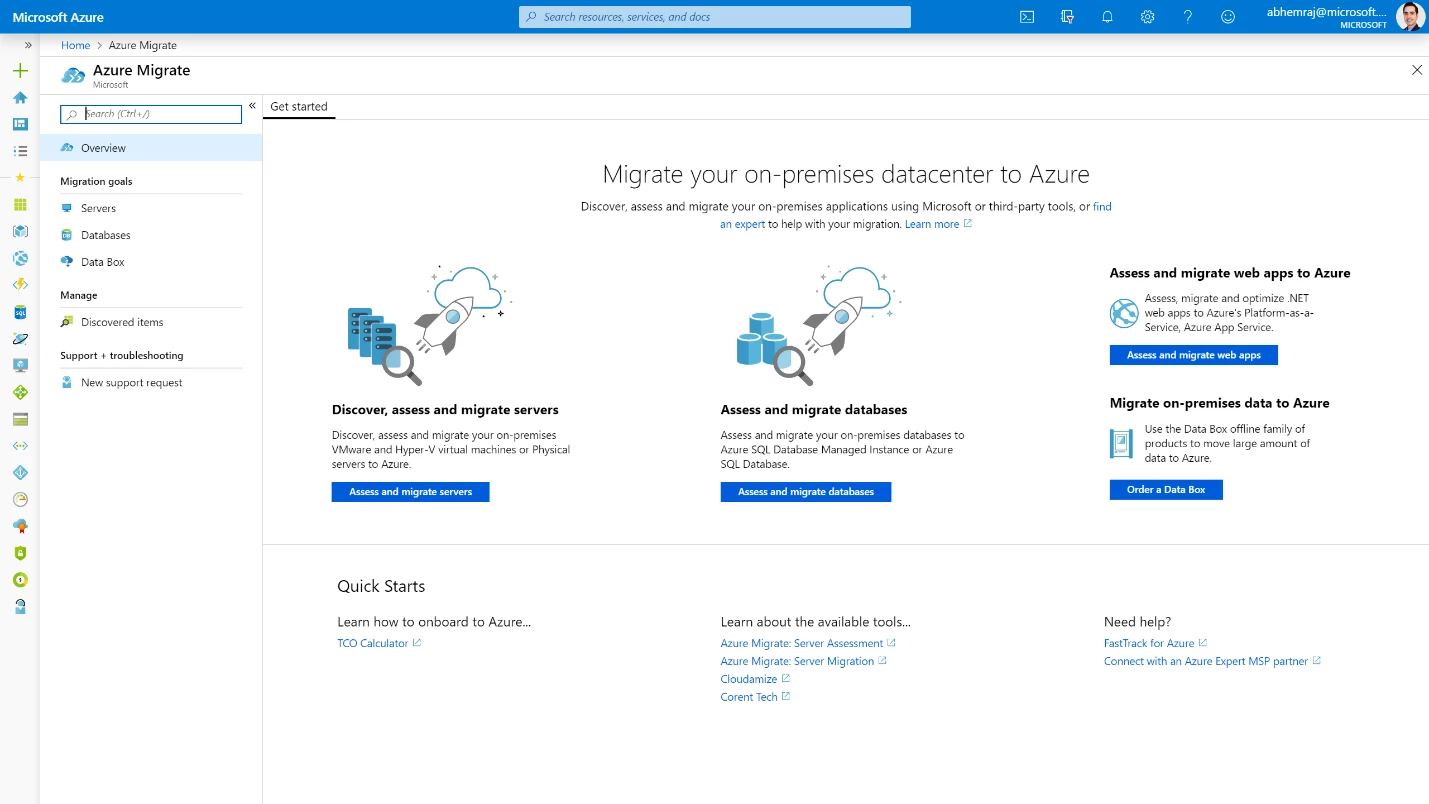
Azure Migrate is Microsoft’s hub for discovering, assessing, and migrating on-premises workloads to Azure. It discovers infrastructure, applications, and data, maps dependencies, and produces readiness and cost insights. For VMware, it supports agentless and agent-based migration of vSphere VMs to Azure. The platform includes the Azure Copilot migration agent, which guides the journey and coordinates with first-party and third-party tools. It also supports migration to Azure Local for hybrid and edge scenarios.
Key features include:
- Discovery and dependency mapping: An appliance discovers servers, applications, and data and maps dependencies.
- Assessment and right-sizing: It assesses Azure readiness, estimates costs, and right-sizes target Azure VMs and Azure VMware Solution nodes.
- Agentless and agent-based VMware migration: vSphere VMs can be migrated agentlessly or with an agent-based replication appliance.
- 6 Rs planning: Guided assessments align workloads with rehost, refactor, rearchitect, rebuild, replace, or retire treatments.
- Broad workload support: It covers servers on VMware, Hyper-V, and physical hardware, plus databases and web apps.
- Partner tool integration: A framework allows integration with partner tools for specialized needs.
Limitations (as reported by users on G2):
- Initial setup complexity: Users note that appliance registration and configuration can be complicated.
- Cost estimates: Some reviewers find cost estimates vague.
- Interpreting assessment output: Some users say assessment findings can be overwhelming.
- Azure-focused destination: The tool is oriented toward Azure, so multi-cloud destinations need additional tooling.
Source: Microsoft
6. Google Migrate to Virtual Machines

Best for: Migrating VMs to Google Cloud Compute Engine.
Strengths: Agentless replication with test clones before cutover.
Things to consider: Targets Google Cloud Compute Engine only.
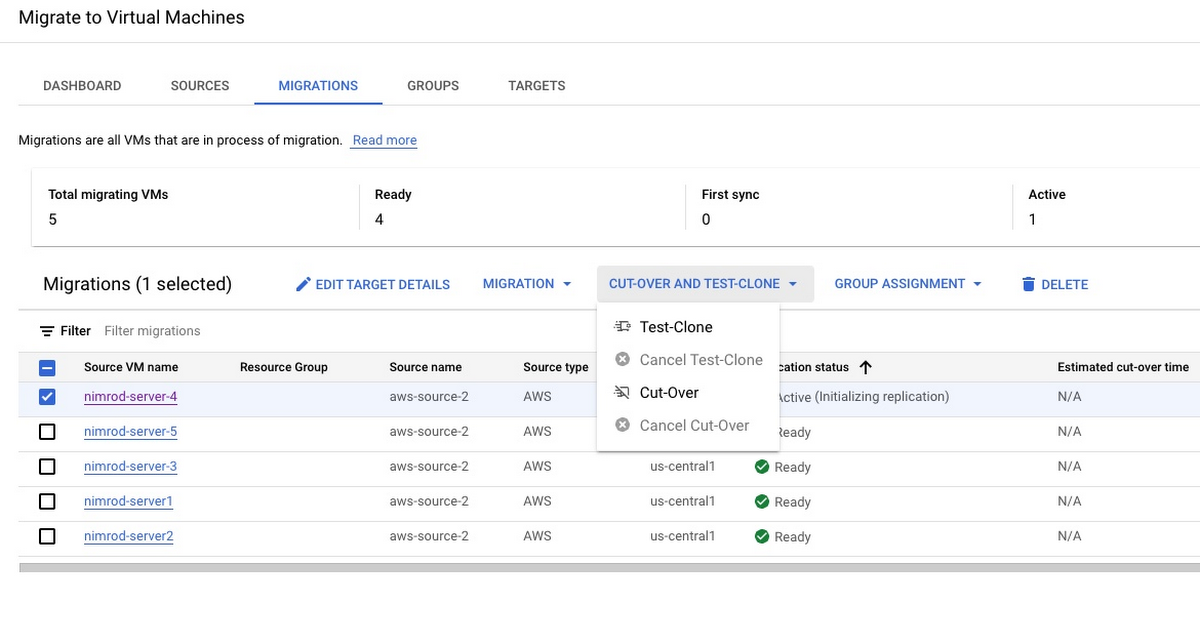
Migrate to Virtual Machines is Google Cloud’s service for moving virtual machines to Compute Engine. It uses continuous disk replication from source VMs to Google Cloud and creates VM clones for testing before cutover. It is part of Migration Center, Google Cloud’s platform for discovery, cost estimation, and migration tooling. Sources include vSphere on-premises data centers, AWS, Azure, and Google Cloud VMware Engine.
Key features include:
- Agentless replication: It replicates without client-side agents.
- Continuous data sync: Disk data is periodically replicated from source to destination.
- Test clones before cutover: Teams can validate migrated VMs before switching production.
- Multiple source environments: It migrates VMs and disks from vSphere, AWS, Azure, and Google Cloud VMware Engine.
- Scale and automation: Teams can migrate single applications or larger groups and use the Cloud API for automation.
- Right-sizing analytics: Usage-driven analytics help right-size destination instances.
Limitations (based on publicly available sources):
- Google Cloud destination: The service targets Compute Engine.
- Source environment prerequisites: VMware migrations expect a reachable VMware host and vCenter in the same network.
- Quota dependency: Migrations depend on sufficient Google Cloud resource quotas.
- High-change workloads: Very high write rates can outpace replication.
Source: Google
7. VMware HCX

Best for: Large-scale workload mobility across VMware environments.
Strengths: Zero-downtime bulk and live migration with network extension.
Things to consider: Non-vSphere and public cloud sources are limited.
VMware HCX, part of VMware Cloud Foundation Operations Workload Mobility, is an application mobility platform for migrating and rebalancing workloads across data centers and clouds. It combines automated network connectivity with optimized data replication to connect environments and move workloads at scale. HCX supports movement across VMware platforms on vSphere 6.5 and later, including VMware Cloud Foundation, VMware Cloud on AWS, Azure VMware Solution, and Google Cloud VMware Engine.
Key features include:
- Multiple migration methods: HCX offers bulk migration and live HCX vMotion.
- Zero-downtime migration: It supports zero-downtime migration and provides visibility into operations.
- Network extension and routing: Migration-aware routing with VMware NSX provides connectivity.
- Broad VMware platform support: It moves workloads across supported VMware platforms.
- Re-platforming and non-vSphere capture: Teams can re-platform applications and capture workloads from KVM and Hyper-V during migration.
- WAN-optimized interconnect: A WAN-optimized interconnect moves workloads securely across regions and data centers.
Limitations (based on publicly available sources):
- Limited non-vSphere sources: OS-assisted migration supports Hyper-V and KVM from on-premises only.
- Unsupported source platforms: Migrating from Nutanix or other non-KVM-on-Linux systems is unsupported.
- CPU generation constraints: EVC rules apply, limiting some live migrations.
- Network design sensitivity: Bulk migration and replication-assisted vMotion depend on correct network design.

Source: VMware
8. Nutanix Move

Best for: Migrating VMs to Nutanix AHV without refactoring.
Strengths: Automated, low-downtime migration with network mapping.
Things to consider: Migrates into Nutanix, not back out to other hypervisors.
Nutanix Move is a migration tool for shifting applications to the Nutanix Cloud Platform without refactoring or rearchitecting. It supports sources including vSphere, Hyper-V, and AWS, and migrates workloads with minimal downtime. Move uses a wizard-driven interface for selecting source and target and can run individual or grouped migrations per plan. It pre-seeds data ahead of time to shrink the cutover window and automates final sync, shutdown, and target boot.
Key features include:
- Wizard-driven migration: A wizard-driven interface lets teams select source and target and trigger migrations.
- Flexible source infrastructure: Move supports vSphere, Hyper-V, and AWS as sources.
- No refactoring required: It migrates applications without changing code or architecture.
- Network mapping: It maps source VM networks to target environments.
- Data pre-seeding: Data can be pre-staged to shorten the cutover window.
- Pre-cutover testing and fast cutover: Teams can validate workloads before cutover and perform a rapid switchover.
Limitations (as reported by users on PeerSpot):
- Batch scalability: Users note migrations are practical in batches of roughly five to ten VMs.
- One-directional migration: Users cannot migrate from Nutanix AHV back to other hypervisors.
- Support response time: Some users report support responses taking several days.
- No retry for failed migrations: A retry option is not available after a failure.

Source: Nutanix
Conclusion
Migrating away from VMware is more than a platform replacement project—it is an opportunity to modernize infrastructure, improve operational flexibility, and reduce long-term dependency on a single virtualization vendor. Successful migrations require careful planning, workload assessment, dependency mapping, and validation to minimize downtime and preserve application performance. By selecting migration approaches that align with business goals and implementing consistent testing and governance throughout the process, organizations can transition to new platforms while maintaining business continuity and creating a foundation for future cloud and infrastructure modernization.